Reference
19
Finding an Exit
Select Exits from the Find page to locate exits on highways, freeways, and interstates throughout the U.S.
This is useful information if you are traveling and need to stop at an exit with a service station or when you
need to fi nd the nearest rest area. When you initially select Exits, your Quest lists all exits on the highway
or interstate that are closest to your current location. If you are driving on Interstate 40 near Albuquerque,
for example, your Quest lists all upcoming exits on I-40. Use the rocker pad to select an exit, and press OK
to view an information page about that exit.
If the exit contains services such as gas stations and restaurants, these business names appear on the
exit’s information page. In this case, select the business you wish to visit and press OK to display informa-
tion about it. Navigate to the exit that includes this business by selecting Route To.
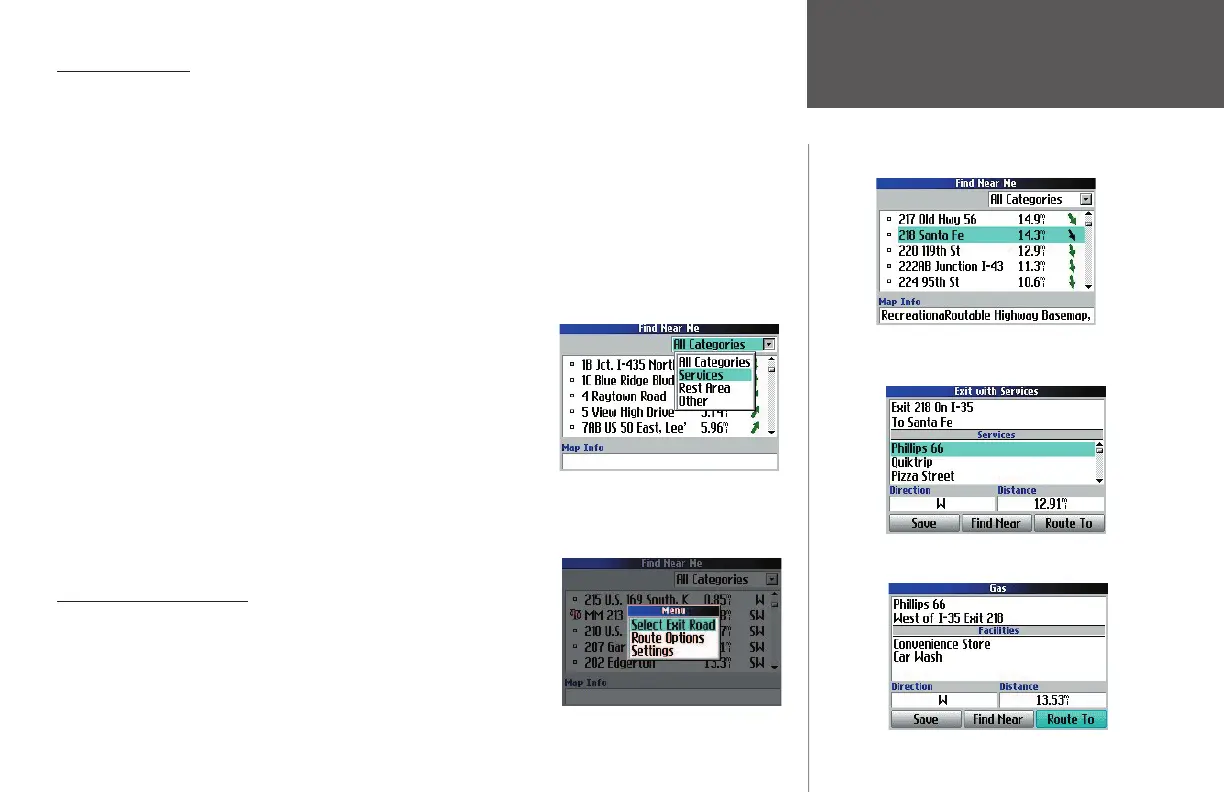
If you know you want to stop at an exit that has a particular type
of service such as a gas station or rest area, you can narrow the number
of exits by selecting the All Categories box and pressing OK. A list of
options appears: Services, Rest Area, Other (such as weigh stations and
Welcome centers).
If you know the name of the road to which you wish to exit, press
MENU while on the Find page and select Select Exit Road. From there,
type in the name of the road you wish to exit using the onscreen
keyboard that appears. Do not enter “I” for Interstate or “HWY” for
highway. For example, if you are looking for Interstate 70, enter “70.”
Other ways to fi nd exits
• You can fi nd exits that are beyond your current location by pan-
ning to a particular area. Press the FIND key, and all exits appear
that are near the map pointer.
Finding Exits
You can narrow your search for a partic-
ular exit by choosing a category (above)
or by choosing ‘Select Exit Road’ and
entering an exit name (below).
A search for exits reveals the list above. Selecting
the ‘218 Santa Fe’ exit shows that it includes
numerous service places, as shown below.
Select a service station name and press OK. An
information page appears, as shown below.
190-00323-00_0B.indd 19 8/20/2004, 11:08:15 AM



 To Next Page