Reference
21
Finding “My Locations”
Whereas Recent Finds stores only the 50 most recent places you found, all of the places you saved to My
Locations stay stored until you delete them. You can store up to 500 locations in My Locations, making it the
optimal place to store your favorite spots. (See Saving your Favorite Places in “My Locations,” page 6.)
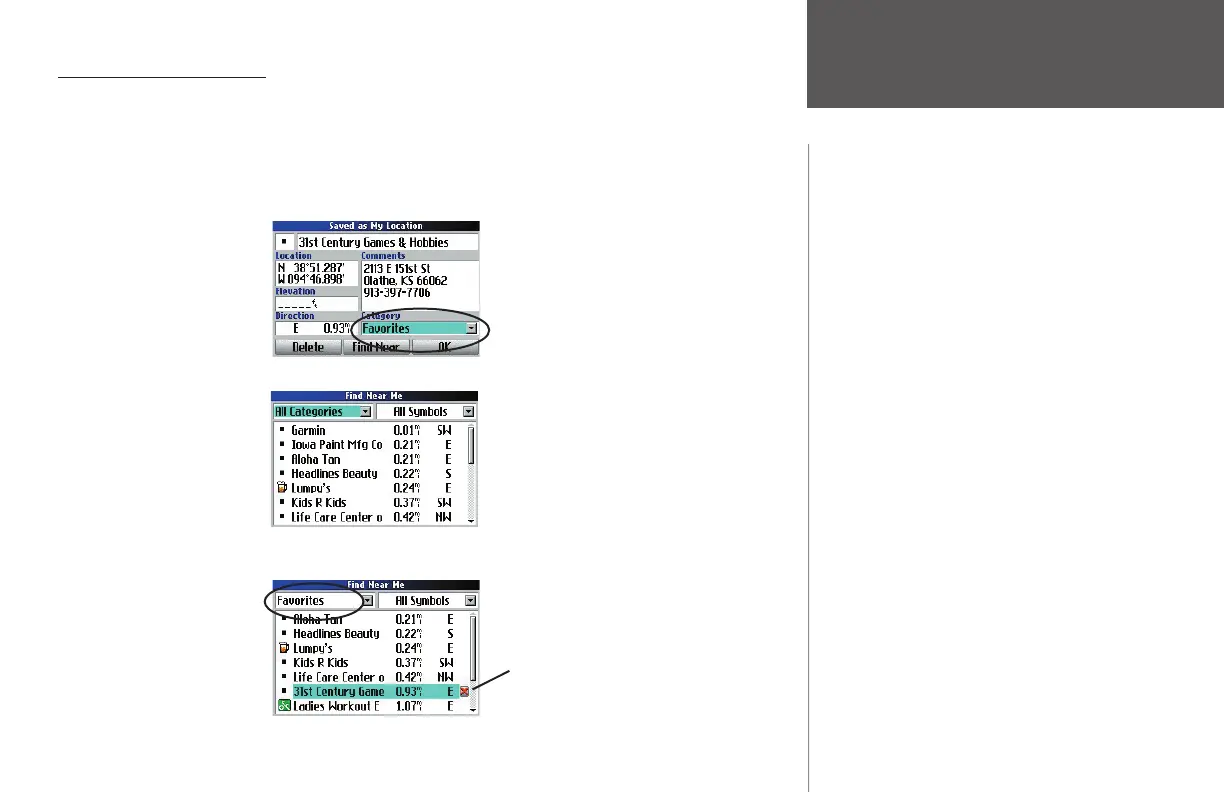
As you save favorite places to My Locations, make certain you enter a Category for them so that you can
search your list as it grows. The business in the example below has been saved to the “Favorites” category:
To fi nd this business again, press FIND and select My Locations. The following list appears:
The list has grown so that the business we want to fi nd does not appear. However, we can search the
“Favorites” category to fi nd the place. The business we seek is found, as shown below:
Finding “My Locations”
Select the red X to the right of a business and
press OK to delete it.
Places you save to ‘My Locations’ stay until you
delete them. You can also upload them to your
personal computer using MapSource.
190-00323-00_0B.indd 21 8/20/2004, 11:08:17 AM



 To Next Page