Appendix
55
Adding Maps to your Quest
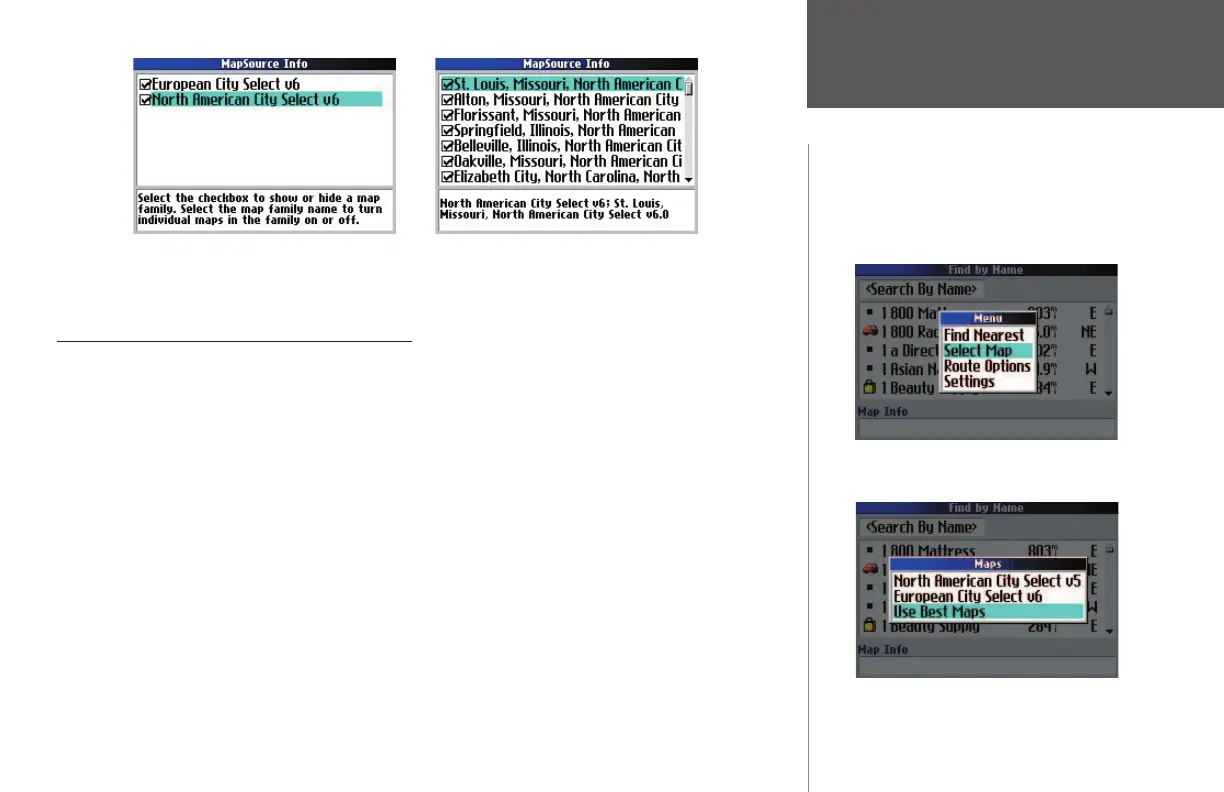
You can disable these maps and the map detail for that area no longer appears on the Map page.
Changing Map Families when Finding Places
If you have loaded additional map families into your Quest (such as European City Select or
MetroGuide Canada), you can specify which map family the Quest uses while searching for cities and/or
places. Recall that you search for cities and places by pressing the unit’s FIND key and then selecting the
appropriate Find option (Lodging, Services, Cities, etc.). The Quest returns a list of results from one map
family. For example, if you are physically located in France and you are searching for a restaurant in Paris,
the Quest will search from the European City Select map family and not the North American City Select
map family. In this case, you do not need to change the map family because the map families do not share
overlapping information. Thus, the Quest knows which map family to use for this particular search.
If your Quest contains map families that might have overlapping information, you may need to specify a
different map family. If you are searching for a restaurant in Ontario, for example, your Quest might search
from the North American City Select map family when you really want it to search from the MetroGuide
Canada map family. Before you can change the map family, you must be using the Find By Name search
method (see Narrowing the Results List, page 15). Then, change the map family by pressing the unit’s
MENU key while you are on the Find page. From the Menu window that appears, select the Select Map icon.
A list of your installed maps that contains searchable cities or places appears on a Select Map page. Select the
In order for the ‘ Select Map’ option to display, the
‘Find by Name’ option must fi rst be active in the
search, as shown in the background above. Then, press
the MENU key to display the ‘Select Map’ option.
The individual, smaller maps shown top right are part of the North American City Select map family.
Select ‘Select Map,’ and the map options
below appear.
190-00323-00_0B.indd 55 8/20/2004, 11:08:56 AM



 To Next Page