Reference
9
Viewing the Map Page While Driving
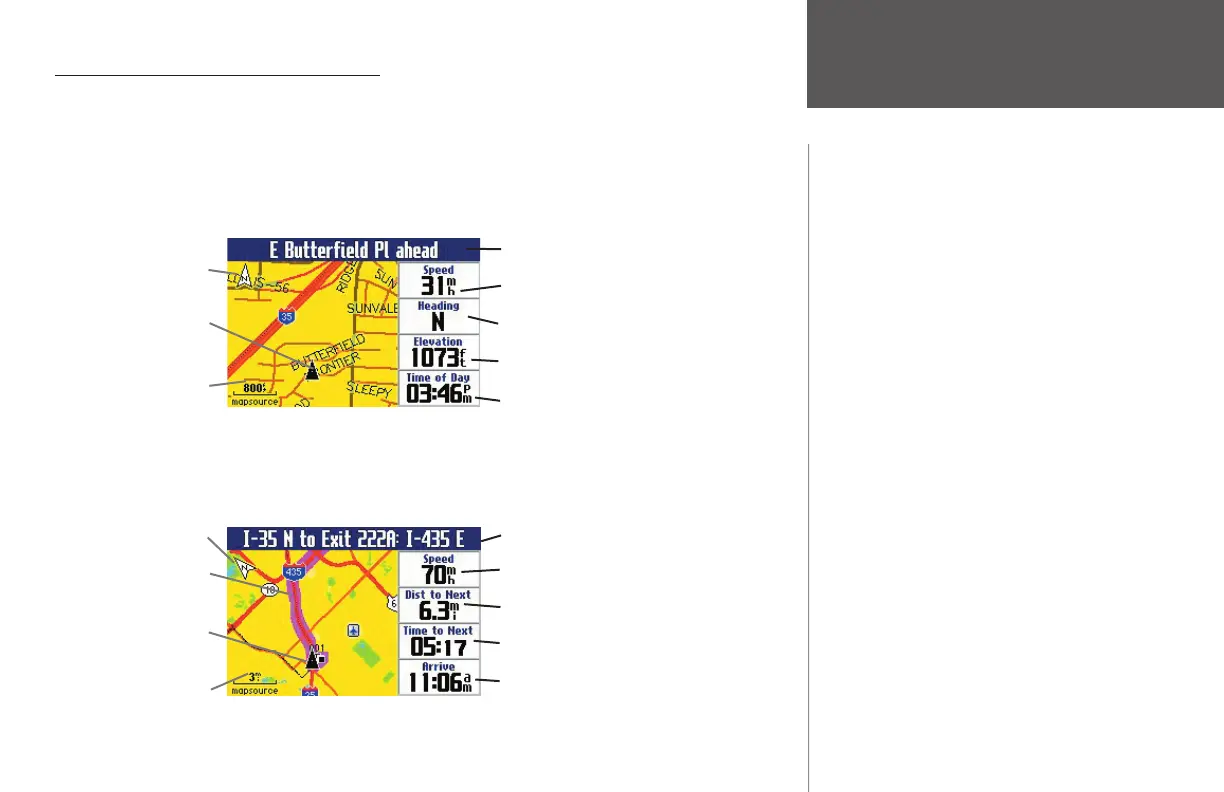
While driving, one of two types of Map pages appears: a Map page in driving mode, which appears
when you have the Quest turned on but you are not navigating a route; and a Map page in routing mode,
which appears when you have created a route and are currently navigating it.
In driving mode, the Map page shows map details, the map scale, and your current location.
Customizable data fi elds are pre-set to show your speed, current direction of travel, elevation at your cur-
rent position, and the current time.
In routing mode, the Map page displays map details and your current location, and it marks your route
to a destination with a magenta-colored route line. It tells you what direction to go as well as the direction
in which you are traveling. Customizable data fi elds are pre-set to display information such as your speed,
distance to the next turn, time remaining before reaching the next turn, and arrival time.
Viewing the Map Page
Navtext bar displaying the upcoming street
Your current speed
Current driving direction
Elevation at your current position
Current time of day
Map Orientation
Position icon display-
ing your current
position
Map Scale
Navtext bar displaying driving instructions
Your current speed
Distance until your next turn
Time until your next turn
Estimated arrival time at your destination
Map Orientation
Route Line
Position icon display-
ing your current
position
Map Scale
190-00323-00_0B.indd 9 8/20/2004, 11:08:05 AM



 To Next Page