Reference
45
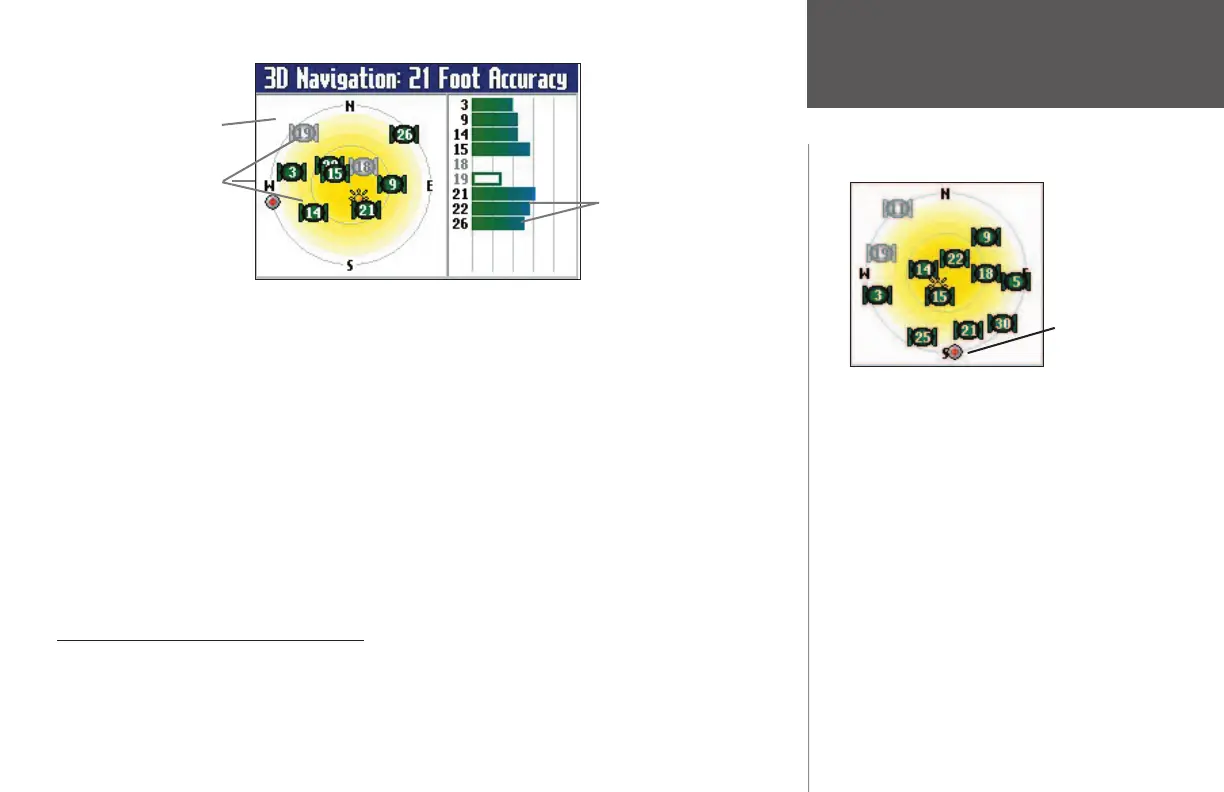
A signal strength bar appears for each satellite in view; the satellite’s number appears to the left of each
bar. The progress of satellite acquisition is shown in three stages:
• No signal strength bar: The GPS receiver in your Quest is looking for the satellite(s) indicated. The
corresponding number(s) on the sky view is not highlighted.
• Hollow signal strength bar: The GPS receiver has found the satellite and is collecting data. The cor-
responding number(s) on the sky view is not highlighted.
• Solid signal strength bar: The GPS receiver has collected the necessary data and the satellite(s) is ready
for use. The corresponding number(s) on the sky view highlighted.
Each satellite has a 30-second data transmission that must be collected (hollow signal strength bar, as
described above) before that satellite can be used for navigation (solid signal strength bar). Once a fi x has
been calculated, the Quest then updates your position, ground track, and ground speed by selecting and
using the best satellites in view.
Sky View and Signal Strength Bars
The sky view and signal strength bars give you an indication of which satellites are currently visible,
which satellites are being used to calculate a position fi x, and the signal quality. The sky view provides
a “bird’s eye” view of each satellite position relative to your unit’s last known position. The outer circle
represents the horizon in all directions (with cardinal heading references). The inner circle represents an
GPS Info Page
Satellites
Sky View
Signal strength bars
When the Sky View is shown in ‘North Up,’ a red ball
indicates your direction of travel. Satellites in the
middle of the Sky View are directly overhead.
Indicates
South as
your current
direction of
travel.
190-00323-00_0B.indd 45 8/20/2004, 11:08:38 AM



 To Next Page