Reference
39
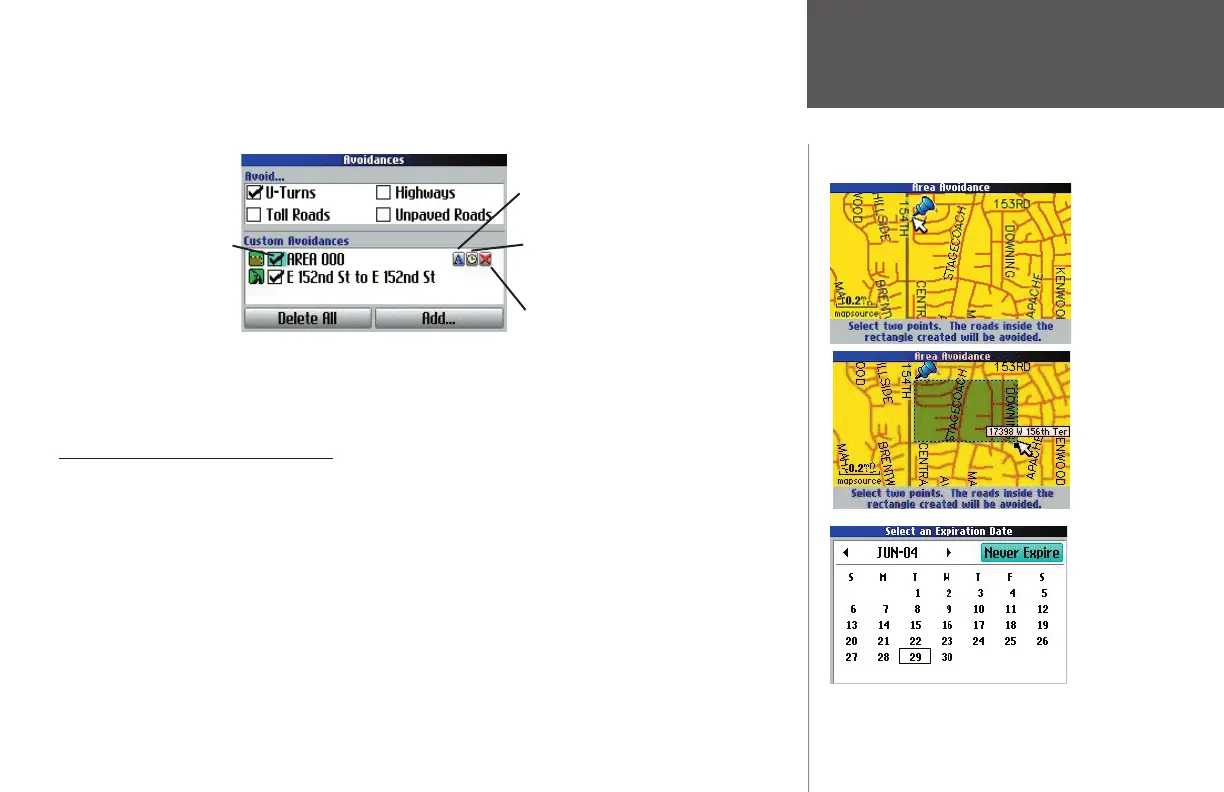
Once entered, your Quest avoids these roads/areas unless no other roads are available or until you
remove them from the Custom Avoidances list or uncheck them. To uncheck an avoidance, select
the check box to the left of the avoidance name and press OK. An unchecked box indicates that the
road/area will not be avoided.
To change the name of an avoidance, select the ‘A’ (as shown above) and use the onscreen keyboard to
create a new name. Select the clock to choose the date that you want the avoidance to expire. Select
the ‘X’ to permanently delete the avoidance.
Customizing the Units Settings
Distance and Speed – Allows you to measure distance in miles (Statute) or kilometers (Metric). If you
select Statute, speed is shown in miles per hour and elevation is shown in feet. Metric shows speed in
kilometers per hour and elevation in meters. You can also use Nautical (nm, kt, ft), Nautical (nm, kt, m), or
Yard s as measurement tools.
Heading Display
– Allows you to display your direction of travel in Cardinal Letters, Degrees, or Mils.
Location Format – Allows you to select from a variety of position formats. Use the default setting if you
are unfamiliar with location format specifi cs.
Heading
– Allows you to choose Tr u e , Magnetic, User, or Grid as a heading. Tr u e shows true north head-
ings and Magnetic automatically calculates the magnetic variation for the geographical area. User allows you
to input a magnetic variation (it appears in the Magnetic Variance fi eld). Grid provides a true north heading
as determined by the Location Format.
Avoiding Areas
Select ‘A’ to change the name of the
avoidance.
Select the clock to choose an expiration
date for the avoidance.
Select ‘X’ to permanently delete the
avoidance.
Uncheck the box to the
left of the avoidance to
deactivate it.
Choose a
‘Start Point’
and press
OK.
Choose an
‘End Point’
and press
OK. The area
you wish
to avoid is
added to
the ‘Custom
Avoidances’
list.
The avoid-
ance you
create is
set to never
expire unless
you select an
expiration
date.
190-00323-00_0B.indd 39 8/20/2004, 11:08:33 AM



 To Next Page