Reference
38
which vehicle type you are driving, you optimize the route for your vehicle type. Likewise, the Quest may
give you access to roads or turns that wouldn’t be available to normal traffi c.
Avoidance button
The Avoidance button appears on the Route Setup page and allows you to avoid certain road types that
may be undesirable on your route. The Quest will use these road types only if alternative routes take you
too far out of your way or if no other road is available.
• U-Turns: If checked, the Quest does not direct you to make a U-turn on non-divided highways.
• Toll Roads: If checked, the Quest avoids entering toll roads.
• Highways: If checked, the Quest avoids routing you along interstates and major highways.
• Unpaved Roads: If checked, the Quest avoids unpaved surfaces.
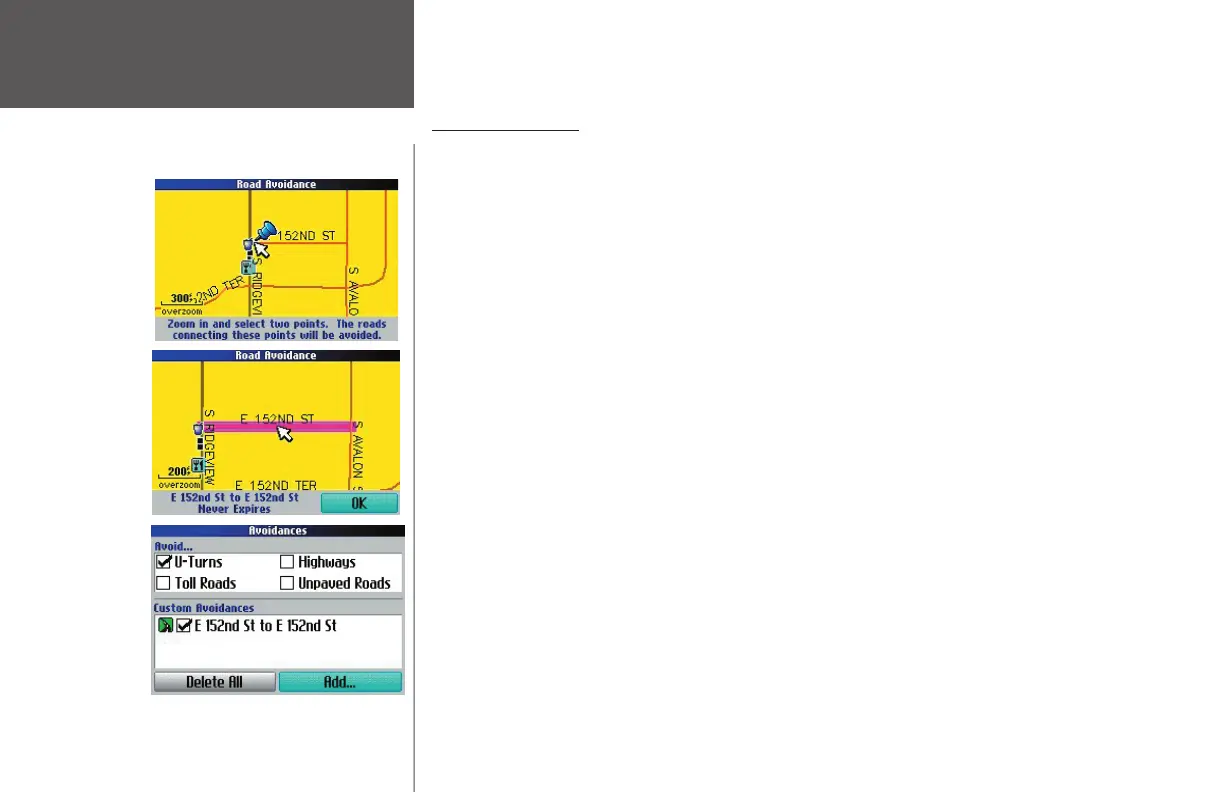
• Custom Avoidances: You can create a list of roads and areas you would like to avoid. Select Add... and
an Add...window appears. From there, choose Road Avoidance or Area Avoidance.
• Road Avoidance: Choose this option if you want to map out a few sections of a road or even an
entire road to avoid. A Map page appears, enabling you to mark a “start point” on a road. Zoom
in enough on the Map page so that your point will be precise. Then, simply move the map
pointer onto the beginning section of a road you wish to avoid and then press OK. Notice that a
blue thumb tack has marked your “start point.” Position your map pointer onto the end section
of a road and then press OK. A map of the avoided road(s) appears, along with a default name.
• Area Avoidance: Choose this option if you want to map out an entire rectangular area—that can
include numerous roads—to avoid. A Map page appears, enabling you to mark the fi rst corner of
your designated area to avoid. Zoom in enough on the Map page so that your point will be pre-
cise. Then, simply move the map pointer onto the beginning section of an area you wish to avoid
and press OK. A “second corner” Map page appears. Notice that a blue thumb tack has marked
your “fi rst corner.” Position your map pointer onto the ending section of an area and press OK. A
map of the avoided area appears, along with a default name.
Avoiding Roads
Choose a
‘Start Point’
and press
OK.
Choose an
‘End Point’
and press
OK.
The road you
wish to avoid
is added to
the ‘Custom
Avoidances’
list.
190-00323-00_0B.indd 38 8/20/2004, 11:08:32 AM



 To Next Page