Reference
17
Finding Addresses, Intersections
When entering street names, do not enter directional words such as “West” or types of streets such as
“Avenue” or “Parkway.” For example, if you are looking for “E. 205 Elm Ave,” enter “205” in the <Number>
fi eld and “Elm” in the <Street> fi eld.
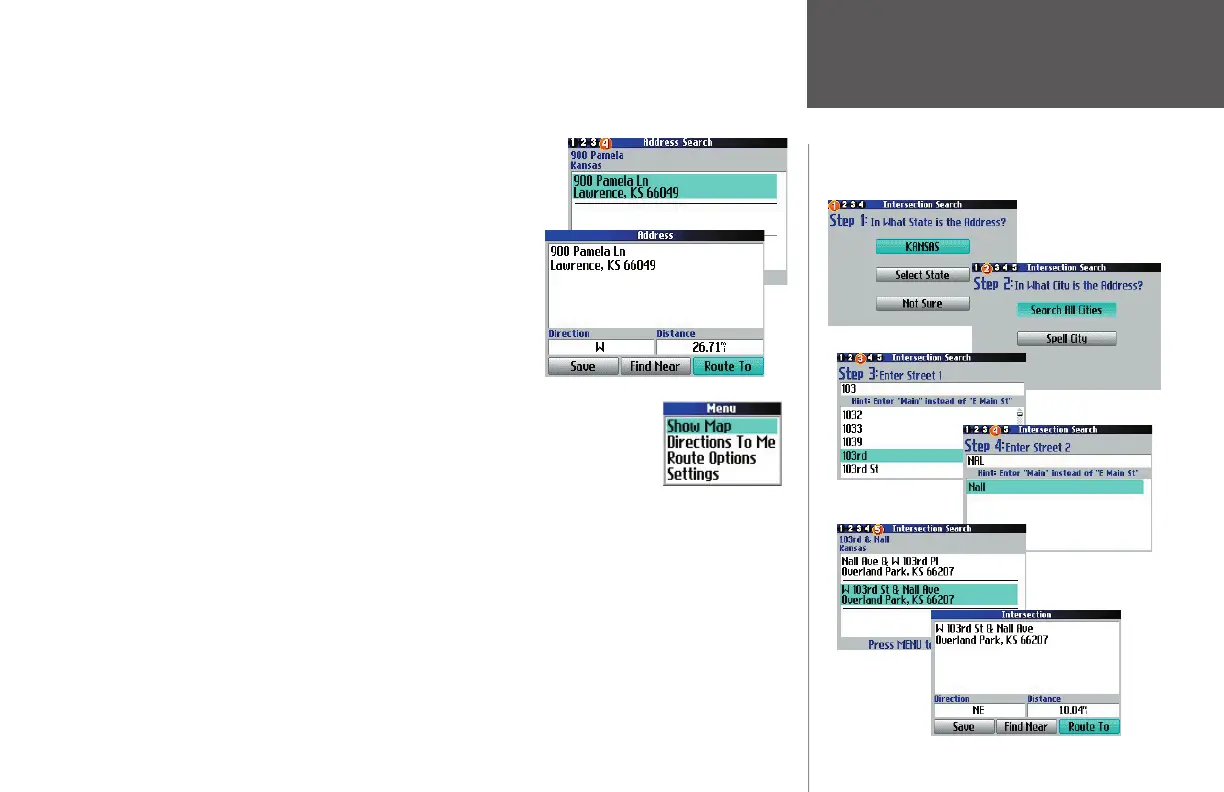
Step 4 of the wizard returns a list of addresses if more than one
is available. Move through the list and select the one you seek. An
Address page appears. To save this address to your My Locations list,
select Save. In this way, you can locate the address more quickly in the
future. To fi nd another place (such as a hotel or restaurant) near this
address, select Find Near. This feature is useful when you are planning
a trip and would like to see what places are near each other. To create
a route to this address, select Route To.
Advanced Options: While on the Address page (as discussed above), press the
MENU key to reveal more options, To see where the address is located on the map,
select Show Map. For step-by-step directions from the address, select Directions to Me.
Finding Intersections is similar to fi nding Addresses.
190-00323-00_0B.indd 17 8/20/2004, 11:08:12 AM



 To Next Page