LAN CommVerter Setup 6.3 Setup
Page 72 MDE-5411A ForeHB Islander Prime Installation Manual · October 2018
6.3.2 General Setup
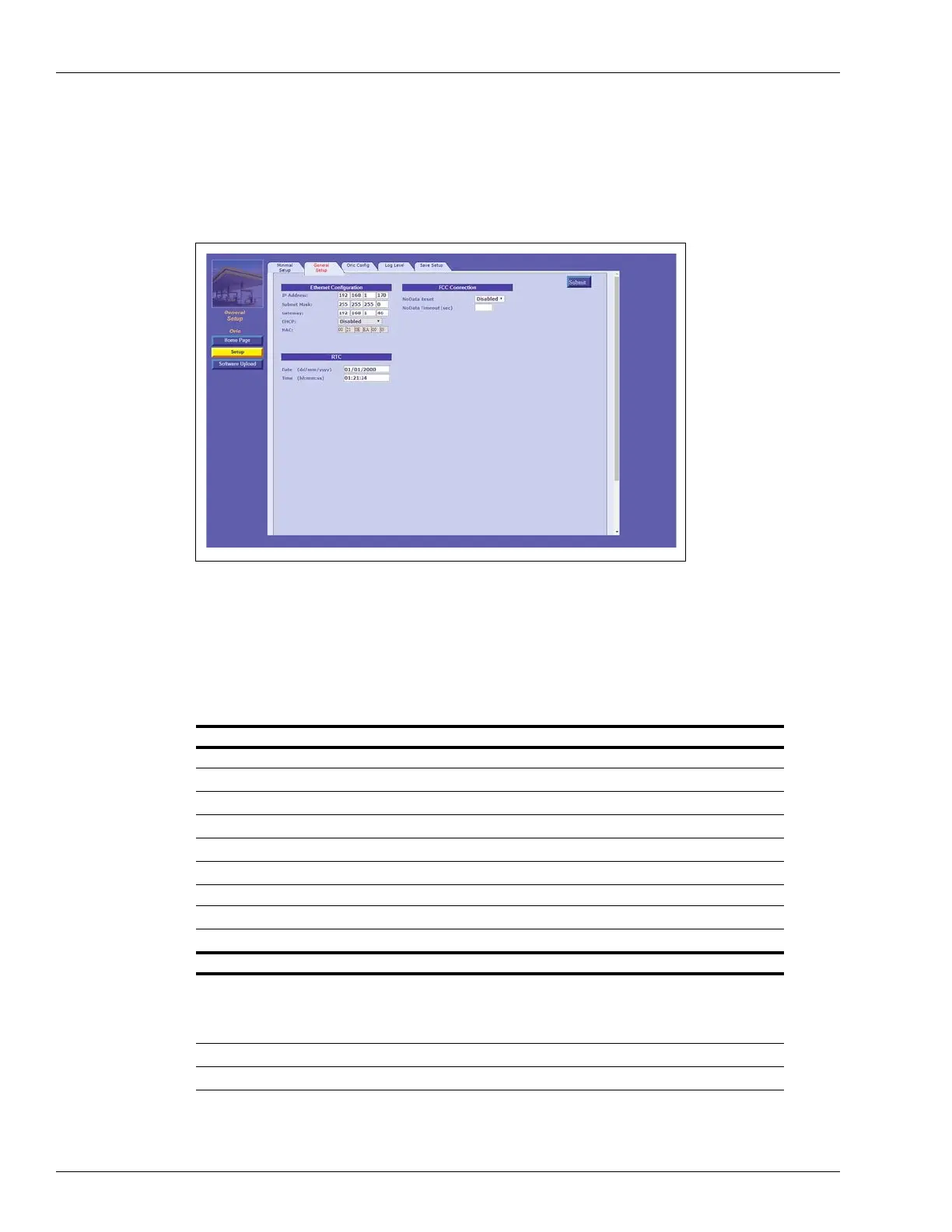
Click the General Setup tab. The following screen opens (see Figure 61):
Figure 61: General Setup Tab
The following actions are available:
• Define the General Setup fields
(see Table 19).
• Click Submit to
save the changes locally.
Note: Clicking Submit saves
the configuration temporarily on a local level. To commit the
changes permanently, ensure to save everything via the Save tab.
Table 19:
Field Description
Ethernet Configuration
IP Address Device IP Address
Subnet Mask Subnet Mask address
Gateway Gateway
DHCP Not currently available
MAC MAC address
RTC
Date (dd/mm/yyyy) Date
Time (hh:mm:ss) Time
FCC Communication
NoData Reset Enable:
The controller checks the TCP/IP at regular intervals; if no
communication is detected within the timeout interval, the device will
automatically reset.
Disable: De
vice will not automatically reset.
NoData Timeout (sec) No Data Timeout timeout interval, in seconds.
Note: Make sure that no pumps at the station are actively fueling before changing the date or time.
General Setup Fields


 To Next Page