7. SERIES 2 PROJECTOR SETUP
7 SERIES 2 PROJECTOR SETUP
To play content with the SR-1000 in a projector, follow the instructions below:
• IMB Marriage must be done,
• Service door tamper must be cleared
• The projector must be set up according to the requirements of the projector manufacturer.
7.1 IMB Marriage and Clearing the Service Door Tamper
from the SR-1000
Follow the steps below to perform the marriage between the SR-1000 and to clear the service
door tamper on the SR-1000:
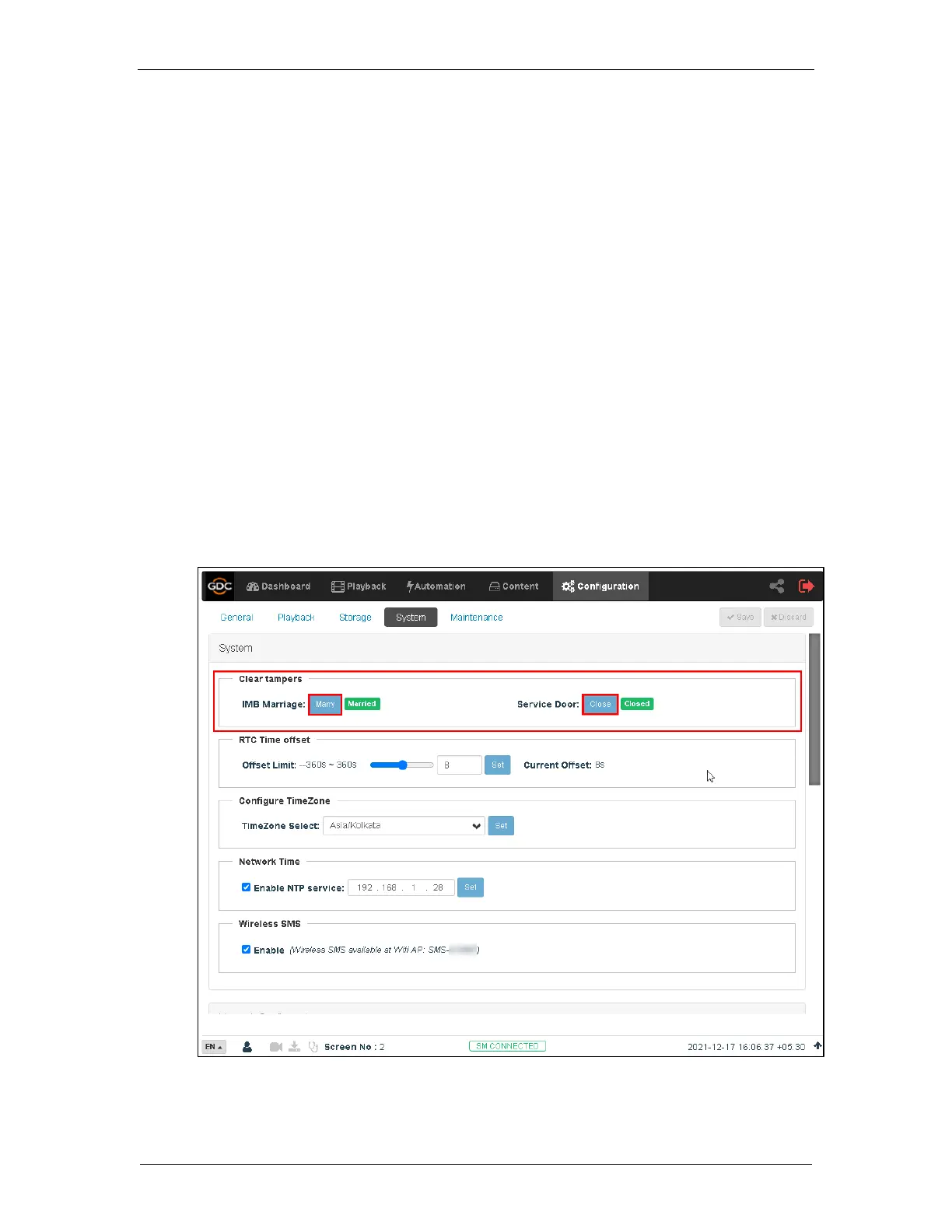
1. Under the Configuration tab in the menu, click the System sub-tab.
2. Go to Clear IMB Tampers section.
3. Click Marry to perform the marriage of the projector and the SR-1000.
4. Click Close to clear the door tamper errors with the projector
5. After the Marriage is performed and the tampers are cleared, green Married and
Closed buttons will be shown respectively (as seen in Figure 18).
Figure 18: Clear IMB tampers



 To Next Page