Pan Focus Fast
This function toggles the quality of a focus image. With this option selected the image quality is lower
than using Pan Focus All, but it is displayed faster.
TIP:
During sample alignment, a sample can be quickly aligned when Pan Focus Fast is
selected.
5.12 Option menu
5.12.1 CCD Calibration
This function creates a correction file that is used for correcting characteristics of the CCD detector.
The created correction file varies depending on the sensitivity, exposure time (short or long), and CCD
cooling temperature.
1
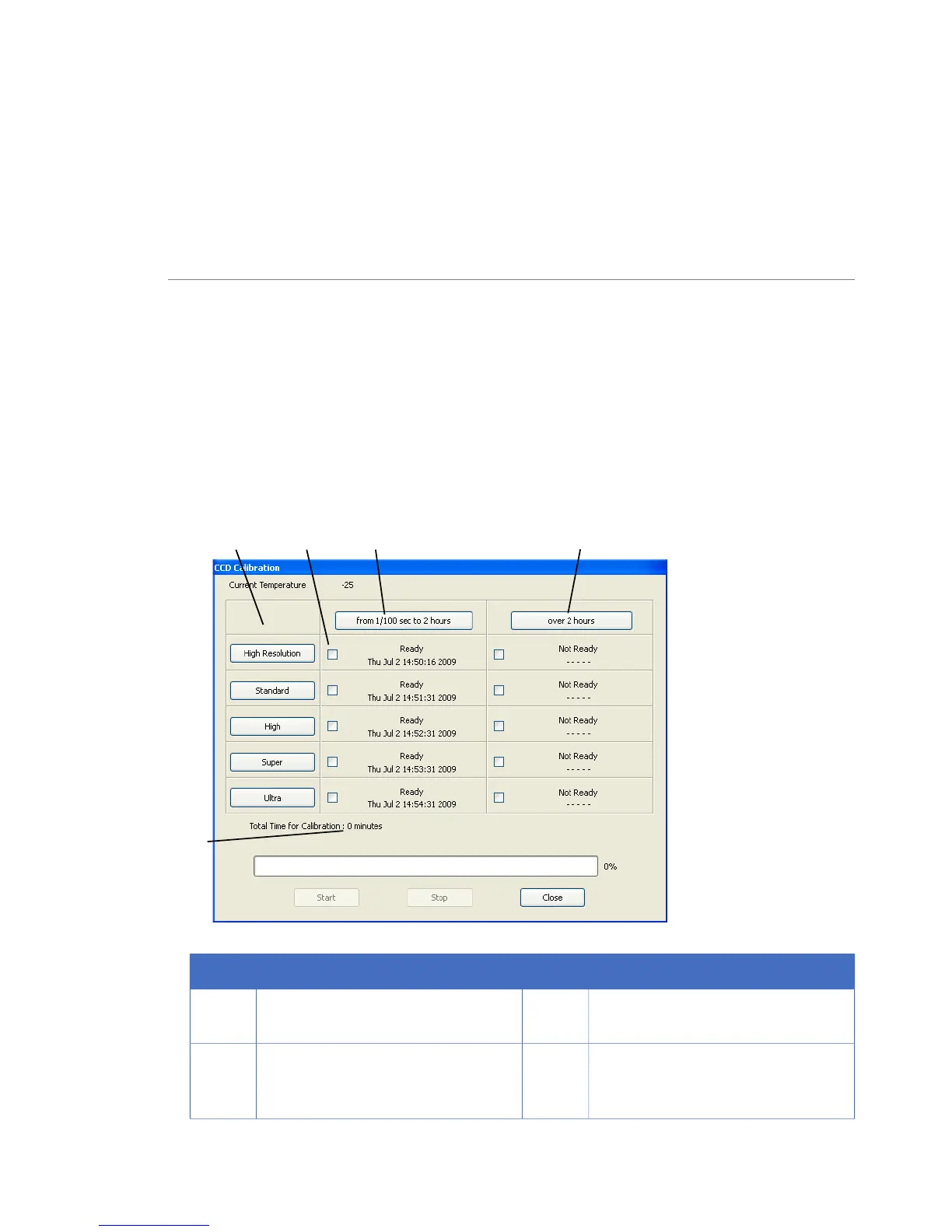
When CCD Calibration is selected in the Option menu, the following window is shown.
DescriptionNo.DescriptionNo.
Click here to check the boxes for all
resolutions for more than 2 hours.
4Click here to check the boxes for all
resolutions for up to 2 hours.
1
Click on the buttons in this column to
check the boxes for both correction
files for specific resolutions.
5The time required for creation is dis-
played.
2
104 ImageQuant LAS 4000 User Manual 28-9607-42 AB
5 Software reference guide
5.11 View menu



 To Next Page