8-
24
LPS-O Line Protection System GE Power Management
8.2 INFORMATION 8 LOCAL USER INTERFACE
8
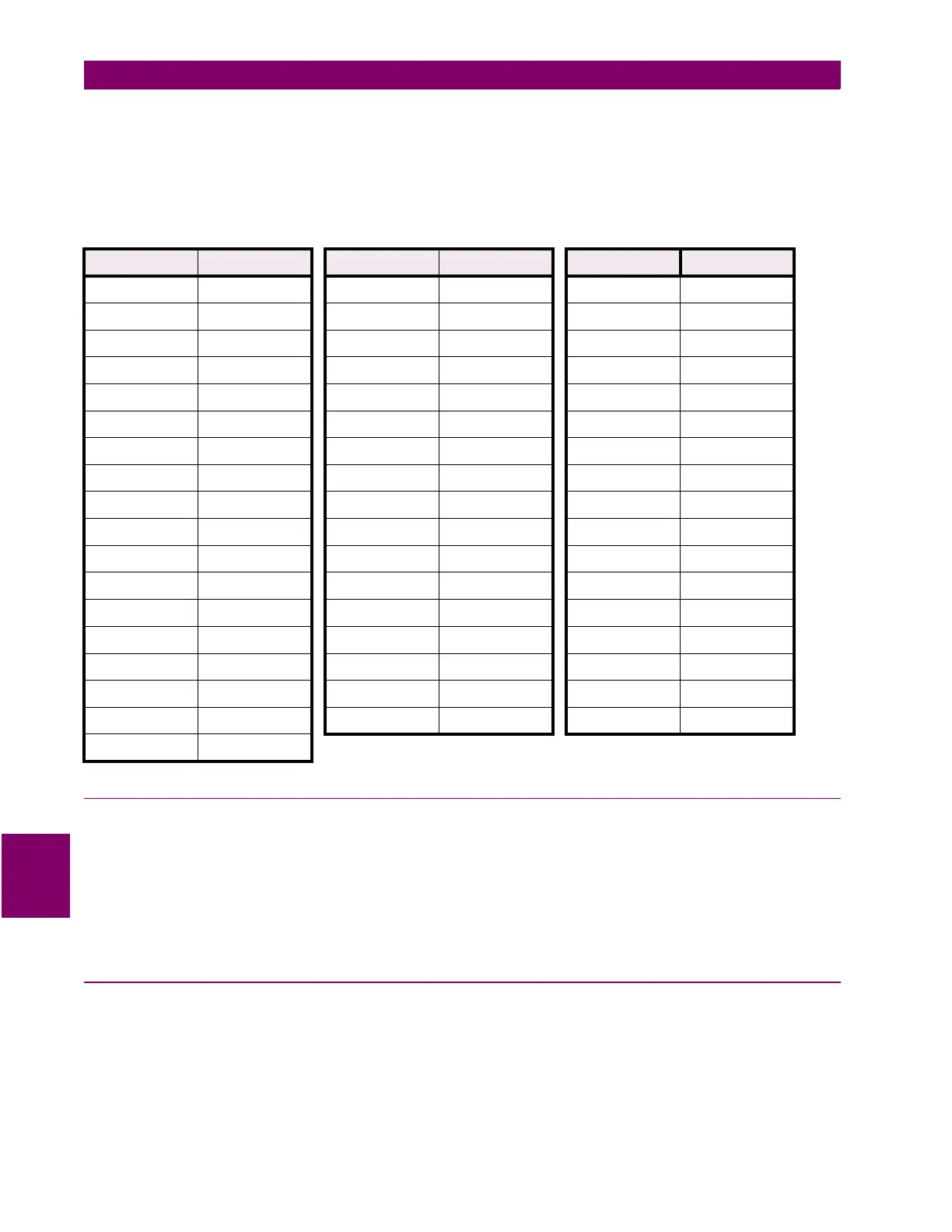
To change the privilege level in the relay, enter the SETTINGS or ACTIONS categories and enter the pass-
word. The [SET] key and the [ACT] key are the only two keys that allow you to set the privilege level. If only the
SETTINGS privilege level is desired, the [SET] key must be used. The [ACT] key must be used only if CON-
TROL privilege level is desired. Either may be used for the MASTER privilege level. See the following table for
decoding information.
8.2.9 REQUEST STATION/LINE ID
This category is used to view the Station and Line ID strings which are set by the remote communications.
These Ids allow the user to easily identify each relay by name while logged in through communications. Use
the arrow keys to display the ID not currently on the screen.
NOTE: If the Station/Line ID string is longer than 20 characters, a check is made to see if the string can
be smoothly separated to fit on two lines. If it is not possible, the first 20 characters of the sta-
tion ID are displayed on the third line and the rest are displayed on the fourth line.
8.2.10 REQUEST LPS-O MODEL/VERSION
This category is used to display the Model and Version numbers for the relay.
Table 8–1: PASSWORD ENCRYPTION KEY TABLE
Displayed Decoded Displayed Decoded Displayed Decoded
(space) P 8 B M 7
!T 9F P(space)
"X :J Q$
$Q ;N R(
%U <C S ,
&Y =G T !
(R >K U%
)V ?O V)
*Z @0 W-
,S A4 X"
-W B8 Y&
1D D1 Z*
2H E5 [ .
3L F9 \ #
4A H2 ] '
5E I 6 ^+
6I L3 _/
7M



 To Next Page