58 SD Series Technical Manual MDS 05-4846A01, Rev. D
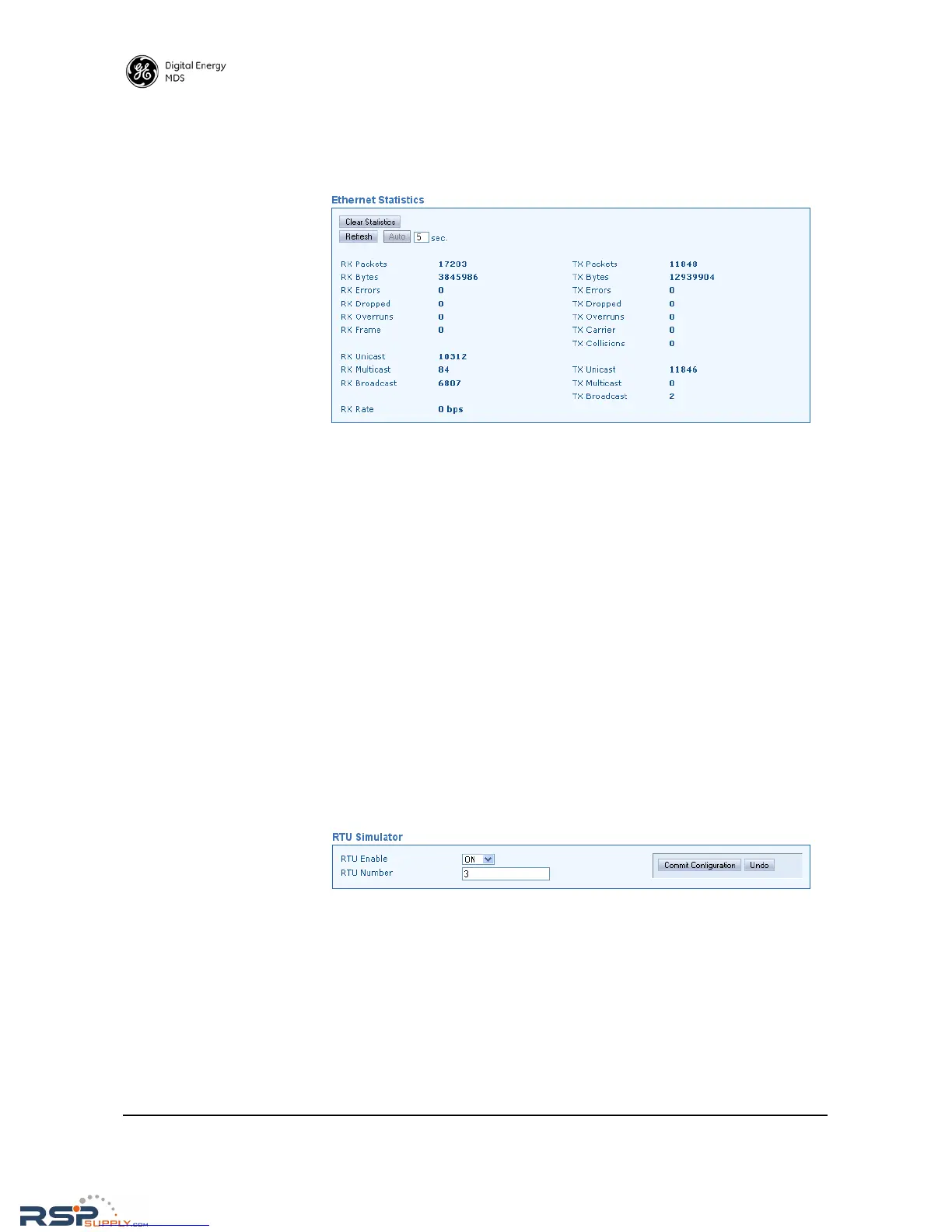
Ethernet Statistics This screen presents a detailed summary of packets received and trans-
mitted, dropped packets, errors, overruns of the buffer, RX data rate
(bps), and RX/TX data for Unicast, Multicast, and Broadcast transmis-
sions.
• Clear Statistics—Clicking this button resets the displayed statistic
counts.
• Refresh—Clicking this button updates the displayed statistics on
demand.
• Auto—Initiates automatic updating of statistics. A time (in sec-
onds) may be entered in the box provided, to specify how often
the display is updated.
Radio Test
The Radio Test functions are a collection of tools useful for testing the
RF performance of the transceiver. It provides a way to key (activate)
the transmitter, measure power output, run a spectrum test, and enable
the built-in RTU simulator.
RTU Simulator The unit’s built-in RTU simulator generates random data similar to what
would be supplied by an external RTU connected to the radio. It is
useful for system testing within the radio network by providing realistic
data to pass over the radio channel.
•
RTU Enable—Select ON or OFF from the drop-down box.
• RTU Number—Enter the desired RTU number in this box.
When you are done with these settings, press Commit Configuration to
apply the changes.



 To Next Page