MDS 05-4846A01, Rev. D SD Series Technical Manual 63
TFTP
Reprogramming
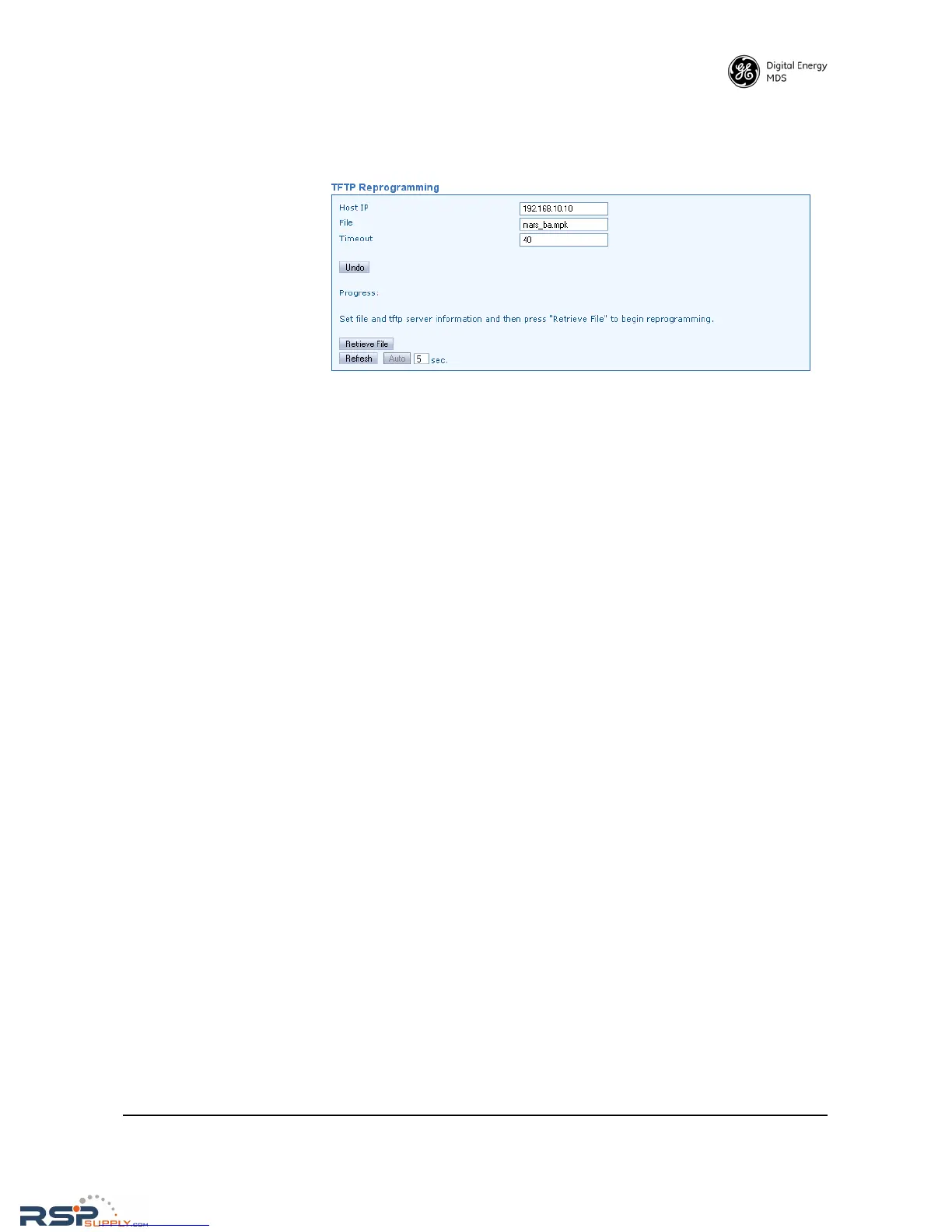
The TFTP Reprogramming screen contains settable parameters for
TFTP file transfers and selections for Importing/Exporting configura-
tion files via TFTP.
•
Host IP—Use this field to enter a valid IP address for the host com-
puter (where the configuration file resides).
•
File—This field is used to enter the exact name of the configura-
tion text file that will be used by the radio to import or export con-
figuration data.
• Timeout—Determines the amount of time (in seconds) that the
radio should wait for a TFTP server to respond. The default set-
ting is 10 seconds, and will not normally require any change. If a
change is needed, enter a new timeout value in this field.
When all of the above fields have been set and you are ready to load a
new configuration file, click the Retrieve File button to begin reprogram-
ming.
This screen may be updated on demand by clicking the Refresh button.
It may also be refreshed automatically by clicking the Auto button. A
time (in seconds) may be entered for automatic refresh in the box to the
right of the
Auto button.
RSPSupply - 1-888-532-2706 - www.RSPSupply.com
http://www.RSPSupply.com/p-8461-MDS-UP-SD9-MS2ES-Upgrade-Key-SD9-MS-to-SD9-ES.aspx



 To Next Page