page | 15
Selecting a Video Input
The Multi-Format Processor allows you to switch between ve simultaneous connections.
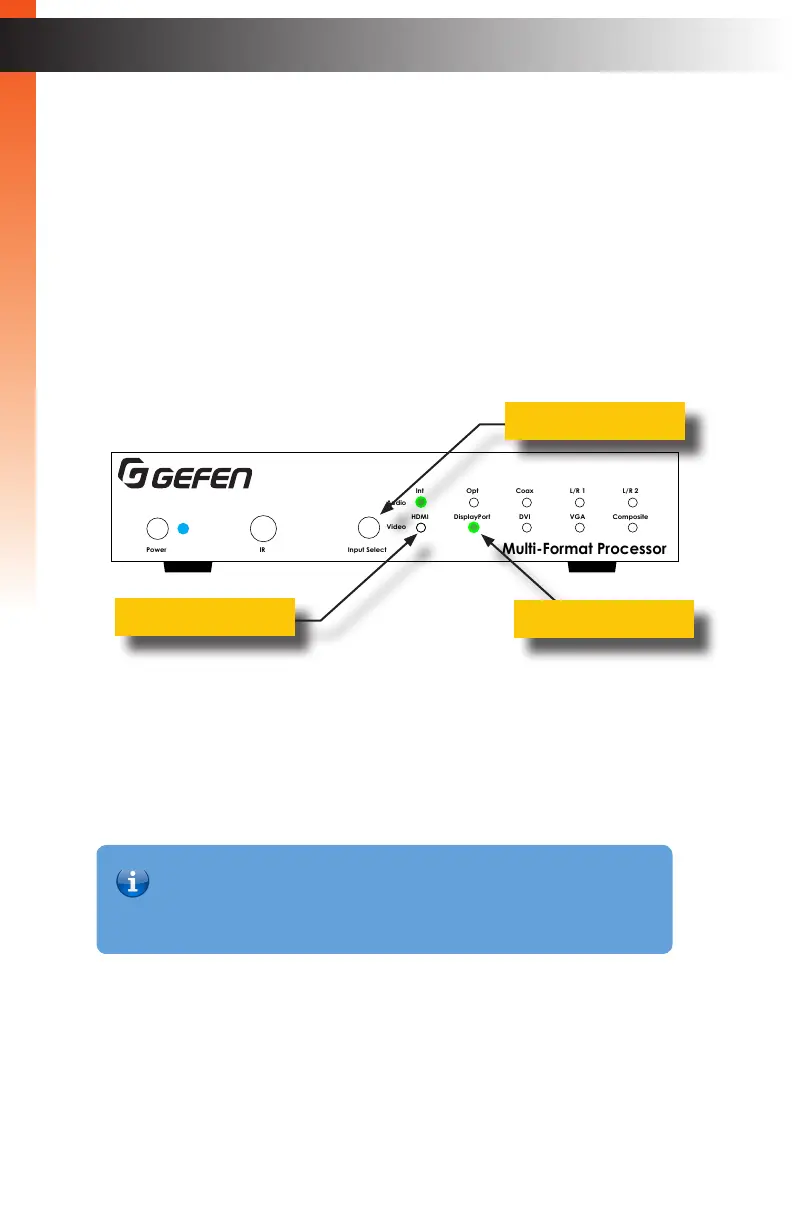
By default, the HDMI port is active. The Multi-Format Processor will cycle through each of
the following inputs, in order: HDMI, DisplayPort, DVI, VGA, and Composite.
1. Press and release the Input Select button to cycle through each of the available
inputs.
2. The input indicator will glow solid green to denote the active input. For example, in the
illustration below, the DisplayPort input indicator is illuminated.
3. Press and release the Input Select button to advance to the next input (DVI).
The input indicators will always be selected from left to right.
4. Continue with this process until the desired input is selected.
5. Once the Composite input is selected, pressing the Input Select button again will
select the HDMI input.
Selecting an Audio Input
Audio inputs must be selected and/or paired with video inputs using the built-in Web
interface. See Setup ► Audio (page 90) for more information.
Basic OperationBasic Operation
Front-Panel Controls
Multi-Format Processor
IR
Audio
Int Opt Coax L/R 1 L/R 2
HDMI DisplayPort DVI VGA Composite
Video
Input Select
Power
®
USB Optical
IR Ext
EXT-MFP
HDMI Out DVI Out HDMI In (1) DisplayPort In (2)
Coax
IP Control
12V DCVGA In (4)DVI In (3)
Composite
In (5)
RS-232
Input Control
Audio In
Audio Out
C 1 2 3 4 5
L/R 1 L/R 2L R
Input Select button
Video Input indicators
Active input indicator
Information
The Video Input Selection can also be changed with the IR Remote Control,
the Web GUI, or by an external controller using either RS-232 or IP Telnet
control, or via the Contact Closure Inputs on the back panel.



 To Next Page