page | 75
Basic Operation
Control Methods
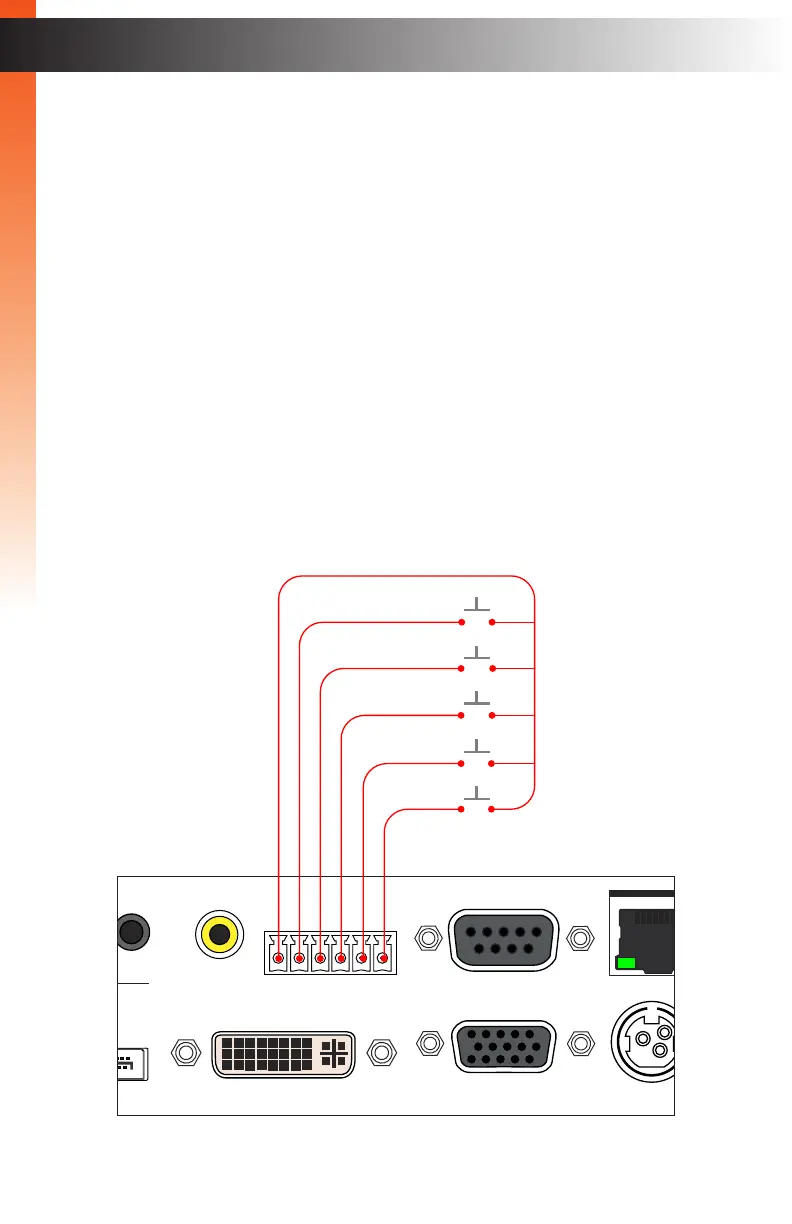
Contact Control
You can select inputs using ordinary dry-contact push-button switches, keypads, or contact
closures. Any device that provides a simple normally-open (NO) momentary closure can be
wired to the Input Control connectors on the rear panel, using the included screw-terminal
connecting block. Video inputs (with associated audio) can be selected by connecting
SPST NO switches between the desired input and the “C” terminal. Refer to the illustration
below.
1. Connect switches between the desired input selection (1 - 5) and the “C” terminal as
shown below. The numbers correspond to the video inputs as follow:
1. HDMI
2. DisplayPort
3. DVI
4. VGA
5. Composite Video
2. Closing the connection momentarily will cause the Multi-Format Processor to select
that video input. If congured, the audio input will also change to the pre-set linked
audio input. See Setup ► Audio (page 90) for more information on audio selection.
Multi-Format Processor
IR
Audio
Int Opt Coax L/R 1 L/R 2
HDMI DisplayPort DVI VGA Composite
Video
Input Select
Power
®
USB Optical
IR Ext
EXT-MFP
HDMI Out DVI Out HDMI In (1) DisplayPort In (2)
Coax
IP Control
12V DC
VGA In (4)DVI In (3)
Composite
In (5)
RS-232
Input Control
C 1 2 3 4 5
HDMI
DisplayPort
DVI
VGA
Composite



 To Next Page