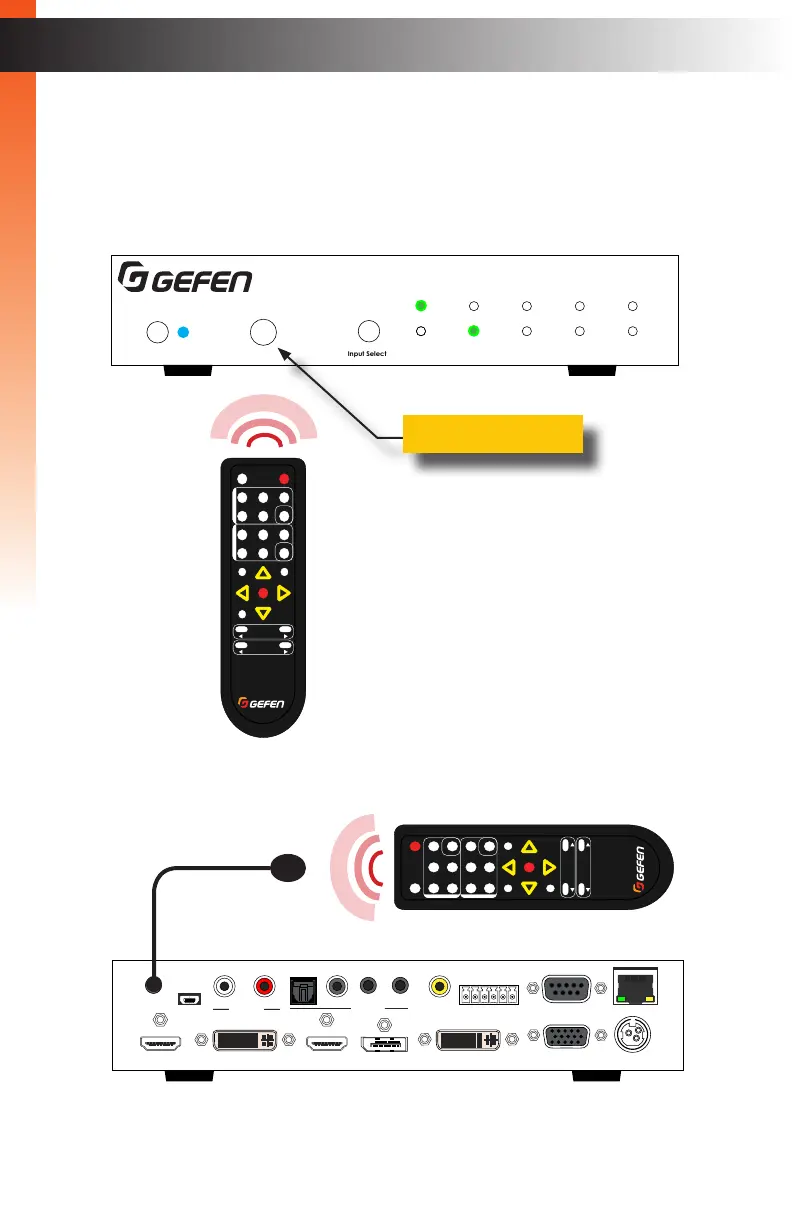
You can use the included IR Remote Control to operate the Multi-Format Processor,
by pointing the remote at the IR Window on the unit. If the Multi-Format Processor is
concealed in a cabinet or otherwise out of range of the remote, you can plug in a Gefen
IR Extender (Gefen part no. EXT-RMT-EXTIR) to the IR Ext port on the back panel, and
place the sensor where it will be in range of the remote.
page | 16
Basic Operation
Basic Operation
Basic Operation
Basic Operation
Multi-Format Processor
IR
Audio
Int Opt Coax L/R 1 L/R 2
HDMI DisplayPort DVI VGA Composite
Video
Input Select
Power
®
USB Optical
IR Ext
EXT-MFP
HDMI Out DVI Out HDMI In (1) DisplayPort In (2)
Coax
IP Control
12V DCVGA In (4)DVI In (3)
Composite
In (5)
RS-232
Input Control
Audio In
Audio Out
C 1 2 3 4 5
L/R 1 L/R 2L R
Multi-Format Processor
IR
Audio
Int Opt Coax L/R 1 L/R 2
HDMI DisplayPort DVI VGA Composite
Video
Input Select
Power
®
USB Optical
IR Ext
EXT-MFP
HDMI Out DVI Out HDMI In (1) DisplayPort In (2)
Coax
IP Control
12V DCVGA In (4)DVI In (3)
Composite
In (5)
RS-232
Input Control
Audio In
Audio Out
C 1 2 3 4 5
L/R 1 L/R 2L R
IR window
IR extender
IR sensor
Using the IR Remote Control
®
RMT-MFP
OK
Resolution
Menu
Exit
L/R 1
Int
VGA
HDMI
Off On
DP DVI
Comp Mask
Optical Coaxial
L/R 2 Mute
Info
Vol -
Vol +
Aspect Ratio
Audio Video
®
RMT-MFP
OK
Resolution
Menu
Exit
L/R 1
Int
VGA
HDMI
Off On
DP DVI
Comp Mask
Optical Coaxial
L/R 2 Mute
Info
Vol -
Vol +
Aspect Ratio
Audio Video



 To Next Page