EasyManua.ls Logo

Gema OptiCenter OC09 - User Manual

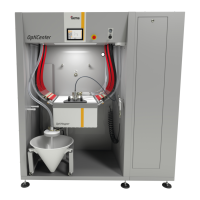
Gema OptiCenter OC09
112 pages
Print Icon
To Next Page IconTo Next Page
Loading...
Rev. 00 1017 579 EN
Operating instructions and Spare parts list
Powder management
system
OptiCenter OC09
Translation of the original operating instructions

Table of Contents

Questions and Answers

  • J
    Jason ColemanSep 9, 2025
    What causes a defective vibrator in Gema Control Unit?
    • D
      Daniel TapiaSep 10, 2025
      If the vibrator is defective in your Gema Control Unit, it could be due to several reasons. First, the motor protection switch Q6 might have reacted. Remove the small maintenance panel and switch on the motor protection switch again. If alarms repeat, contact a Gema service center. Second, the vibrator itself might be defective, so replace it. Finally, the cable could be broken, so replace it.
  • R
    Rebecca HughesSep 12, 2025
    What to do if there is CAN bus malfunction in Gema Control Unit?
    • R
      robert57Sep 12, 2025
      If there is a CAN bus malfunction in your Gema Control Unit, it could be due to no communication with CM40/CM41. Switch on the higher-level control unit CM40/CM41. If the issue persists, a CAN bus participant might be defective, contact Gema Service.
  • S
    Scott MartinSep 14, 2025
    What causes valve battery failure in Gema Control Unit?
    • M
      michaelrobinsonSep 14, 2025
      If there is a valve battery failure in your Gema Control Unit, the safety equipment (F7) might have reacted, causing the control unit to switch to stand-by mode. Check the 24 VDC Power pack (G4).
  • N
    nelsonelizabethSep 16, 2025
    What to do if fuse Fxx is defective in Gema Control Unit?
    • E
      Eric BurgessSep 16, 2025
      If the fuse Fxx is defective in your Gema Control Unit, the fuse (1 AT) in the WAGO module A1 might be defective, causing the control unit to switch to stand-by mode. Replace the fuse, otherwise contact a Gema service center.

Summary

Introduction and Safety

About these instructions

Provides essential information for operating the OptiCenter OC09 and guidance for setup and manual retention.

Safety

Covers general safety principles, compliance, and integrated system safety requirements.

Product Overview and Technical Details

Transport

Covers transport precautions, personnel needs, packing, and loading procedures.

Product Description

Explains the product's purpose, field of application, and potential misuse scenarios.

Technical Data and Specifications

Details electrical, pneumatic, powder transport, compressed air, dimensions, sound, and rating plate information.

Design, Functionality, and Components

Explains overall view, touch panel, key components like OptiHopper, and operational principles.

Interface and Operation

Touch Panel and Operating Interface

Lists panel features, technical data, specifications, interface elements, symbols, and colors.

Operating Modes and User Management

Covers operating modes, user levels, access control, and CAN bus communication.

Setup, Start-up, and Operation

Assembly and Connection

Details installation, environmental limits, grounding, and compressed air supply requirements.

Start-up Procedures

Outlines start-up conditions, powder quality, air supply, and SD card handling.

Operation of the OptiCenter

Guides on system start-up, mode selection, coating procedures, and manual operation.

Maintenance, Troubleshooting, and Lifecycle

Maintenance and Repairs

Highlights maintenance importance, schedule, and detailed cleaning procedures for components.

Fault Clearance and Troubleshooting

Explains error messages and provides a guide for diagnosing and resolving common faults.

Decommissioning, Storage, and Disposal

Details shutdown procedures, storage conditions, and recommissioning steps.

Spare Parts

Spare Parts List

Provides guidelines for ordering spare parts and identifies key OptiCenter components with part numbers.

Gema OptiCenter OC09 Specifications

General IconGeneral
BrandGema
ModelOptiCenter OC09
CategoryControl Unit
LanguageEnglish

Related product manuals