VRC2000 Installation and Operations Manual Page 7
Technical or Setup Assistance
Telephone: 800.945.7730 (USA) or 801.975.7200 (worldwide) • Worldwide Web @ http://www.gentner.com
inputs and the power-cord connector.
Step 3
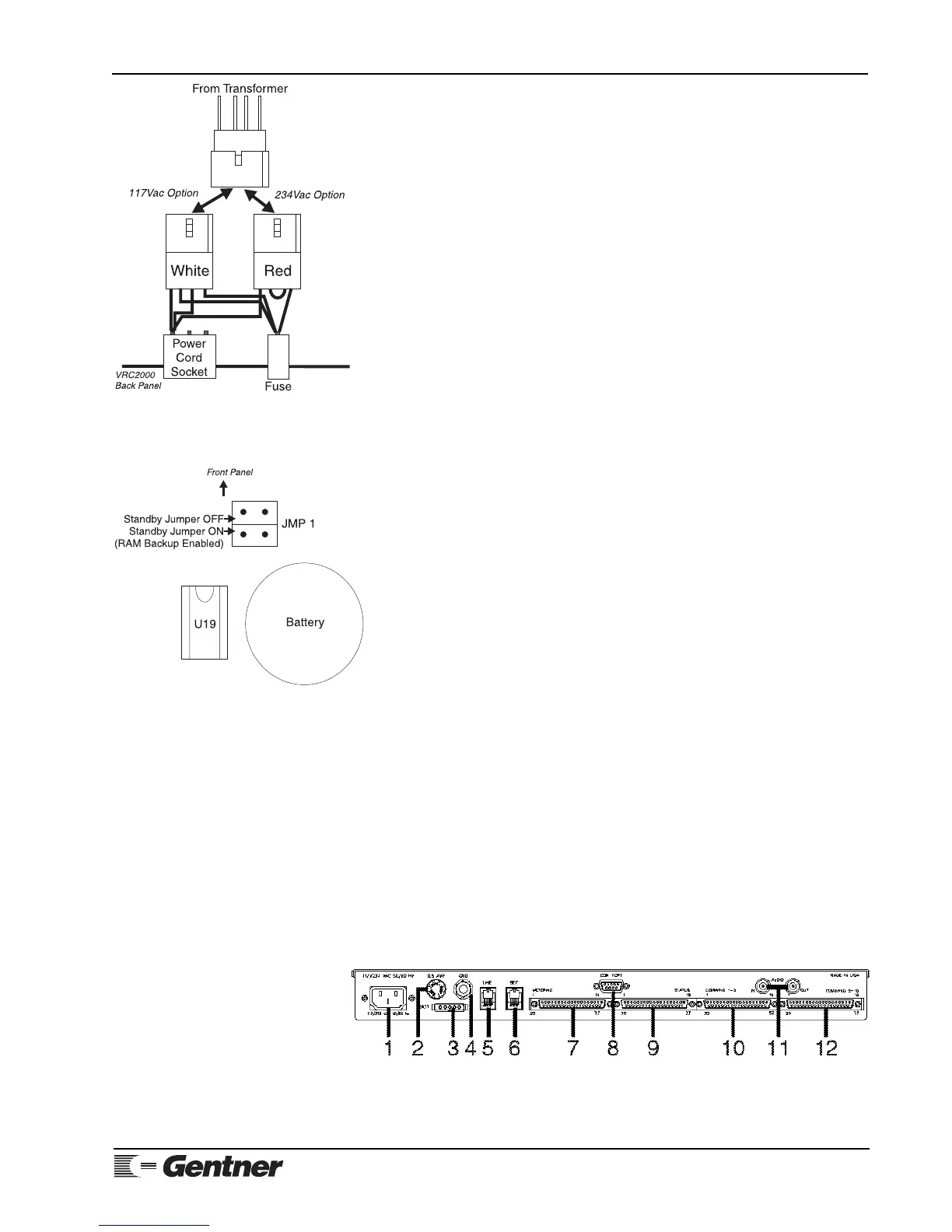
Insert the white Molex connector for 117Vac operation. Use the red Molex
connector for 234Vac operation. (See Figure 5, left.)
Step 2 — Internal Lithium Battery
Properly connect the internal lithium battery to the system RAM and clock
circuitry before applying power to your new VRC2000.
The internal lithium battery provides power to back up the system RAM and
real-time clock. In order to extend the life of the battery, it is not connected
at the factory. You must properly position a Berg shorting jumper (See
Figure 6, left, below.) in order to connect the internal lithium battery.
BATTERY CONNECTION NOTE:
If you do not properly connect the internal lithium battery, all VRC2000 default
programming will be restored in the event of an AC power failure or power bump.
All custom programming will be lost.
Do not apply AC power until you have properly positioned the internal
lithium battery jumper and checked the AC voltage set up for your VRC2000.
Step 3 — Surge Protection Option
The VRC2000 is a sensitive electronic device. In order to avoid damage to
your unit, Gentner Communications strongly recommends that you always
properly protect your VRC2000 from voltage surges over telephone lines and
AC power lines connected to your VRC2000.
The VRC2000 is equipped with a highly reliable Telephone Surge Protector
(See Appendix C: Accessories, Page 100.) on the telephone line input.
Gentner Communications does not guarantee that this Telephone Surge
Protector will protect your VRC2000 from damage caused by all voltage
surges; however, the Telephone Surge Protector will help limit such damage.
VOLTAGE SURGE NOTE:
Never disconnect or bypass surge protection for your VRC2000. Damage to your
VRC2000 system caused by voltage surges is not covered under the terms of the
Gentner warranty agreement (Page 92).
Step 4 — Back-Panel Connections
Telephone Set
Connect a standard DTMF telephone set to the SET jack [6] (See Figure 7,
below.) on the back panel of the VRC2000 with a standard modular cable.
Telephone Line
Use the supplied modular telephone connector to connect the LINE jack [5]
to the telephone line coming into your building.
Figure 5. VRC2000 transformer wiring
diagram
Figure 6. VRC2000 lithium battery
jumper diagram
Figure 7. VRC2000 back-panel
connectors



 To Next Page