Smartdop
®
30EX Basic Operation
5. MODE & MENU SETTINGS
5-3 MENU (Cont.)
5-3-8 MEMORY - STORE
MEMORY-STORE is used to save waveform data into memory to view or print at a later time.
MEMORY - STORE is available in Freeze mode only. See 5-2-1 “Measurement / Freeze
Mode” for details.
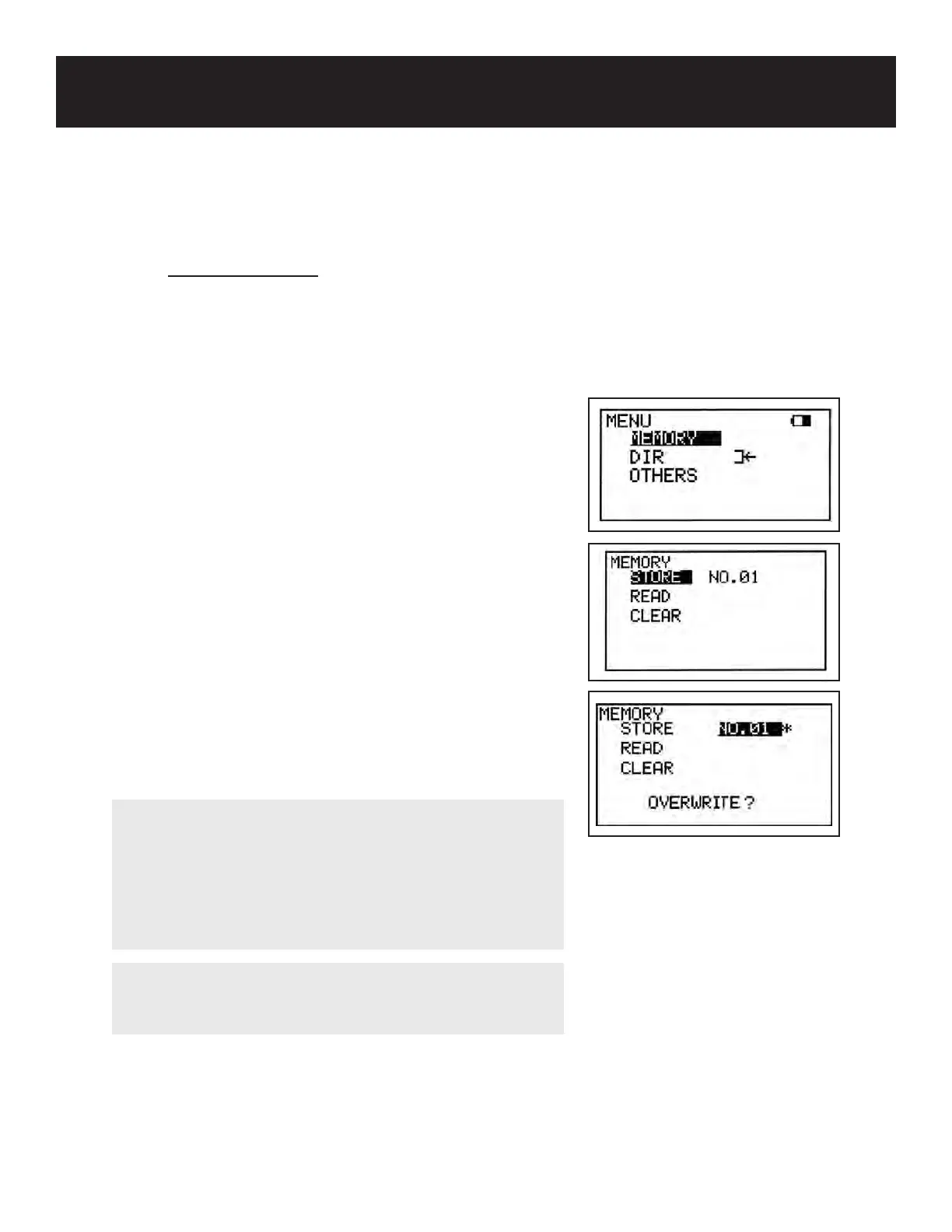
Press the MENU button to go to Menu mode. Scroll up
(PRINT button) or down (LEG/TOE button) until MEMORY
is highlighted. Press the probe selection button (enter)
or the INF/DUMP button (right) to display the submenu.
STORE should be highlighted. If it is not, scroll up or down
to select it.
Press the INF/DUMP button (right) to highlight the memory
number. The rst available number will be automatically
be selected. To change the memory number, scroll up
(PRINT button) or down (LEG/TOE button).
Press the probe selection button (enter) to store the data
into the selected number. The LCD will automatically
display the saved waveform.
21
NOTE
Memory numbers shown with an asterisk (*) indicate
numbers which already contain data. If storing over
existing data, the conrmation “OVERWRITE?” will be
displayed on the LCD. Press enter (probe selection
button) to overwrite the existing data or press any other
cursor button to cancel.
NOTE
MEMORY-STORE is not available until the pressure has
been assigned to ARM or LEG/TOE.



 To Next Page