Smartdop
®
30EX Basic Operation
32
6. LCD DISPLAY
6-1 BLOOD VELOCITY MODE
6-1-1 WAVEFORMS
1. Smartdop
®
30EX automatically adjusts the baseline to best position. There are 4
baseline positions: bottom, 1/4 from the bottom, center, and 3/4 from the bottom.
2. The waveform amplitude is automatically adjusted.
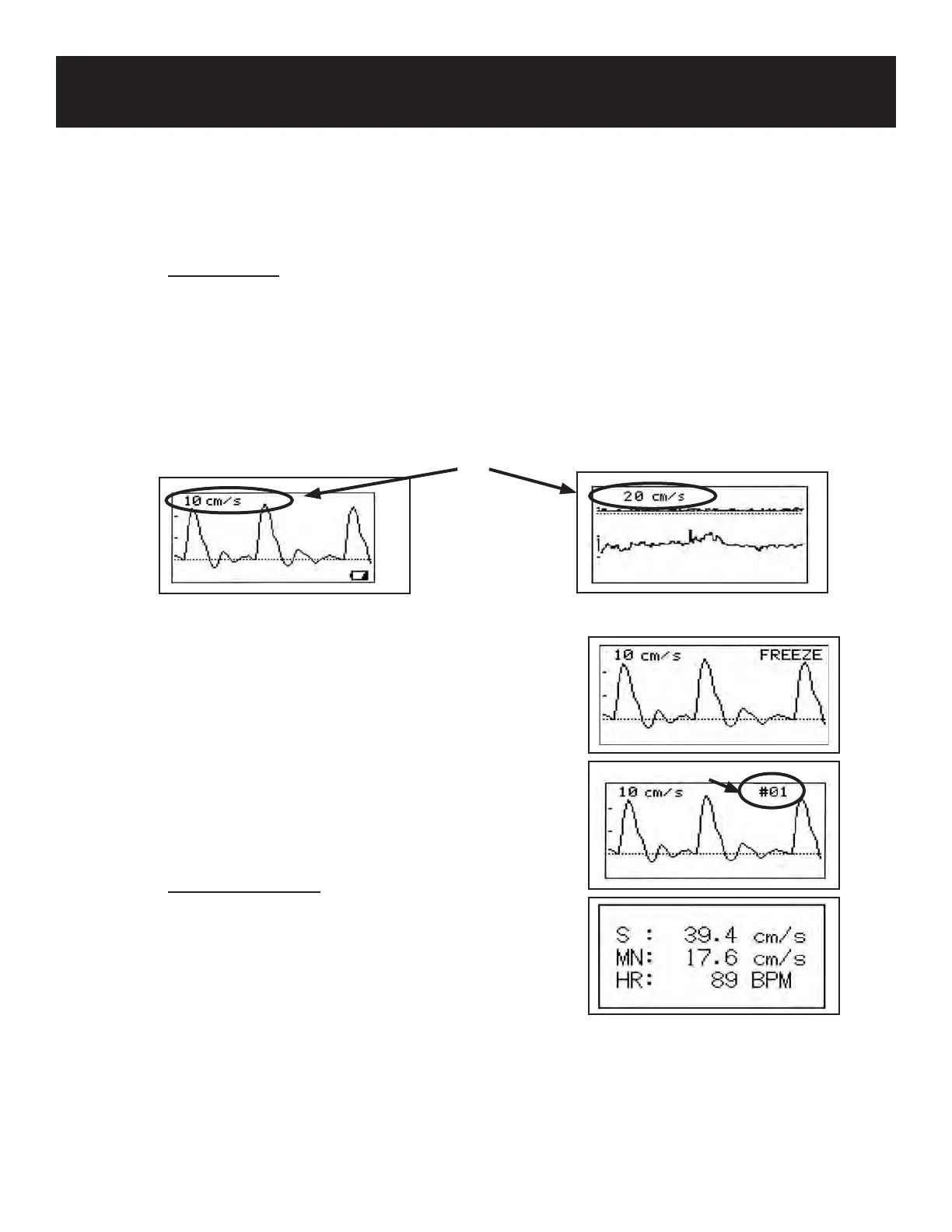
3. The amplitude scale (velocity or frequency per division) is displayed in the upper left
corner of the LCD.
4. Freeze the waveform by pressing the INF/
DUMP button or the probe button (probe button
function must be set to FREEZE or FRZ&PRINT).
Smartdop
®
30EX will stop monitoring and display
the frozen waveform on the LCD with “FREEZE” in
the upper right corner.
5. When reading waveforms from the memory, the
waveform is displayed on the LCD with the memory
number (e.g. #01) at the upper right corner.
6-1-2 NUMERICAL DATA
Press the LEG/TOE button to display numerical
data. Numerical data is available on Mode 1 &
Mode 2. See 7-3 “NUMERICAL VELOCITY” for
numerical data abbreviations.
Memory number
Amplitude scale
Mode 1
Mode 2



 To Next Page