Smartdop
®
30EX Basic Operation
3. CONTROLS
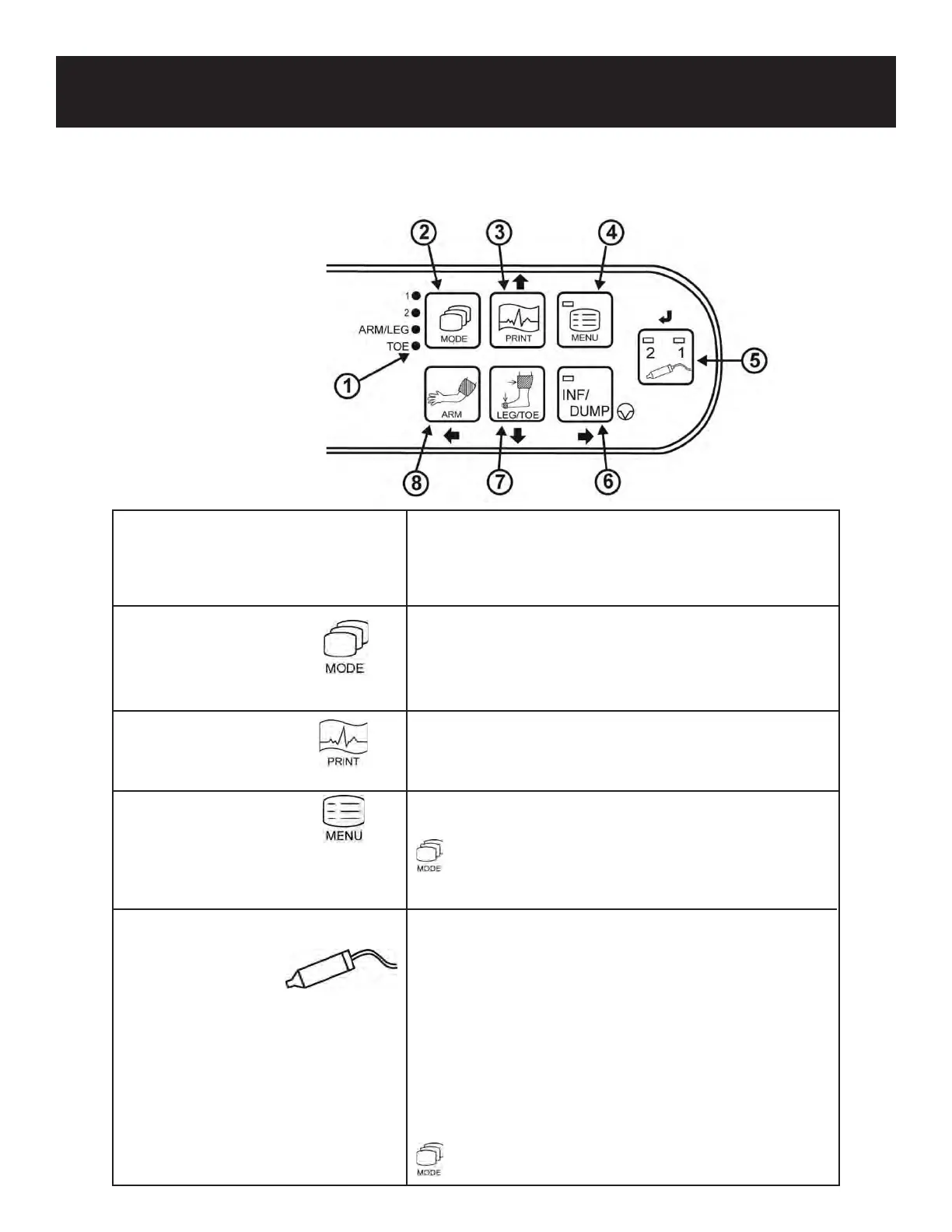
3-2 OPERATION PANEL
1) MODE LEDs Indicates the mode selected.
(Mode 1, Mode 2, Arm/Leg, Toe)
Illuminates sequentially while the battery is charging.
2) MODE BUTTON To select the mode -
Mode 1 (Arterial), Mode 2 (Venous), Arm/Leg
Pressure, Toe Pressure. See 5-1 “BASIC MODE
SETTINGS” for details.
3) PRINT BUTTON To activate / deactivate the printer.
Menu mode: Moves the cursor up.
4) MENU BUTTON To enter Menu mode. See 5-3 “MENU” for details.
+ Turns the backlight ON/OFF.
5) PROBE SELECTION To select the probe intended for use from the connected
BUTTON probes. The LED corresponding to the probe number
will illuminate.
To select PV Arterial mode (both LED’s will be lit).
Menu mode: Sets and/or changes the mode or
setting.
Freeze mode:
View next memory number.
+ View previous memory number.
6



 To Next Page