Smartdop
®
30EX Basic Operation
5-3-12 DISP / OTHERS - DISP (Waveform/Data)
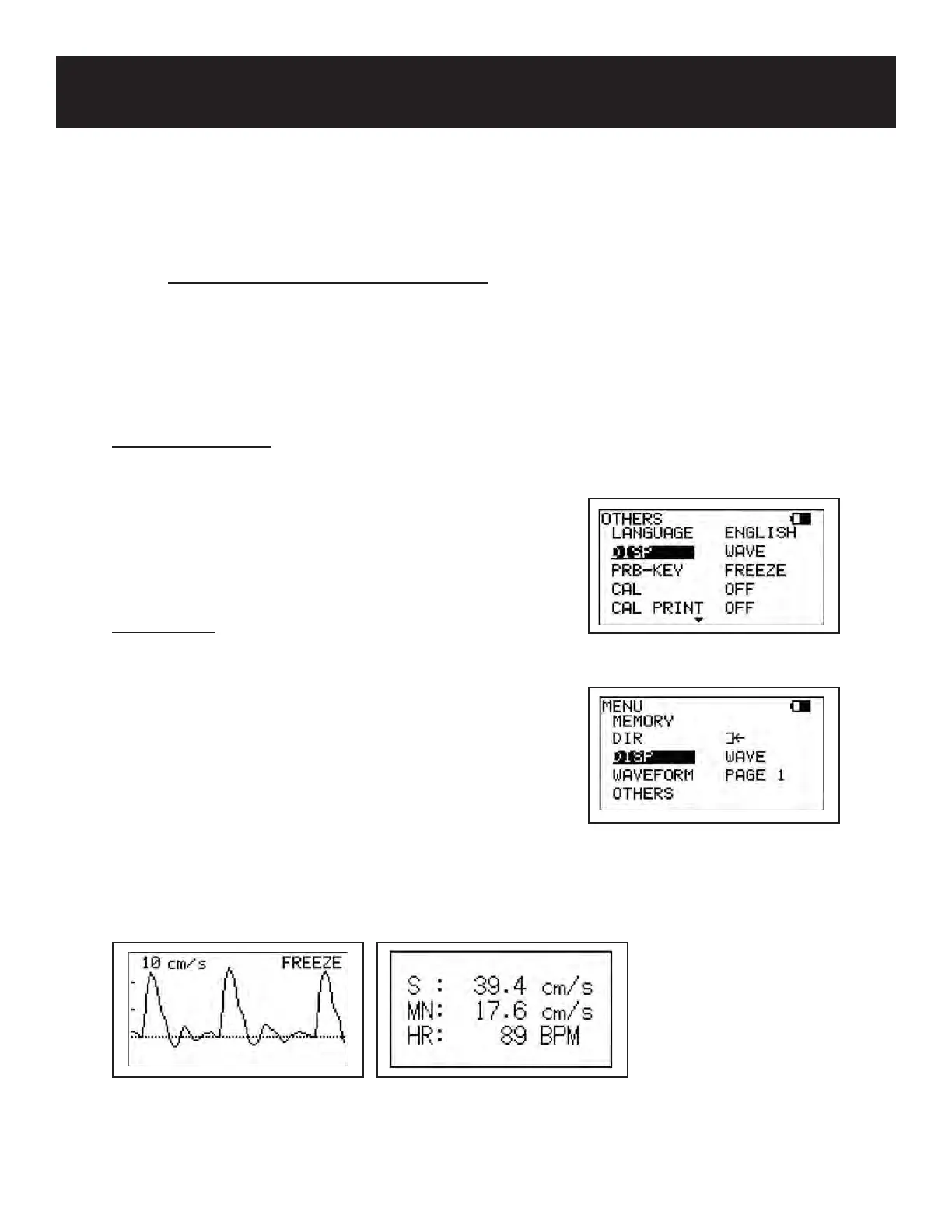
DISP is used to change the LCD display from Waveform to Data.
DISP is available in blood ow velocity measurement and freeze modes. When in measurement
mode, DISP is a submenu of OTHERS in the menu. See 5-3-2 & 5-3-3 “Menu for Blood
Velocity Measurement Mode” & “Menu for Blood Velocity Freeze Mode” for details.
Measurement Mode
Press the MENU button to go to Menu mode. Scroll up
(Print button) or down (LEG/TOE button) until OTHERS
is highlighted. Press the probe selection button (Enter)
or INF/DUMP (Right) to select the submenu. Scroll up or
down until DISP is highlighted. Press the probe selection
button (Enter) or INF/DUMP button (Right) to change the
setting.
Freeze Mode
Press the MENU button to go to Menu mode. Scroll up
(PRINT button) or down (LEG/TOE button) until DISP is
highlighted. Press the probe selection button (Enter) or
INF/DUMP (Right) to change the setting.
WAVE: displays waveform
DATA: displays numerical data
Once the DISP option has been set, press the MENU
button to exit and return to the previous screen.
5. MODE & MENU SETTINGS
5-3 MENU (Cont.)
24
Wave Display Data Display
Freeze Mode
Measurement Mode



 To Next Page