Smartdop
®
30EX Basic Operation
3. CONTROLS
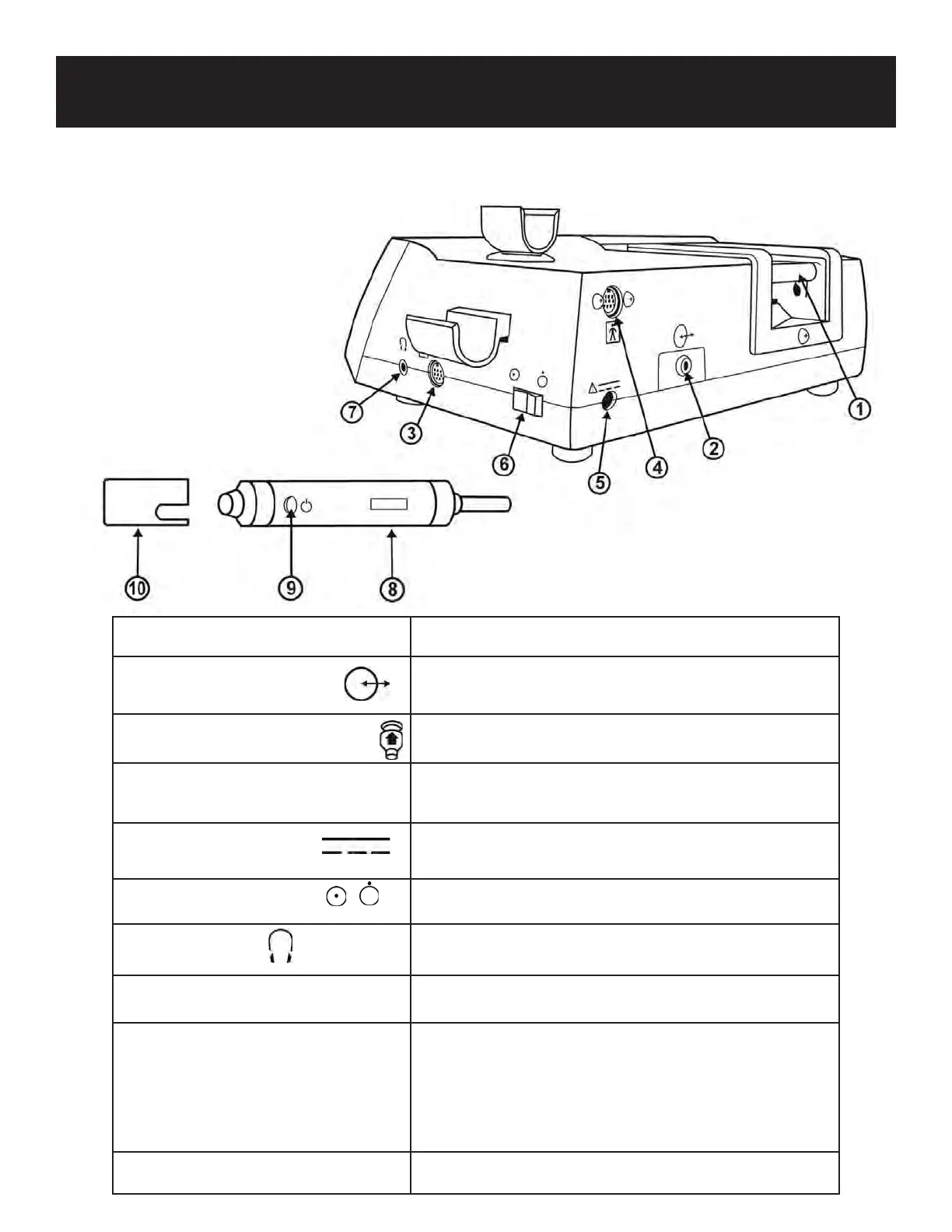
3-3 RIGHT REAR VIEW
& PROBE
1) ROLL SHAFT To hold the paper roll in the printer.
2) COMMUNICATION To connect the Doppler to a computer.
PORT
3) PROBE CONNECTOR 1 To connect probe 1.
4) PROBE CONNECTOR 2 To connect probe 2. Use when connecting PPG or
additional probes.
5) AC ADAPTOR To connect the designated AC adaptor.
CONNECTOR
6) POWER SWITCH To turn the unit ON/OFF.
7) HEADSET To connect a headset (not provided). Cuts o sound
to the speaker.
8) PROBE Multi-probe selection: 5, 8 and 10 MHz.
9) PROBE BUTTON To freeze / unfreeze the waveform.
To activate / deactivate the printer.
To activate / deactivate the cu inator.
The probe button function is set in Menu mode under PRB-KEY.
See 5-3-15 “OTHERS-PRB-KEY” for details.
10) PROBE CAP To protect the probe transducer tip when not in use.
8
ON
OFF



 To Next Page