Smartdop
®
30EX Basic Operation
5. MODE & MENU SETTINGS
5-3 MENU (Cont.)
5-3-25 P.CLEAR
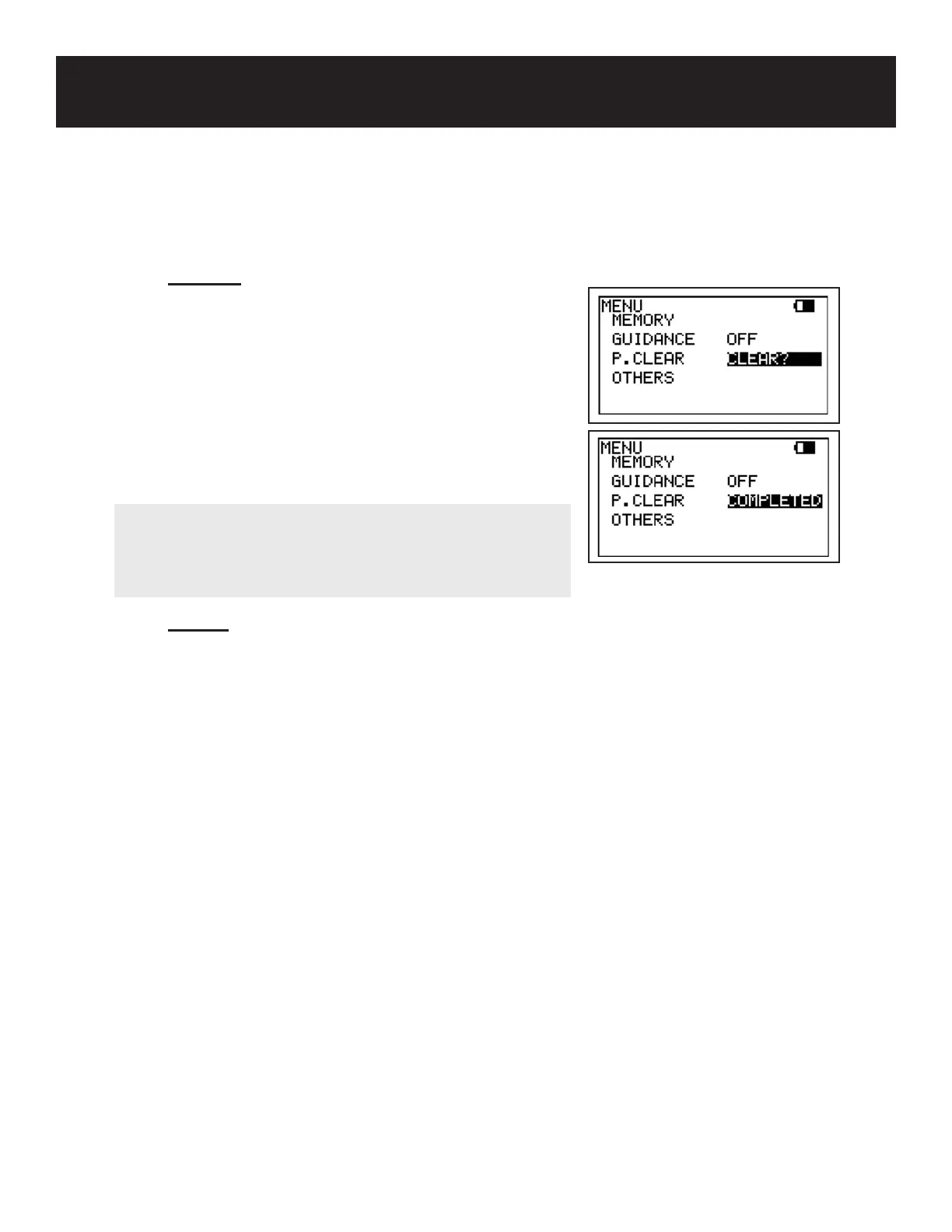
P.CLEAR is used to clear the pressure data. It is available
in ARM/LEG and TOE pressure modes.
Press the MENU button to go to Menu mode. Scroll up
(PRINT button) or down (LEG/TOE button) until P.CLEAR
is highlighted. Press the probe selection button
(Enter). “CLEAR?” will appear next to P.CLEAR
on the LCD. Press Enter again to delete the data.
“COMPLETED” will show next to P.CLEAR for 5 seconds.
5-3-2
6 COUNT
COUNT is used to set the number of times the patient should dorsiex the foot during Venous
Reux studies. It is available when the optional PPG probe is connected and the MODE is set
to Mode 2 (DC).
Press the MENU button to go to Menu mode. Scroll up (PRINT button) or down (LEG/TOE
button until COUNT is highlighted. Press the probe selection button (Enter) or INF/DUMP
button (Right) to change the setting.
Once COUNT has been set, press the MENU button to exit and begin testing.
30
NOTE
Pressure data can also be cleared by pressing the ARM or
LEG/TOE button longer than 2 seconds. A conrmation
“Pressure Data Cleared” will appear on the LCD.



 To Next Page