Smartdop
®
30EX Vascular Testing Instructions
Take the systolic pressure at the toe
1. After taking the arm pressures and documenting the
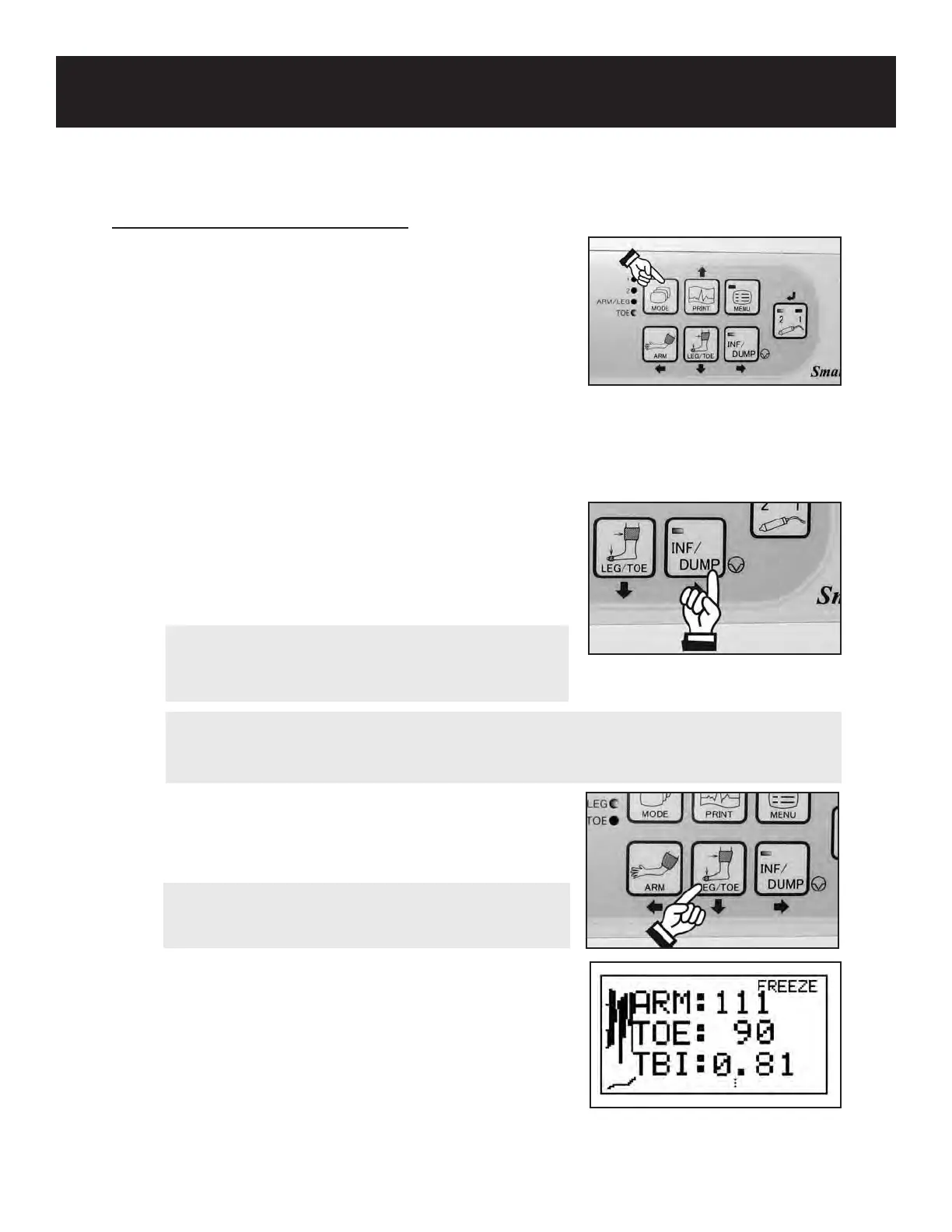
PPG waveform, press the MODE button to select Toe
pressure mode (the TOE LED will be lit).
2. Connect one end of the tubing to the toe cu and the
other end to the ination inlet on the front of the unit.
3. Watch the LCD and wait for steady cyclic waveform
motion to appear.
When the waveform becomes stable and the INF/
DUMP LED begins to blink, press the INF/DUMP
or probe button to activate the automatic cu
inator. The Smartdop
®
30EX will automatically
inate the cu past the point of pressure cessation,
then slowly deate the cu until waveform motion
returns.
4. Press the LEG/TOE button to store the toe
pressure. The Smartdop
®
30EX will automatically
calculate the TBI and display the results.
5. If you would like to save the data in memory, see
5-3-8 “MEMORY - STORE” for details.
NOTE
If the waveform is not steady or absent, check the sensor for good contact, the limb for
possible vasoconstriction, and the pulse for ectopic beats.
4. PPG TOE PRESSURES & TOE BRACHIAL INDEX (TBI) (Cont.)
59
NOTE
Make sure the face of the PPG sensor is clean and
free of stains. Clean if necessary.
NOTE
Pressing the ARM or LEG/TOE button longer than 2
seconds will clear the pressure memory.



 To Next Page