164
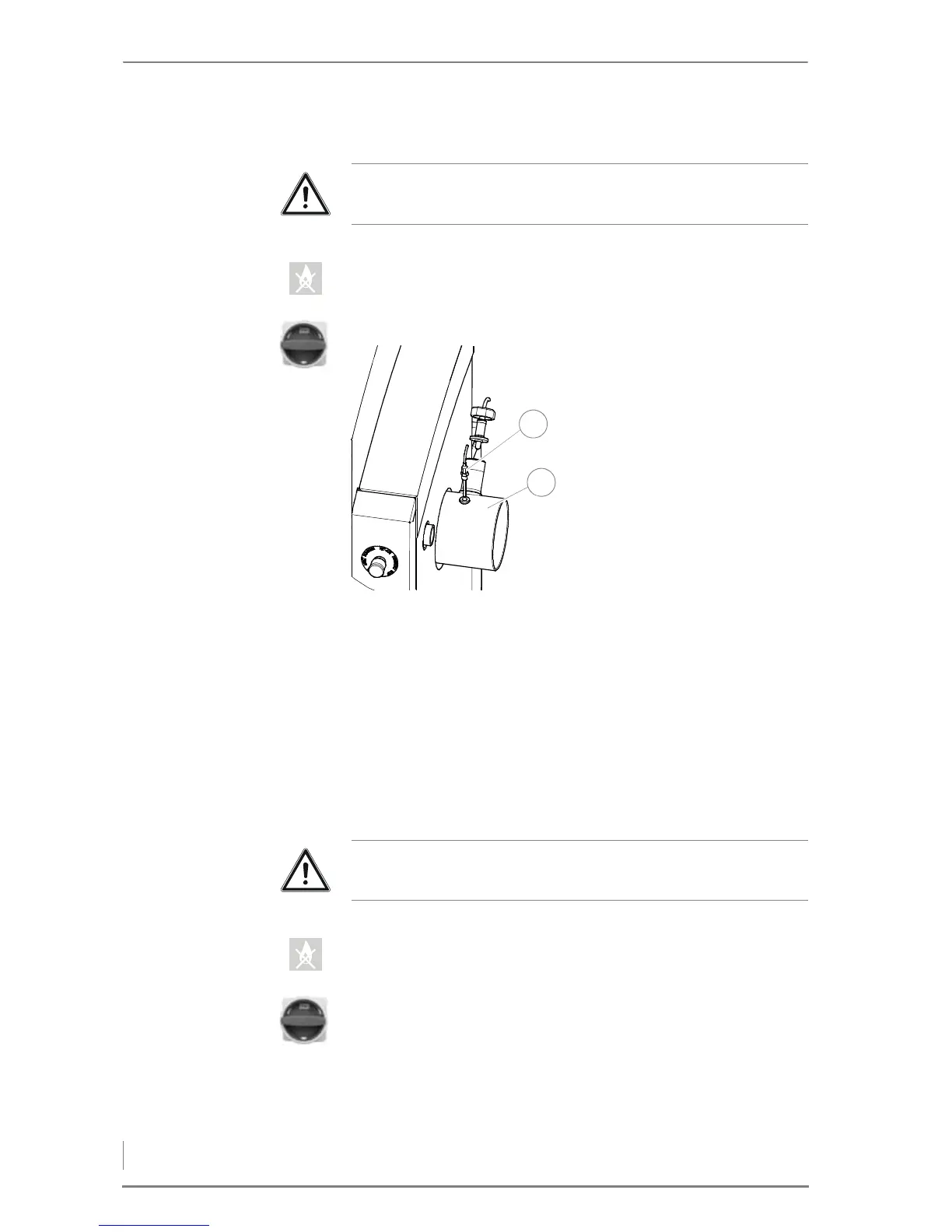
CLEANING THE FLUE GAS TEMPERATURE SENSOR
1. Set the control to the operating mode OFF.
✓ The OFF symbol lights up.
2. Allow the fire in the heating system to burn out and cool down.
3. Turn the main switch off.
7. Carefully mount the flue gas temperature sensor in the reverse se-
quence.
8. Switch the heating system on again.
✎ See the chapter entitled “6 Using the heating system”, section
“6.2 Switching on the heating system”.
✓ The cleaning of the flue gas temperature sensor is completed.
CHECKING AND LUBRICATING THE FILL LEVEL INDICATOR
1. Set the control to the operating mode OFF.
✓ The OFF symbol lights up.
2. Allow the fire in the heating system to burn out and cool down.
3. Turn the main switch off.
4. Open the front door.
Important!
✎ See “Generally applicable safety instructions” in this section.
4. Release the flue gas tempera-
ture sensor (1) using a 13 mm
spanner.
5. Pull the sensor (1) out of the
flue pipe (2).
6. Clean the sensor (1) with a
moist cloth.
Figure 7/21 - Cleaning the flue gas temperature sensor



 To Next Page