Step 1: In the main menu, choose " →Smart Event" to enter Smart
Event setting interface.
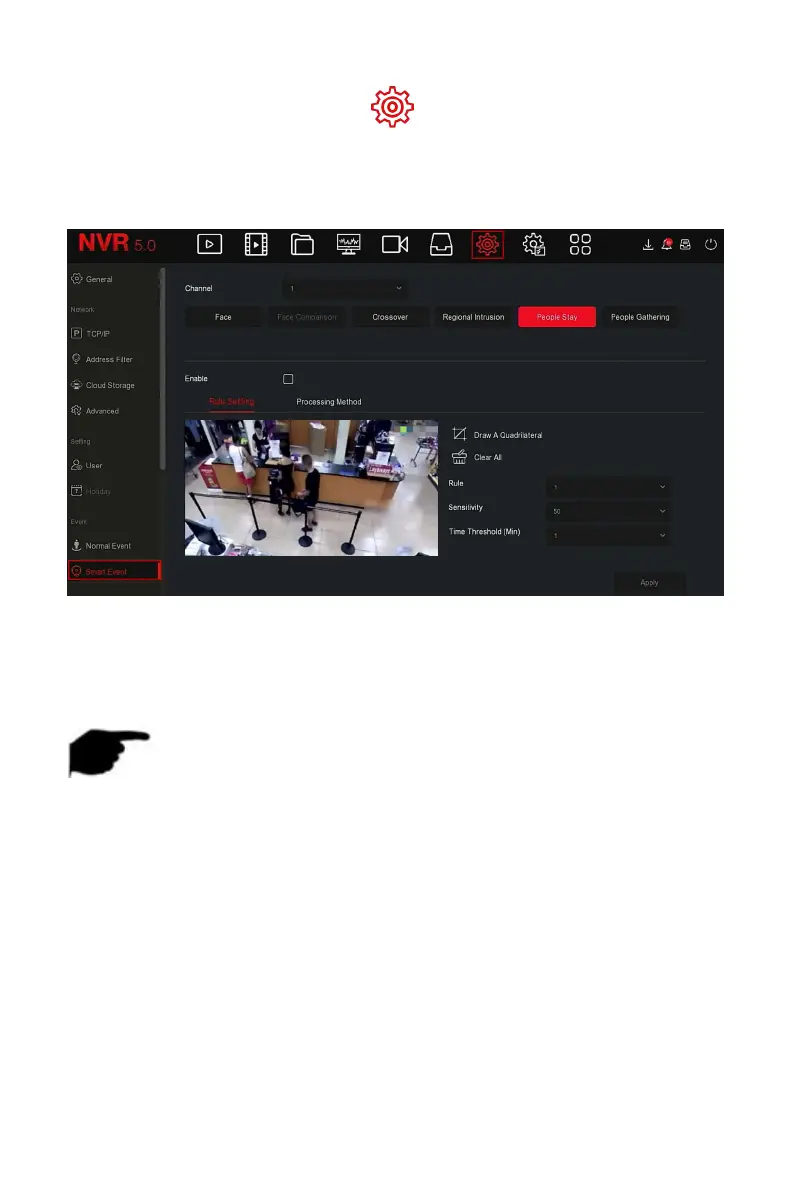
Steps 2: Choose the channel you need to set the loitering, click "People Stay"
to enter loitering setting mode, as shown in Figure 5-70
○
1
below.
Figure 5-70
○
1
Steps 3: Click "Enable→Rule Setting",, to set the rule of loitering, the specific
steps are shown as below:
1. In the "Rules" drop-down list, select any rule as you need.
NOTE
1. Loitering can set 4 rules, you can choose any rule.
2.Set the Time Threshold (Seconds) and sensitivity of the rule.
Sensitivity: It is used to set the size of the control target object. The
higher the sensitivity, the easier the object is judged to be the target
object. The lower the sensitivity, the larger the object will be judged as
the target object. The sensitivity can be set in the range of 0-100.
Time Threshold (Min): An alarm is generated after the target enters the
warning zone for a continuous dwell time. If the time threshold is set to
5 seconds, the target intrusion zone is triggered for 5 seconds. The
range is 1-10 (seconds).



 To Next Page