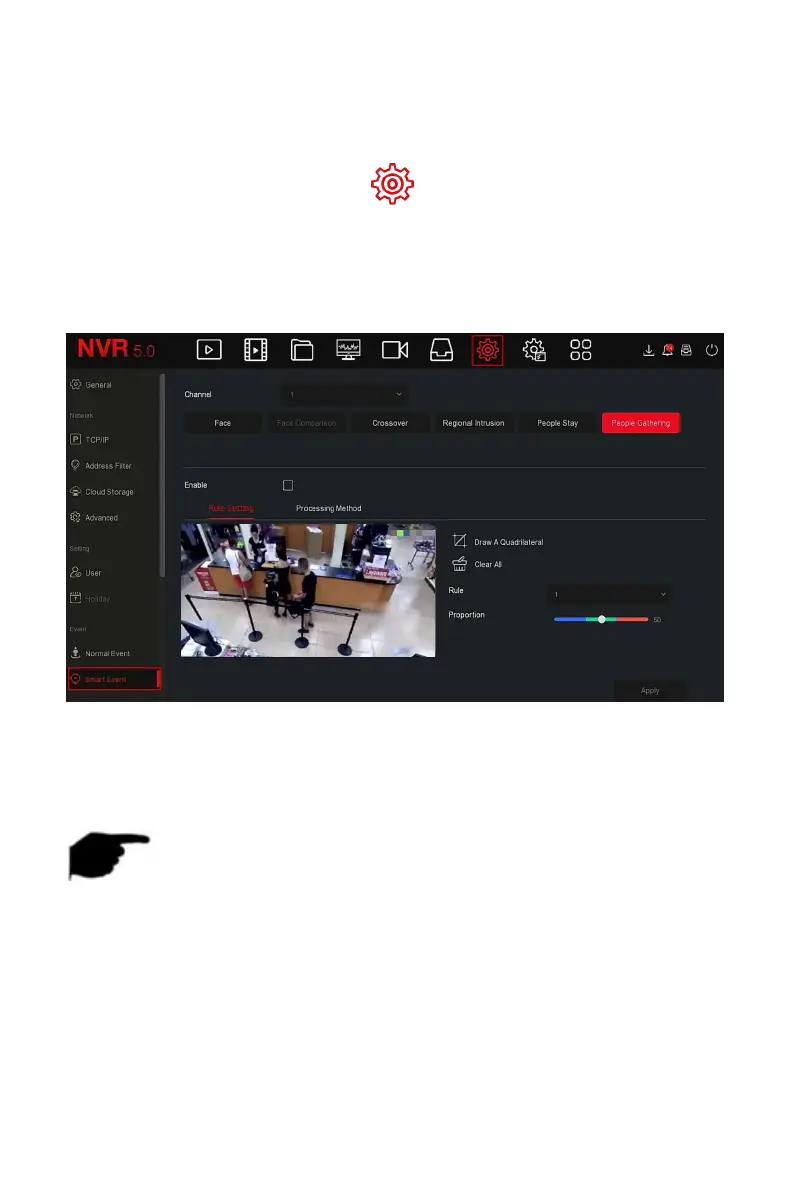
The people gathering function can detect the density of the human body in
the set area, if it exceeds the set threshold, it will trigger an alarm linkage
The specific operation steps are as follows:
Step 1: In the main menu, choose " →Smart Event" to enter Smart
Event setting interface.
Steps 2: Choose the channel you need to set the people gathering, click "
people gathering " to enter people gathering setting mode, as shown in
Figure 5-71
○
1 below.
Figure 5-71
○
1
Steps 3: Click "Enable→Rule Setting",, to set the rule of people gathering, the
specific steps are shown as below:
1. In the "Rules" drop-down list, select any rule as you need.
NOTE
People gathering can set 4 rules, you can choose any rule.
2.Set the proportion of rules.
Proportion: Represents the proportion of personnel in the entire
warning area, when the proportion of personnel exceeds the set
proportion value, the system alarm is triggered, otherwise the system
does not alarm.



 To Next Page