When you upgrade multiple IP devices, you can only select the same IP
device. During the upgrade, all IP devices cannot be powered off.
Otherwise, the upgrade fails or the device cannot start.
5.3.5.2 POE
POE is used to view and set the power supply of each POE channel of NVR.It
consists of PoE Power Configuration and PoE Bonding Configuration.
PoE Power Configuration
The specific operation steps are as follows:
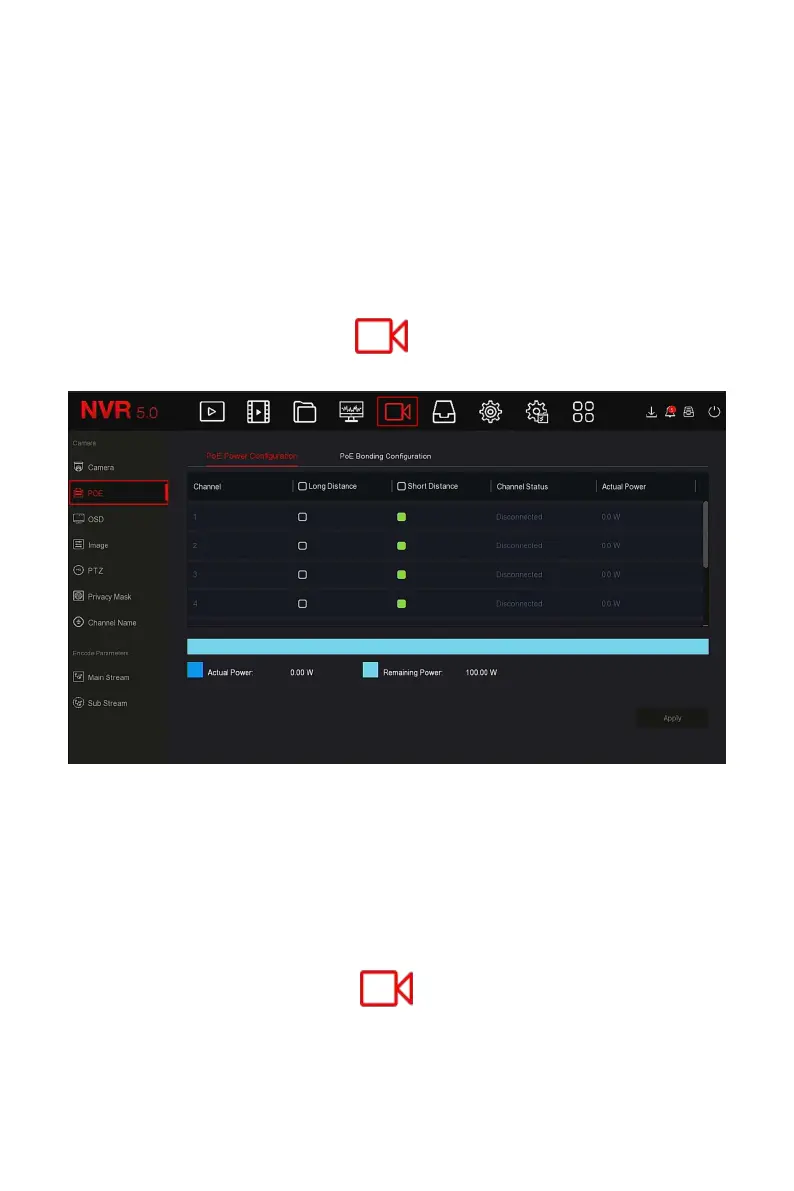
Step 1: In the main menu, click " →POE→PoE Power Configuration" to
enter PoE Power Configuration interface, as shown in Figure 5-30 below.
Figure 5-30
Steps 2: Check the connection status and power usage of each port of POE,
and choose "long distance" or "short distance" according to the actual
connection distance.
Steps 3: Click "Apply" to save the setting.
PoE Bonding Configuration
The specific operation steps are as follows:
Step 1: In the main menu, click " →POE→PoE Bonding Configuration"
to enter PoE Bonding Configuration interface, as shown in Figure 5-31 below.



 To Next Page