OPERATOR'S STATION
1-29
COOLING OPERATION
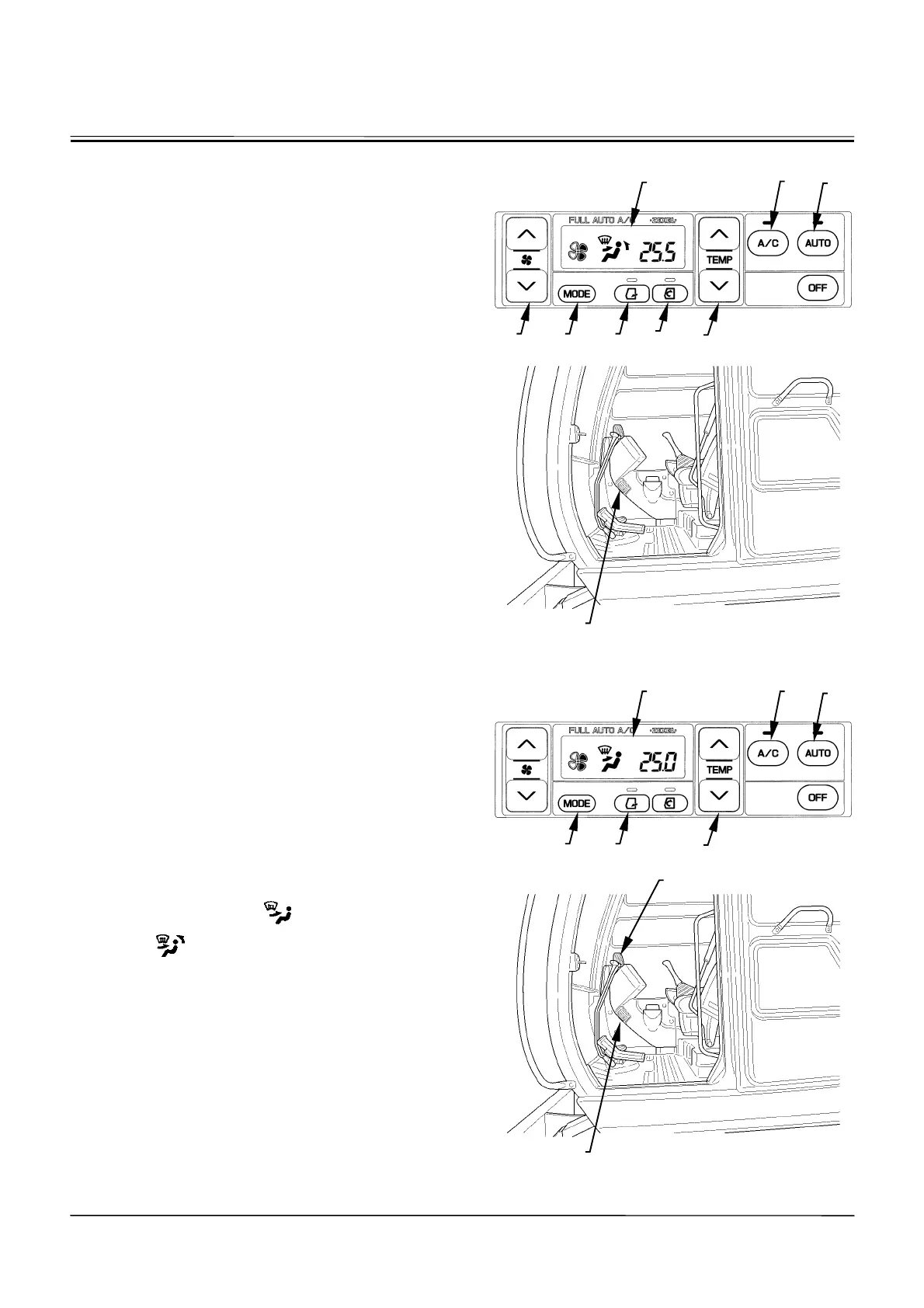
1. Press AUTO Switch (9)
The AUTO and the A/C indicators come ON. Then,
the air temperature at the vent, blower speed, vent
locations, and air suction ports are automatically con-
trolled by the air conditioner amplifier according to
signals sent from various sensors.
2. Operate Temperature Control Switch (11).
Set temperature control switch (11) so that
ª
25.0
¼
is
indicated on LCD (7). Control air temperature inside
the cab using this switch as necessary.
3. As Necessary:
•
Operate MODE switch (14) to manually select the air
vent.
•
Operate blower switch (6) to manually control the
blower speed.
•
Operate fresh air mode switch (13) to maintain the air
vent in the fresh air circulation mode.
•
Operate circulation mode switch (12) to maintain the
air suction port in the circulation mode.
In case the front window (lower) becomes clouded, manu-
ally close the defroster vent (3).
DEFROSTER OPERATION
1. Press AUTO Switch (9). Temperature-controlled air
blows out. During cold weather season when starting
the engine, the engine coolant temperature and air
temperature in the cab are low. Then, cool air is re-
stricted not to flow in the cab to the minimum (LO) by
the Heater Start-Operation Control System.
2. Set temperature control switch (11) so that
ª
25.0
¼
is
indicated on LCD (7). Set fresh air vent switch (13) in
the fresh air circulation mode.
3. Select the front vents
or the front and rear
vents
using MODE switch (14).
Control air flow direction by adjusting the louvers at the
front vent (1) and the defroster vent (3).
Control air temperature in the cab by operating tempera-
ture control switch (11). If the windowpanes become
clouded in rainy season or when dehumidifying, turn the
indicator of A/C switch (8) ON.
M178-01-075
M1CC-01-017
M178-01-074
M1CC-01-017
9
13
12
11
14 6
8
3
3
1
9
13
11
14
8
7
7



 To Next Page