OPERATOR'S STATION
1-28
x
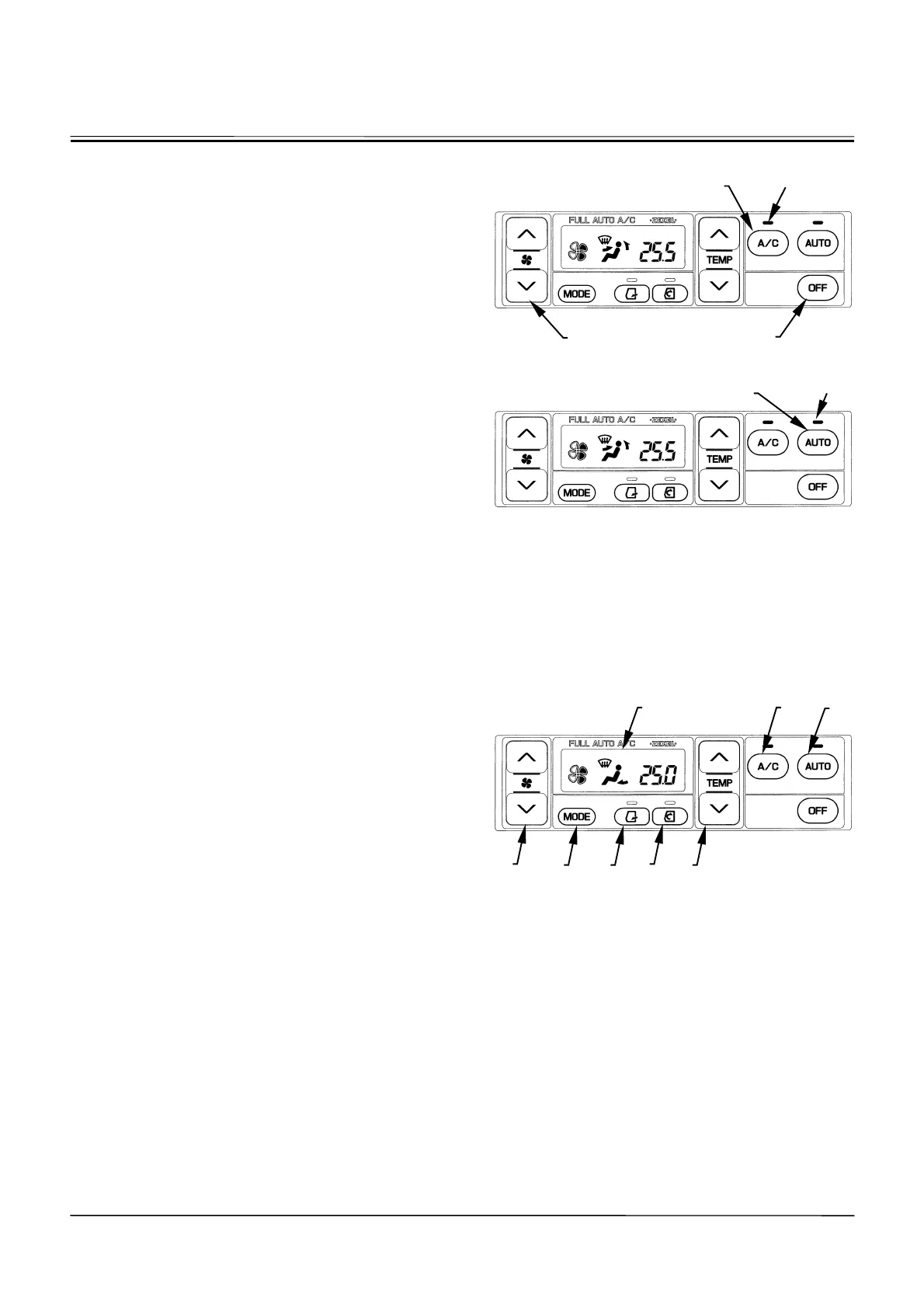
Air Conditioner (A/C) Switch (8)
Press A/C switch (8) to turn the cooler and the A/C indi-
cator ON. However, unless the blower is running (the fan
display of blower switch (6) is lit), the cooler will not be
turned ON.
x
OFF Switch (10)
Press OFF switch (10) to turn the blower and the air
conditioner OFF.
x
AUTO Switch (9)
Press AUTO switch (9) to turn the AUTO and the A/C
indicators ON so that the air flow-in temperature at the
vent, blower speed, vent locations, and fresh air suction
port are automatically controlled.
CAB HEATER OPERATION
1. Operate the AUTO switch.
According to signals sent from various sensors, the
air conditioner amplifier automatically selects the air
flow-in vents, air suction ports, and air flow-in tem-
perature at the vent, and controls the blower speed.
2. Operate Temperature Control Switch (11).
Set temperature control switch (11) so that
ª
25.0
¼
is
indicated on LCD (7). Control air temperature inside
cab using this switch as necessary.
3. As Necessary:
•
Operate MODE switch (14) to manually select the air
vent.
•
Operate blower switch (6) to manually control the
blower speed.
•
Operate fresh air mode switch (13) to maintain the air
vent in the fresh air circulation mode.
•
Operate circulation mode switch (12) to maintain the
air suction port in the circulation mode.
When the A/C indicator is ON, the air conditioner functions
dehumidifier. Press A/C switch (8) to turn OFF the dehu-
midifier function.
M178-01-075
Display when Air Conditioner Switch (8) is pressed:
M178-01-075
Display when AUTO Switch (9) is pressed:
M178-01-079
8
9
AUTO Indicator
A/C Indicator
10
6
8
9
11
12
13 14
6
7



 To Next Page