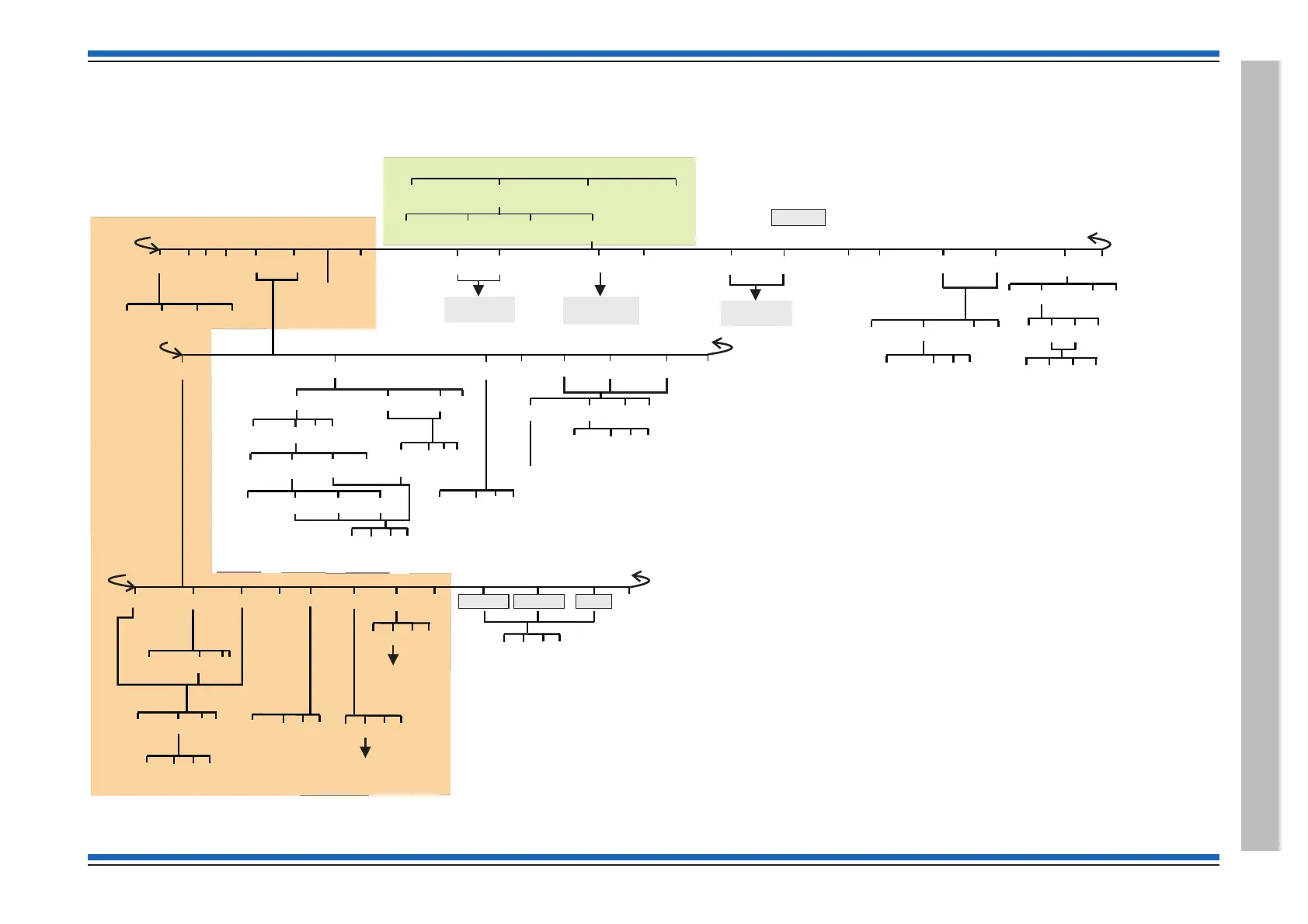
[Control]
[Set Up]
[Info]
[Test/Eng]
<etc>
[UserCode]
[Protect]
[Remove]
[Backup]
[Recover]
<etc>
<etc>
[SetClock]
[Next] [Retard] [Advance] [Enter]
[Assign]
[Modify]
[Enter]
<etc>
[Set Up]
{}
[Label]
{}
Params
1-128
[MCP]
~
[IO Line]
~
[Device]
<etc>
[Zone]
~
[Local]
<etc>
[Loop]
[Device]
~
Params
1-8
{}
Params
1-207
{}
Params
1-4
[Deaction]
[C]
[Q]
[E]
[En]
[Dis]
<etc>
Enter Label
[Period]
~
[Signal 1]
~
[Signal 2]
~
[Signal 3]
~
<etc> <etc>
[C] [Q]
[E]
{}
Params
0-15
[C] [Q]
[E]
[Sounder] [Output]
Enter upto 8 FAB/SAB pairs
[Action]
See Set up
menu map 3
See Setup
menu map 2-1
[Sound]
~
[Signal1]
[Loop]
[Action]
[Sector]
{}
Params
1-32
{}
Params
1-8
[MAlarm] [Buzzer]
[NoAction]
[Signal2] [Signal3]
[C] [Q]
[E]
[Disable]
/[Enable]
{}
Params
1-2s
[C] [Q]
[E]
[C] [Q]
[E]
[C] [Q]
[E]
[NoAction]
BS Vigilon with MCC at V3.97 or higherControl panel
[ ] Menu map 1Set Up
# [Save]
[Custom]
Enter Label
[C] [Q]
[E]
[NVM Card]
[C]
[Q]
[E]
[NVM Card]
See Setup
menu map 2-2
[Man Fire]
<etc>
[MCP];[Auto Fire]
[C] [Q]
[E]
Access level 2b
Menus accessible with panel door open and AL2 password
Access level 2b
Menus accessible with panel door open and AL3 password
Access level 3
No menus are accessible at AL1
Access level 1
Menus accessible with panel door open
Access level 2a
Access level 3
Access level 2a
[Option]
These options will only be displayed with Freeblocks
switched On, see Test Engineering
~ - These menu options are not applicable at a Network node.
Key
[E] = [Enter]
[C] = [Cancel]
[Q] = [Quit]
{}
Params
0-15
# - The [Save] option will only appear under the customer password at
(access level 2), which is used to save changes to labels and clock settings.


 To Next Page
 Loading...