4188-856_issue 7_07/15_Generic Vigilon (Compact + VA) Comms. 149
Vigilon 4/6 loops & Compact (VA) panels & network nodes
Appendix C - Guidelines for standalone system commands
Time slots and Time blocks
Time slots
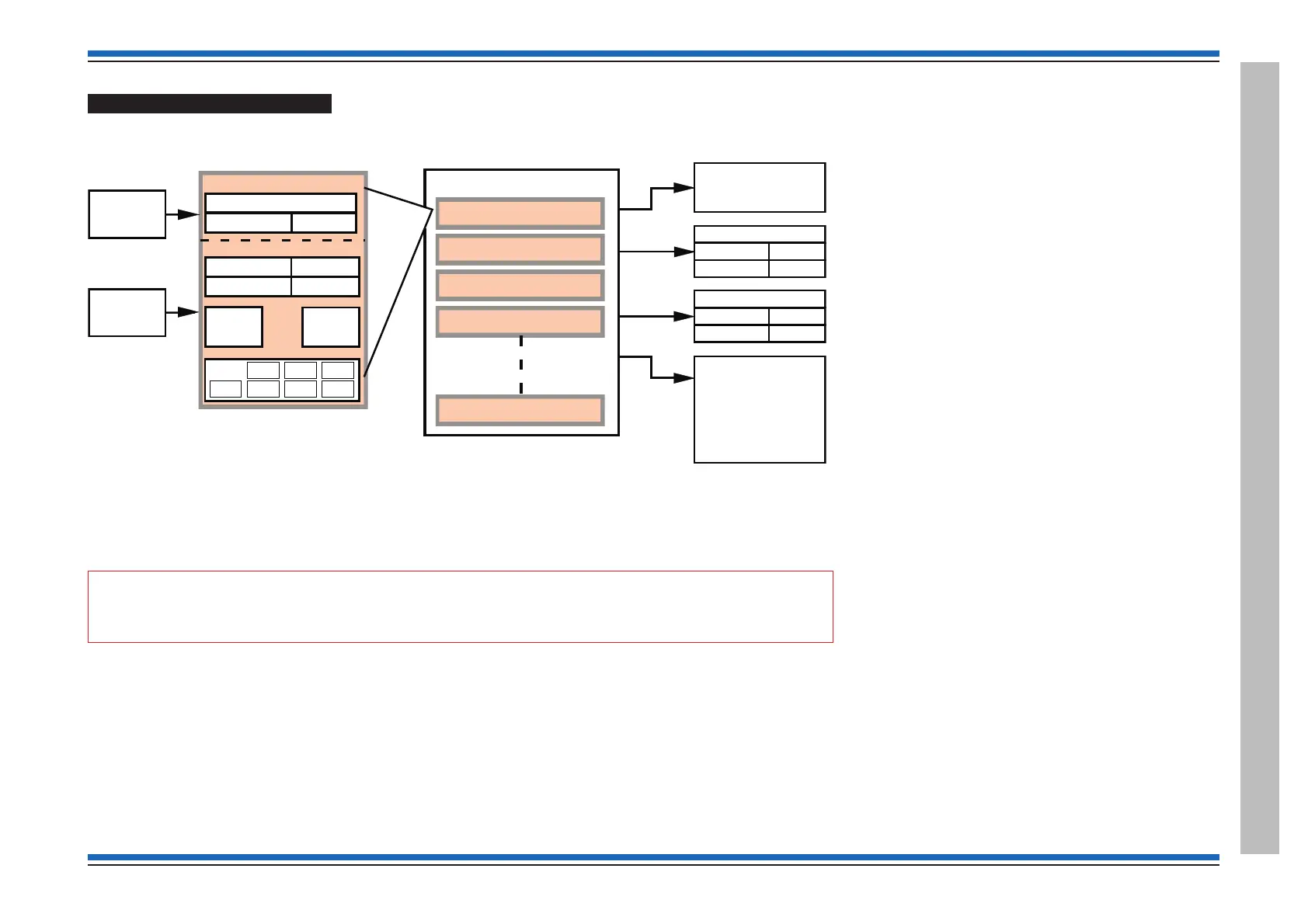
A Time slot must be linked with a Time block. It is the Time block that perform actions on the system.
"
Timeslots do not process when the panel is in a fire condition.
¨
a Time slot can be:
•
triggered automatically
•
switched ON / OFF manually
•
or switched ON / OFF by Command build
¨
it performs an action immediately or after a delay of 0 to 24 hours.
¨
There can be up to 16 Time slots per panel
¨
each Time slot has to be given an Enable time and a
Disable time
¨
each Time slot must be ANDed / ORed to the days of
week, (Mon, Tue, Wed, Thu, Fri, Sat, Sun).
¨
when a Time slot is ANDed with selected days, it will
only operate on the selected days
¨
when a Time slot is ORed with selected days, it will be
Enabled during selected times and will remain ON
throughout the days selected.
Time blocks
A Time block is used to perform periodic enable disable action on
the system.
¨
There are0-15Time blocks per panel
¨ the Time block 0 is always in the Enable state and is the
default for all sensors
¨
a Time block can be linked to one or more Time slots
¨
when a Time slot is enabled the time block it is linked to
is also Enabled
¨
a sensor or interface input can only be assigned to one
Time block
¨
when a Time block is in an Enable state:
•
any sensor(s) linked to it will operate in the Enable
state that has been set up
•
any Command build linked to it is triggered.
¨
when a Time block is in a Disabled state any Zone tasks
linked to it are also Disabled.
COMMAND
BUILD
ENABLE TIME
DISABLE TIME
08:00
17:00
TIMESLOT 1
ACTION
DAYS
:
MON
TUE WED
THU FRI SAT SUN
AND
(BOTH)
OR
(EITHER)
DELAYED BY
0 - 24 hrs
TIME
DAYS SETUP
AND/OR
TIMEBLOCK 1
TIMESLOT 1
TIMESLOT 2
TIMESLOT 3
TIMESLOT 4
TIMESLOT 16
SETUP
ENABLE STATE
DISABLE STATE
0
15
DEVICE NO. = "X"
SETUP
ENABLE STATE
DISABLE STATE
8
13
DEVICE NO. = "X"
SETUP
TRIGGER
MAXIMUM OF 16 PER PANEL
MAXIMUM OF 15 PER PANEL
ENABLE / DISABLE TIMESLOT
COMMAND BUILD NO. "Y"
SETUP
Zone
NOTE: A Timeblock may contain any multiple Timeslots.
A Timeslot may be linked to any number of Timeblocks.
The default is for all the devices to be in Time block 0.
A Timeblock is enabled if any one of the Timeslots within
it is in the enable state.
A COMMAND BUILD LINKED
TO A TIMEBLOCK WILL BE
TRIGGERED WHEN THE
TIMEBLOCK IS ENABLED
AND REVERSED WHEN THE
TIMEBLOCK IS DISABLED.


 To Next Page
 Loading...