*
See Control
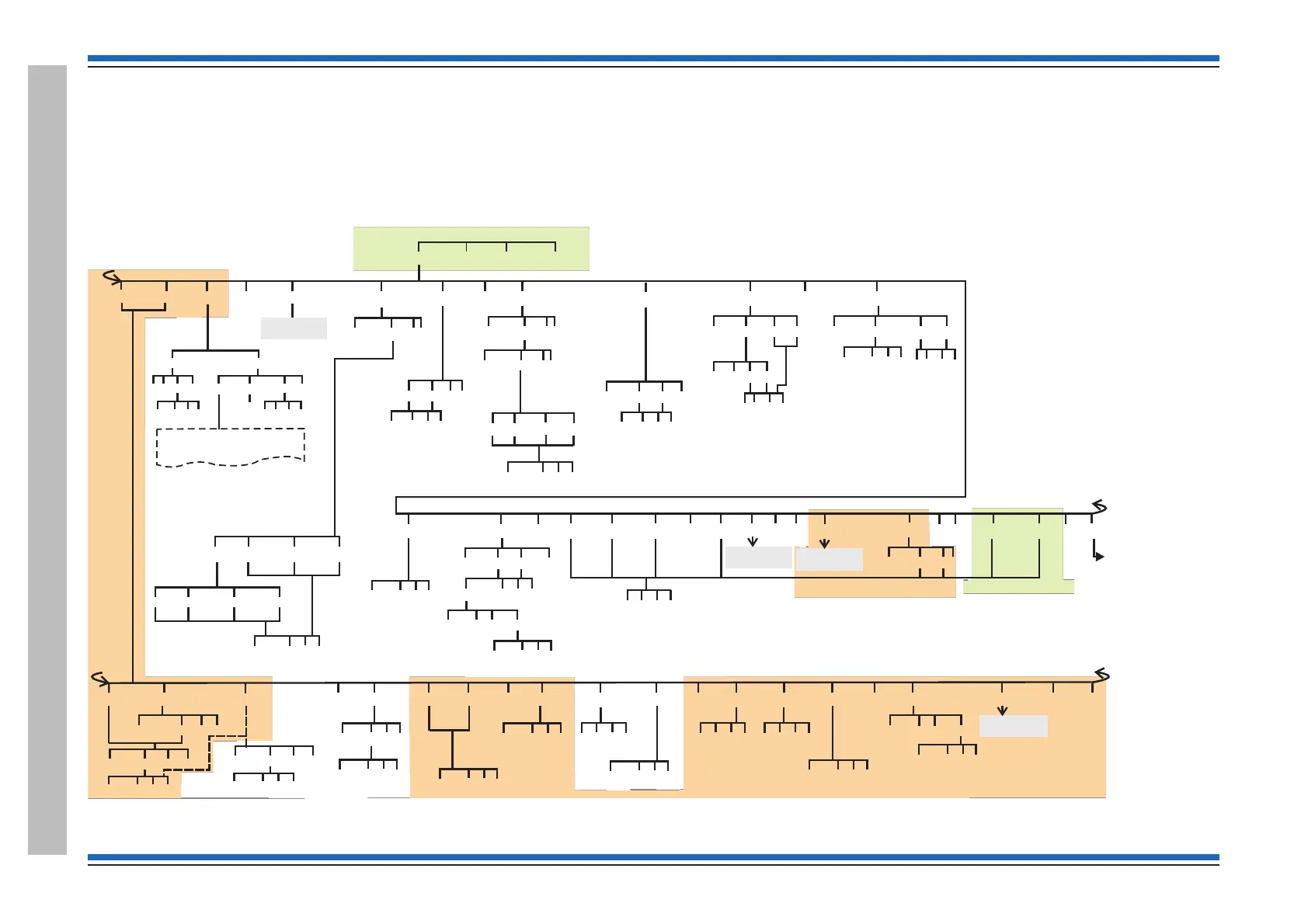
menu map 2-2
Access level 2b
Access level 2a
[Control] [Set Up] [ Info ] [ Test/Eng ]
[Enable] [Disable] <etc> [Sector]
~
[MSector] <etc> [Sounder]
~
[Timeslot]
~
[Sound]
<etc>
[Silence] [Reset] <etc>
[StartMA] [StopMA] [UserCode]
Params
{}
[Action]
[Aux Rly]
Params
1-2
{}
[On] [Off]
[E] [C] [Q]
Params
1-207
{}
[Loop]
Params
1-8
{}
[Action]
Params
1-16
{}
[Delay][On]
Params
HH:MM:SS
{}
[On]
[E] [C] [Q]
[Pause] [Build] <etc>
[E] [C] [Q]
Params
0-30sec
{}
Params
1-255
{}
[On] [Off]
[E] [C] [Domain]
Params
1-255
{}
[E] [C] [Q]
[Sig1]
[Off]
[Sig2] [Sig3]
[Off]
[Off]
[Node]
[E] [C] [Q]
[E] [C] [Q]
EN Vigilon with MCC/MCB
V4.53 or higher
[ ] Menu map 1
Control panel
Control
at
Key
[E] = [Enter]
[C] = [Cancel]
[Q] = [Quit]
[Verify] <etc>
if off
if on
[On]
[Q]
[E] [C] [Q]
[Test] [Q][Paper Fd] [Off]
8Line
feeds
[E] [C] [Q]
****** PRINTER TEST ******
!"#$%&'()*+,-./0123456789:;<=>?@ABCDEFGH
IJKLMNOPQRSRUVWXYZ[=]^-`abcdefghijklmnop
qrstuvwxyz{|}
[Printer]
[DelayBlk]
~
Params
1-16
{}
[Delayed]
[E] [C] [Q]
Params
MM:SS
0-10min
{}
[End]
[E] [C] [Q]
[Stop]
[Audio]
~
See Control
menu map 2-4
#
# - The ‘Print’ option will only appear if a
printer is connected to the panel.
[Signal1]
[Off]
[Signal2] [Signal3]
[E] [C] [Q]
[Signal1]
[All]
[Signal2] [Signal3]
[E] [C] [Q]
Params
1-255
{}
See Control
menu map 2-1
~ - These menu options are not applicable for a Network node.
Menus accessible with panel door open and AL2 password
Access level 2b
Menus accessible with panel door open and AL3 password
Access level 3
No menus are accessible at AL1
Access level 1
Menus accessible with panel door open
Access level 2a
Access level 2a
1-255
Access level 3
[Sensing]
~
[IO Line]
~
<etc> [Sector]
~
[Zone]
~
[Group]
~
Params
1-4
{}
[Device]
Params
1-128
{}
[E] [C] [Q]
<etc> <etc>
Params
0-15
{}
[E] [C] [Port]
<etc>
Params
1-8
{}
[E] [C] [Q]
{}
Params
1-207
[Loop]
[FARE]
Params
1-2
{}
[E] [C] [Q]
Params
0-3
{}
[E] [C] [Q]
[Build]
Params
1-255
{}
[E] [C] [Q]
Params
1-32
{}
[E] [C] [Q]
Params
1-8
{}
[E] [C] [Q]
[MAlarm]
[E] [C] [Q]
[MSector]
~
Params
1-255
{}
[E] [C] [Q]
[Audio]
~
See Control
menu map 2-3
[Sounders]
~
*
Access level 2b
Params
1-8
{}
[E] [C] [Q]
{}
Params
1-207
[Loop]
[FARE]
[Off] [On]
[E] [C] [Q]
- These menu options will appear on
a Vigilon Compact VA panel only.
[Digital]
~
[Voice]
~
<etc>
<etc>
[AuxRly][FPE]
[E] [C] [Q] [E] [C] [Q]
[Comms]
*
#
#
- This menu option will appear on a Vigilon panel
when a D1 system is connected.
Params
1-263
{}
[On] [Off]


 To Next Page
 Loading...