Bezels
The following procedures cover removal and replacement of the bezel.
Model 6E1
Removal
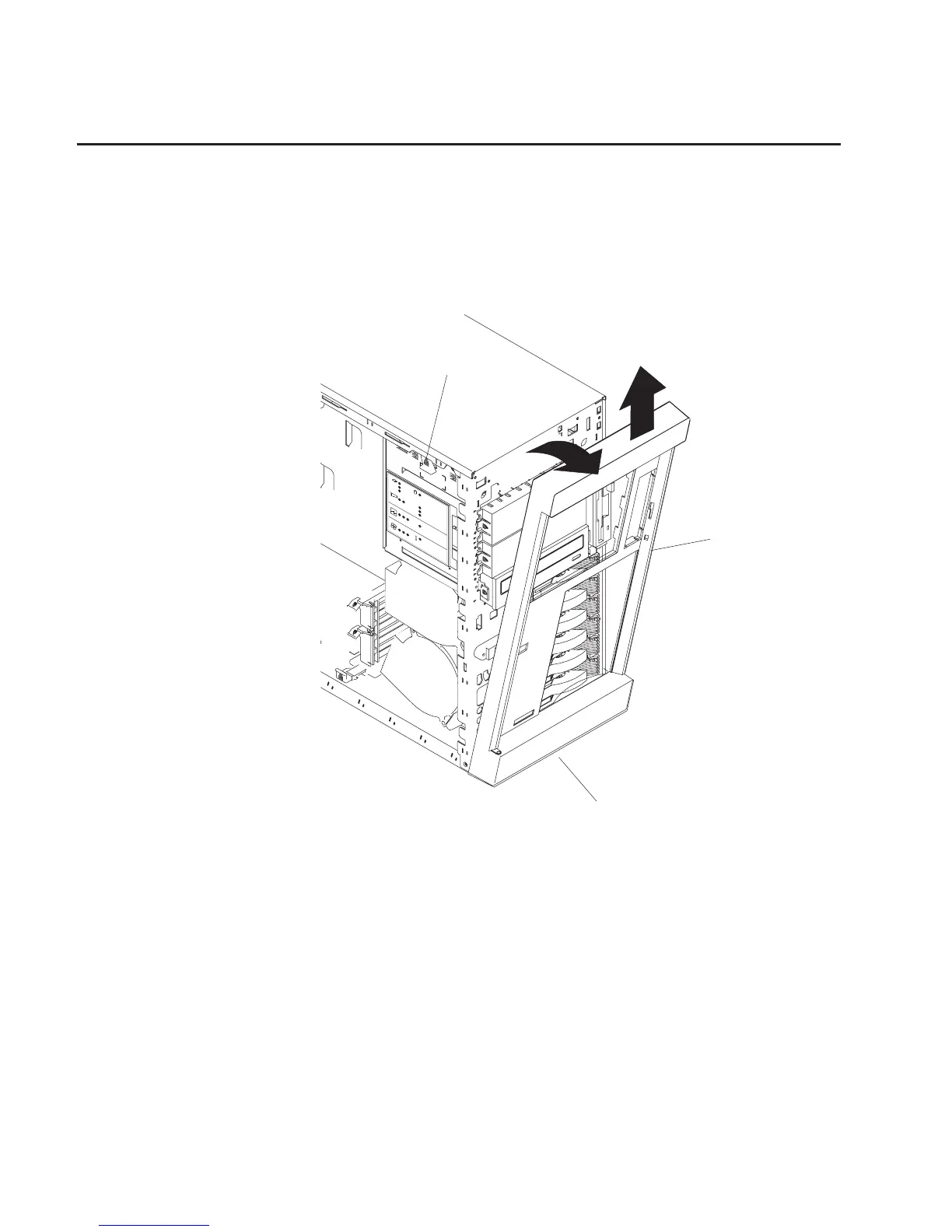
Refer to the following illustrations while you perform the steps in this procedure.
CPU
VRM
MEMOR
Y
HDD
PCI B
US
NMI
SMI
SER
VICE PR
OCESSOR
B
US
NON REDUND
ANT
PO
WER SUPPL
Y
1 2 3
A B
1 2 3
F
AN
TEMPERA
TURE
2
3
1
2
3
1 Bezel-release lever
2 Bezel
3 Side with bezel tabs and slots
To remove the bezel:
1. Remove the service access cover as described in “Covers” on page 258.
2. Move the blue bezel-release lever (1), following the curve of the lever opening.
3. Lift the bezel tabs out of the slots (3), and pull the bezel (2) away from the system
front. Store the bezel in a safe place.
Replacement
Replace in reverse order.
262 Service Guide




 To Next Page