13-2
BASIC MANUAL
13
CONNECTOR INFORMATION
1.5 kΩ
±5%
1.5 kΩ
±5%
2.2 kΩ
±5%
4.7 kΩ
±
5%
1.5 kΩ
±5%
1.5 kΩ
±5%
2.2 kΩ
±5%
4.7 kΩ
±
5%
S5
S6
S7
S8
S1
S2
S3
S4
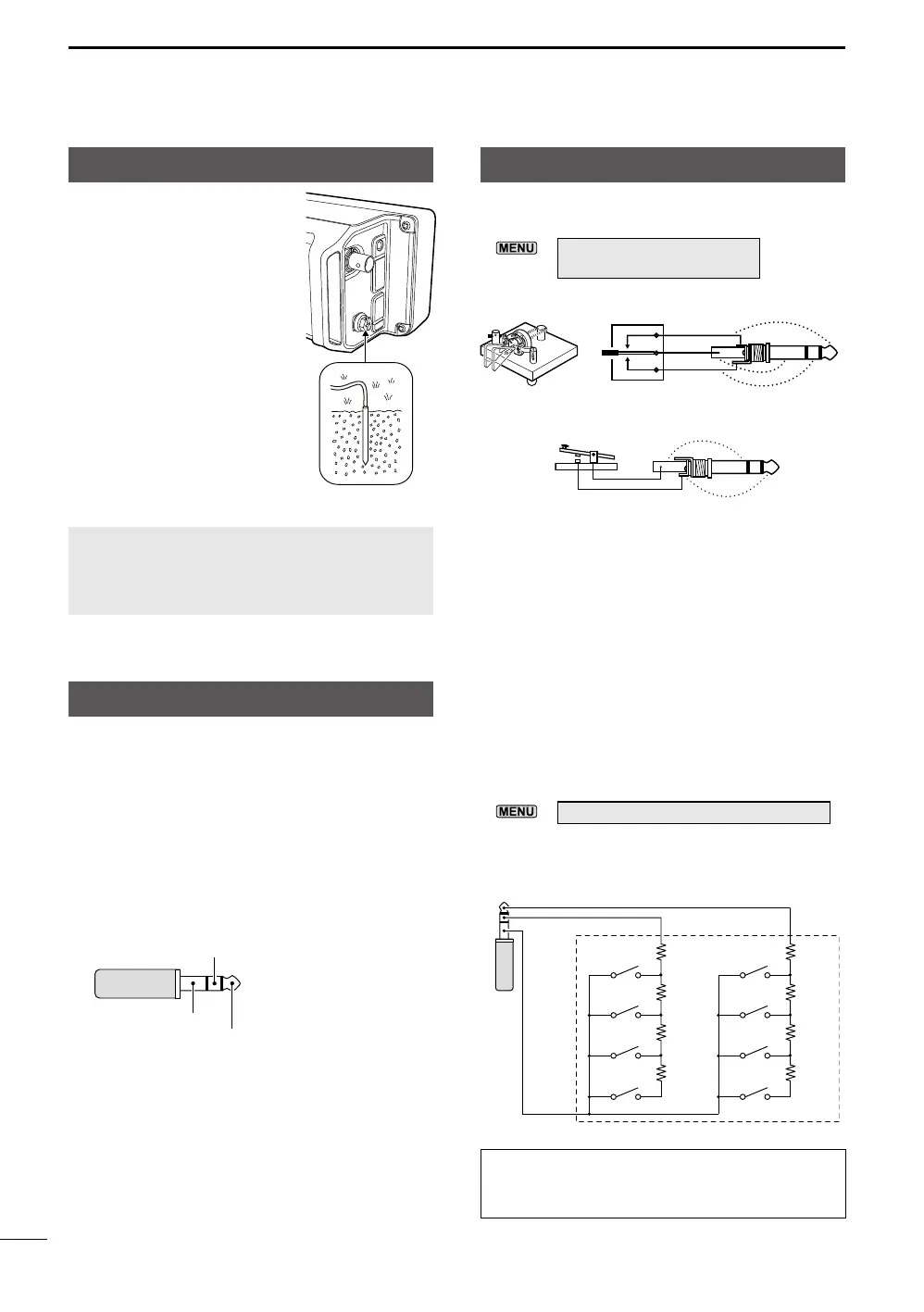
[KEY]
Connect a Paddle key or Straight key.
LYou can select the key type.
»
KEYER > EDIT/SET
> CW-KEY SET > Key Type
• Paddle key
[SEND/ALC]
1 ALC
When operating with a non-Icom linear
amplifier, input ALC voltage (
–4 ~ 0 V) from
the linear amplifier.
2 SEND
To control an external device such as a non-
Icom linear amplifier, the terminal goes low
when the transceiver transmits.
_
3.5 mm (1/8 inch)
• Straight key
3.5 mm (1/8 inch)
dot
com
dash
By connecting an external keypad to [KEY] with
a circuit as shown below, you can send memory
content from one of the 8 memories. You can
send memory content from a CW Keyer Memory
(M1 ~ M8), SSB/AM/FM/DV Voice Memory
(T1 ~ T8), or RTTY Memory (RT1 ~ RT8) to be
transmitted.
z Push a switch to send memory content.
z Hold down the switch for 1 second to
repeatedly send memory content.
LTo use the external keypad, turn ON the following
item.
»
SET > Connectors > External Keypad
LThe external keypad shown below is not supplied
by Icom.
3.5 mm (1/8 inch)
GND
1 ALC
2 SEND (I/O)
External Keypad
TIP: You can alternate between an external
keypad and a Paddle key or Straight key,
when connecting them in parallel.
Grounding
When connecting an external
DC power source, ground the
transceiver using the ground
terminal [GND] on the side
panel to prevent electrical
shock, television interference
(TVI), broadcast interference
(BCI), and other problems.
For best results, connect a
heavy gauge wire or strap to
a long ground rod. Make the
distance between the [GND]
terminal and ground as short
as possible.
RWARNING! NEVER connect the [GND]
terminal to a gas or electric pipe, since the
connection could cause an explosion or
electric shock.





 To Next Page