10
D-STAR OPERATION (BASIC)
10-8
Receiving
When a DV call is received, the call signs of the caller,
the called station, and the called station’s access
repeater are saved in the RX History� Up to 50 calls
can be saved�
Even if you turn OFF the transceiver, the RX History is
retained�
This section describes how to display the RX History
screen and how to save the call sign in Your Call Sign
memory�
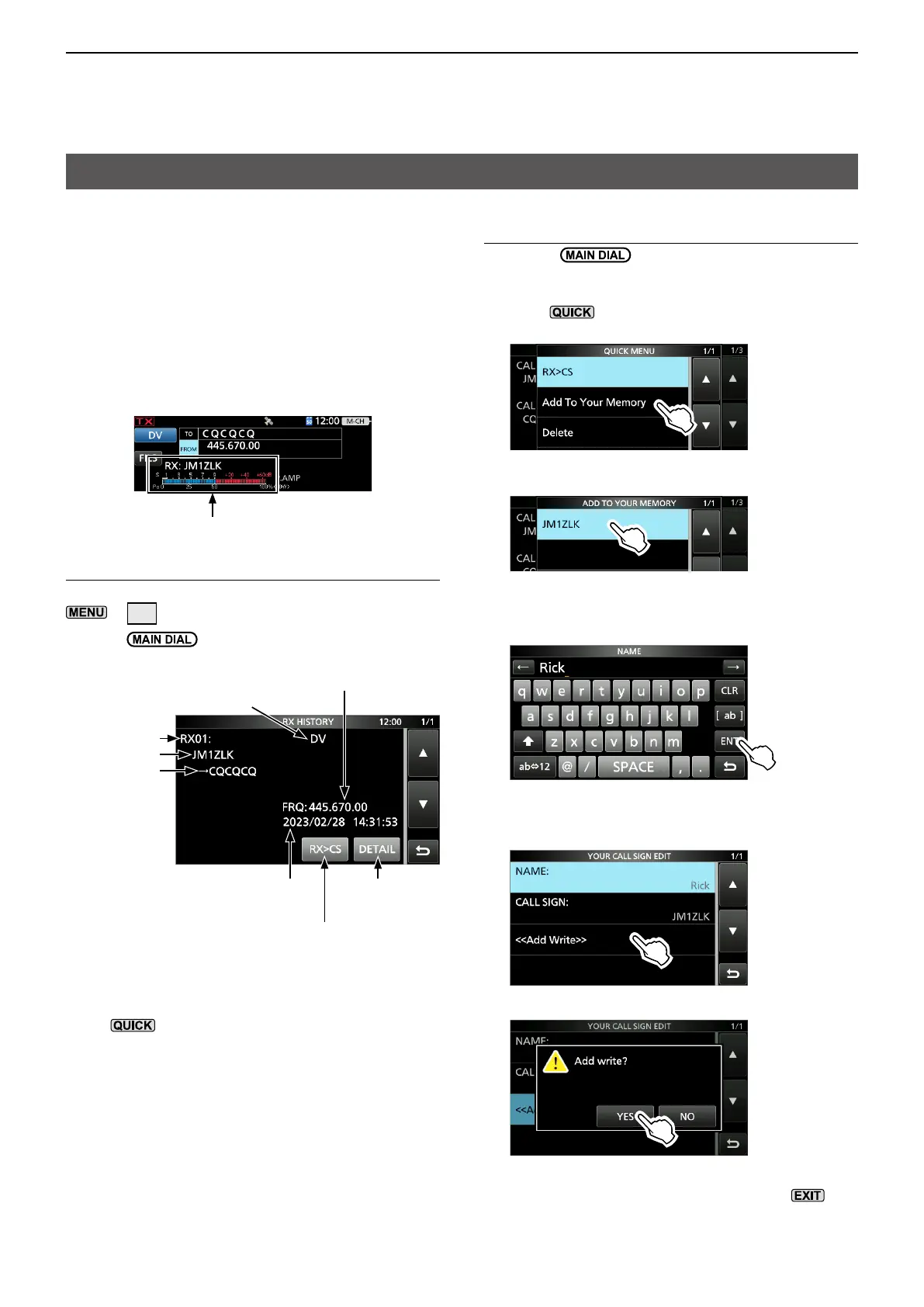
When receiving a call from “JM1ZLK”:
The S-meter and the caller’s call sign are displayed�
Step 1. To display a received call sign
Open the RX HISTORY screen�
»
CD
• Rotate to display other RX history records�
* The caller name is displayed when the name is set in the
“Your Call Sign” list�
Push
to switch between name display and call sign
display�
L “/” and a note may be displayed after the call sign�
L If a call is received from an area, not from a specic
station, “CQCQCQ” is displayed�
Received data and time
Sets the call sign to “TO”
(destination)
Displays
detailed screen
Received repeater name, or frequency
Record number
Caller station*
Called station
Step 2. Save the destination call sign into Your
Call Sign memory from RX History
1� Rotate
to select the RX history record
with the call sign that you want to save to memory�
2� Touch [DETAIL]�
3� Push �
4� Touch “Add To Your Memory�”
5� Touch the call sign that you want to save�
(Example: “JM1ZLK”)
6� Touch “NAME�”
7� Enter a name of up to 16 characters, then touch
[ENT]�
L See “Keyboard entering and editing” in the Basic
manual for details�
8� Touch “<<Add Write>>�”
9� Touch [YES]�
• Returns to the RX HISTORY DETAIL screen�
10� To close the RX HISTORY screen, push
several times�
Operating mode



 To Next Page