3
BASIC OPERATION
1
2
3
4
5
6
7
8
9
10
11
12
13
14
15
16
17
18
19
20
21
3-13-1
L The status or position of each key or dial is stored and
recalled when the power is turned ON.
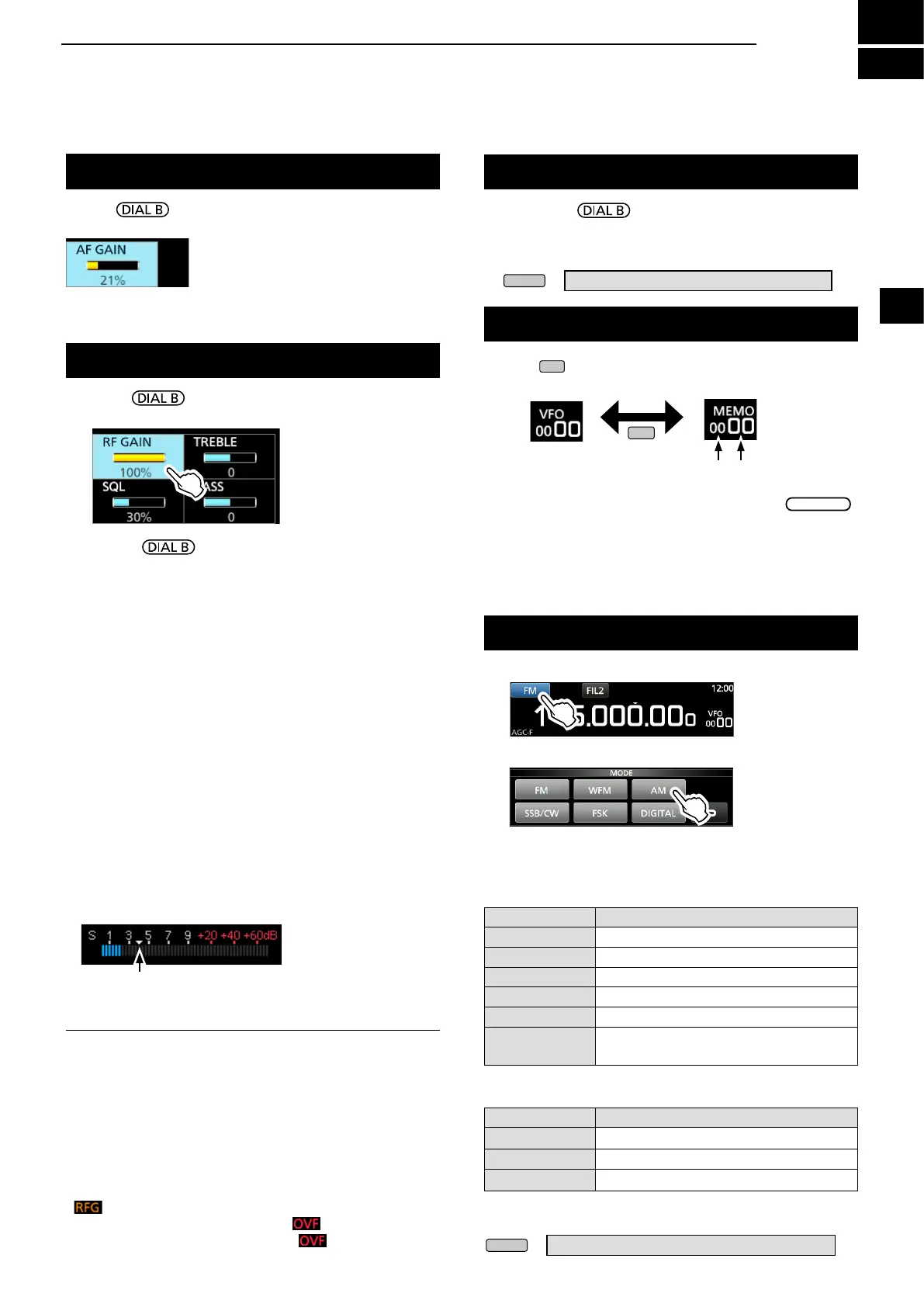
Rotate to adjust the volume level.
• While adjusting, the volume level is indicated in %.
Adjusting the volume level
About the VFO and Memory modes
z Push
to select the VFO or Memory mode.
Selecting the receiving mode
1. Touch the receiving mode icon. (Example: FM)
Mode key Receiving mode
[FM] FM
[WFM] WFM
[AM] AM ↔ S-AM(D)*
[SSB/CW] USB* ↔ CW*
[FSK] FSK*
[DIGITAL]
D-STAR→P25→dPMR→NXDN-
vn
→NXDN-n→DCR→D-STAR
*Touch for 1 second to select other modes. See the table below.
Mode key Receiving mode
[AM]
S-AM(D)→S-AM(U)→S-AM(L)→S-AM(D)
[SSB/CW] CW ↔ CW-R, or USB ↔ LSB
[FSK]
FSK ↔ FSK-R
2. Touch to select the receive mode. (Example: AM)
L When the mode key is touched for 1 second, the
selectable modes differ. See the table below.
• Selectable modes when the mode key is touched
MODE screen
• Selectable modes when the mode is touched for 1 second
RF gain/SQL level/Audio tone
1. Push .
2. Touch an item to select. (Example: RF GAIN)
3. Rotate .
• Settable range RF GAIN (Sensitivity): 0 ~ 100%
SQL (Squelch): 0 ~ 100%
TREBLE (Higher tone): –15 to +15
BASS (Lower tone): –15 to +15
D Noise squelch
The Noise Squelch allows the audio to be heard only while
receiving a signal that includes less noise than a set level.
• Activates when the squelch level is set to between 30%
and 50% in the FM, AM, S-AM or DIGITAL mode.
• A higher level blocks weak signals. A lower level allows
you to hear weak signals including noise.
L While the squelch is closed, the noise audio is muted and
the [RECEIVE] indicator is OFF.
D S-meter squelch
The S-meter Squelch mutes the speaker sounds when the
signal strength is less than the set value.
• Activates when the squelch level is set to between 50% and
100% in any mode.
• The squelch level is indicated by the position of
“▼.”
L
When the received signal is stronger than the S-meter
squelch level designated by the “▼,” the squelch opens.
D RF gain
Normally, set the RF gain to maximum (100%).
• You can adjust the RF gain to decrease the interference or
noise from a nearby strong station.
• indicates that the RF gain is reduced.
L If a strong signal is received and (Overow)
appears, reduce the RF gain until
disappears.
VFO mode
You can set the receive frequency by rotating
or by
directly entering it with the keypad
.
Memory mode
You can
set the receive frequency by
selecting a preset
channel. See Section 8 for details.
z Hold down
to forcibly open the squelch.
• [MONI] appears and [RECEIVE] lights.
L
You can change the function in the digital mode setting on
the MENU screen.
» SET > Digital Set > Digital Monitor
Monitor function
VFO mode Memory mode
Group No. Channel No.
S-meter squelch level
InformationL
When the squelch circuitry activates to emit the audio,
"Squelch opens." When the squelch circuitry mutes the
audio emission, "Squelch closes."
L You can chose the receiving mode icons that appears
when you touch the [DIGITAL] key.
» SET > Digital Set > Digital Mode Select


 To Next Page