10-1
Setting the Time and Date NTP Time Server
NOTE: The backup battery for the internal clock
The IC-R8600 has a rechargeable Lithium battery to
backup the internal clock. If you connect the receiver to
a power source, the battery is charged and it keeps the
correct clock setting. However, if you do not connect the
receiver to a power source for a long period of time, the
battery will discharge. In that case, the receiver resets the
internal clock.
If you do not use the receiver for a long period, we
recommend that you connect the receiver to a power
source at least once a month. The charging period is two
days whether the receiver’s power is ON or OFF.
Manually set date and time without accessing the time
management server.
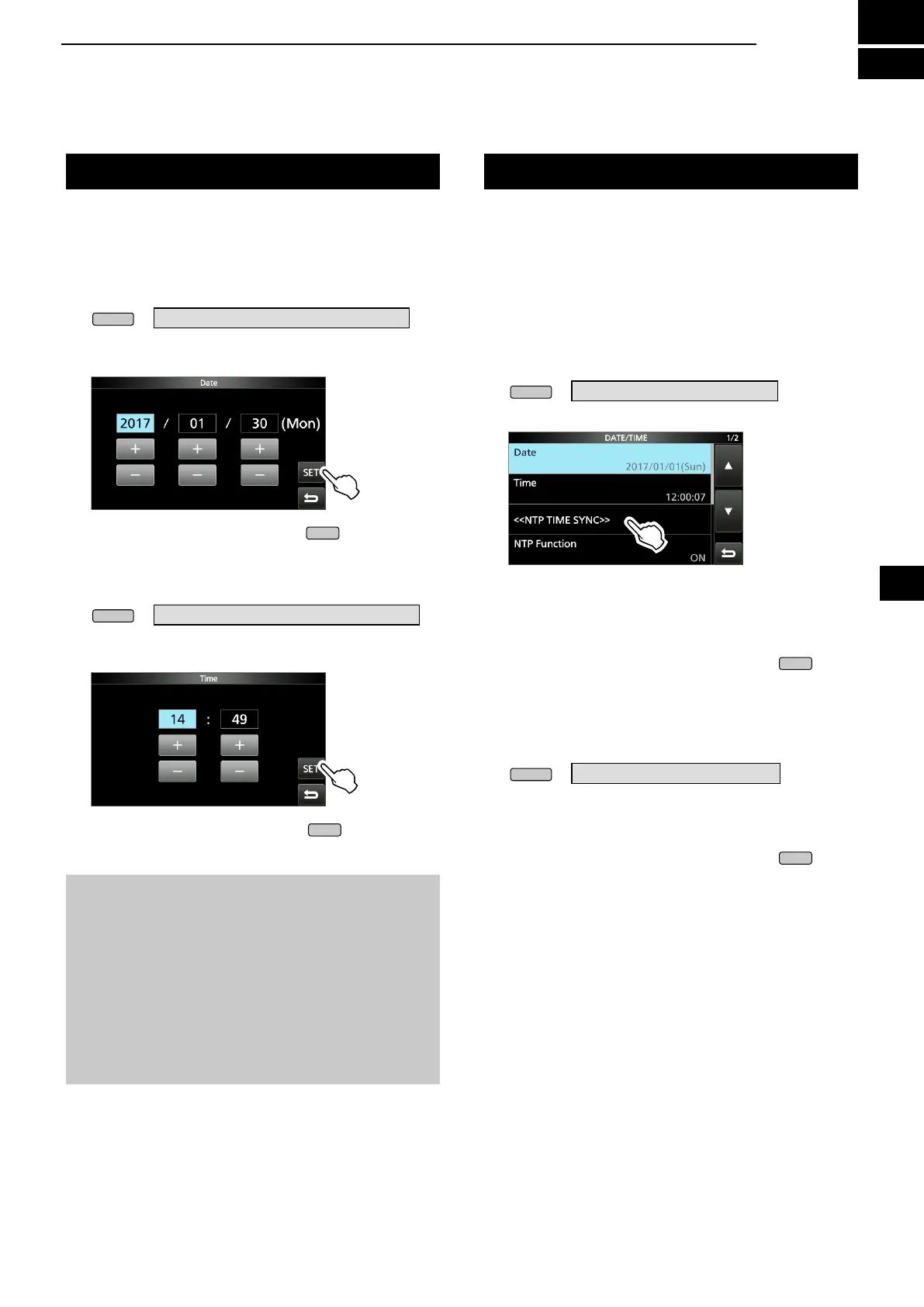
D Setting date
1. Open the Date screen.
» SET > Time Set > Date/Time > Date
2. Touch [+] or [–] to set the date.
3. Touch [SET] to store the entry.
4. To close the Date screen, push
several times.
D Setting time
1. Open the Time screen.
» SET > Time Set > Date/Time > Time
2. Touch [+] or [–] to set the current time.
3. Touch [SET] to store the entry.
4. To close the Time screen, push
several times.
The NTP function periodically synchronizes the
internal clock with the time management server.
L To use this function, an internet connection are necessary.
D Execute the time synchronization
The IC-R8600 accesses the NTP server address that
is set in the “NTP Server Address” item.
1. Open the DATE/TIME screen.
» SET> Time Set > Date/Time
2. Touch <<NTP TIME SYNC>>.
• The "Connecting to the NTP server" dialog is
displayed.
3. When the "Succeed" dialog is displayed, touch
[OK].
4. To close the DATE/TIME screen, push
several times.
D Setting the NTP Server address
1. Open the DATE/TIME screen.
» SET > Time Set > Date/Time
2. Touch [NTP Server Address].
3. Enter the address using the keypad, then touch
[ENT].
4. To close the DATE/TIME screen, push
several times.
10
CLOCK AND TIMER
1
2
3
4
5
6
7
8
9
10
11
12
13
14
15
16
17
18
19
20
21



 To Next Page