iv
D About the touch operation
In the manual, the touch operation is described as
shown below.
Touch
If the display is touched briey, one short beep
sounds.
Touch for 1 second
If the display is touched for 1 second, one
short and one long beep sound.
D Touch screen precautions
• The touch screen may not properly work when the
LCD protection lm or sheet is attached.
• Touching the screen with your nger nails, sharp
topped object and so on, or touching the screen
hard may damage it.
• Tablet PC’s operations such as ick, pinch in and
pinch out cannot be performed on this touch screen.
D Touch screen maintenance
• If the touch screen becomes dusty or dirty, wipe it
clean with a soft, dry cloth.
• When you wipe the touch screen, be careful not to
push it too hard or scratch it with your nger nails.
Otherwise you may damage the screen.
ABOUT THE INSTRUCTIONS
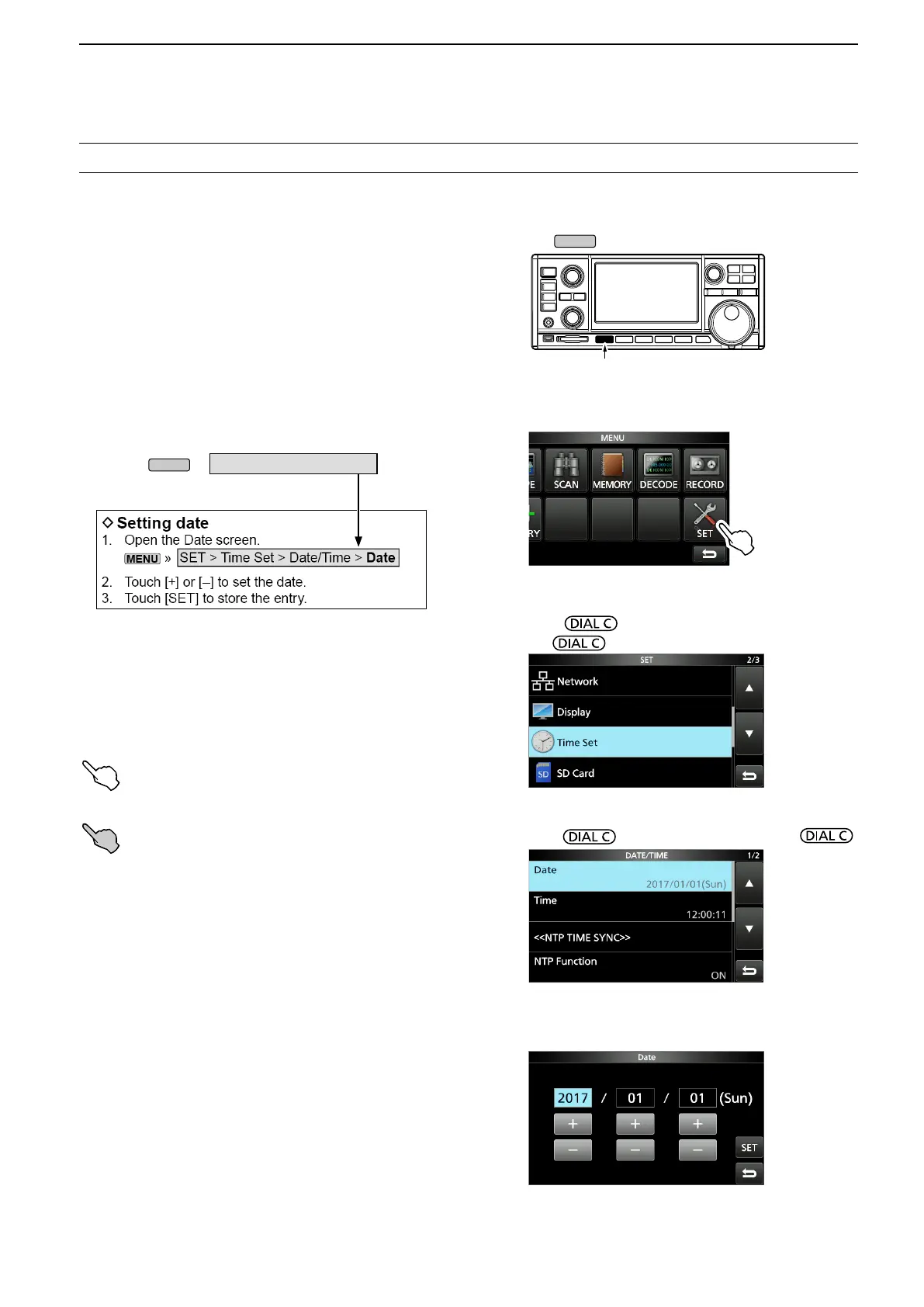
Instruction example
» SET > Time Set > Date
Detailed instruction
1. Push
.
Push
• The MENU screen opens.
2. Touch [SET].
MENU screen
• The SET screen opens.
3. Rotate to select “Time Set,” and then
push .
4.
Rotate to select “Date,” then push .
SET screen
This manual is described in the following manner.
“ ” (Quotation marks):
Used to indicate icons, setting items, and screen titles
displayed on the screen.
The screen titles are also indicated in uppercase
letters. (Example: FUNCTION screen)
[ ] (brackets):
Used to indicate keys.
Routes to the set modes and setting screens
Routes to the Set mode, setting screen and the setting
items are described in the following manner.
DATE/TIME screen
DATE screen
5. Touch [+] or [–] to set the date.
6. Touch [SET] to save the entry.



 To Next Page