7
USING AN SD CARD
7-3
Loading the data les
You can load the Memory channels and receiver’s
settings from the card to the receiver.
TIP: Saving the current data is recommended before
loading other data into the receiver.
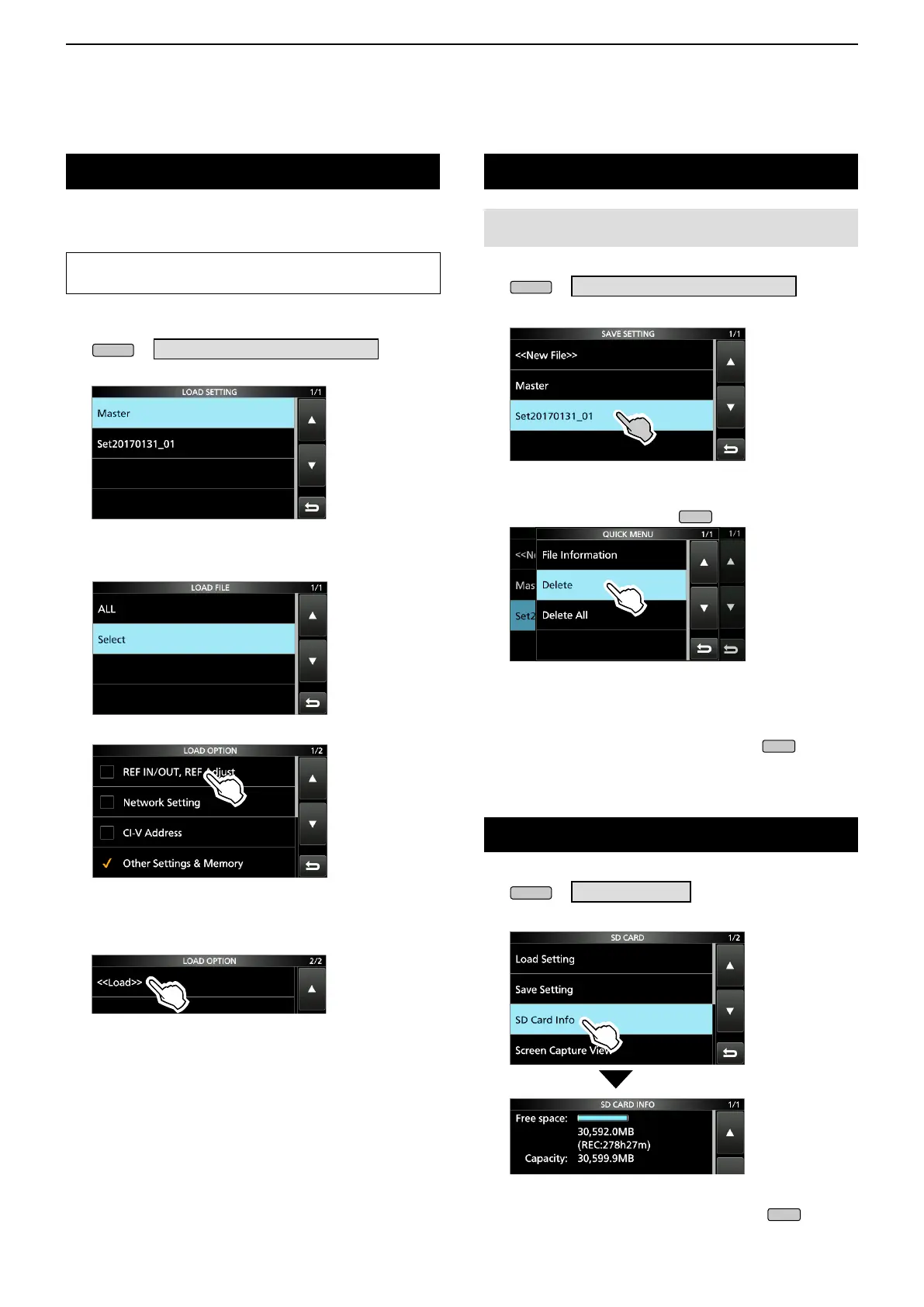
1. Open the LOAD SETTING screen.
» SET > SD Card > Load Setting
2. Select the file you want to load.
LOAD SETTING screen
3. Select a loading option.
L Choose “ALL” when you load all the receiver settings.
4. Touch the desired loading items.
• “✓” is displayed left side of the selected option.
L The Set mode settings and Memory channel contents
are always loaded.
5. Touch “<<Load>>.”
• The load conrmation dialogue appears.
6. Touch [YES].
• Starts le loading.
L When you select “REF IN/OUT, REF Adjust” in step 4,
“The new "REF IN/OUT, REF Adjust" setting will be
saved” is displayed.
7. After the loading has been completed, “Restart the
IC-R8600” is displayed.
L Turn OFF the receiver power, then turn ON again.
Deleting a data le
NOTE: Deleted data from a card cannot be recalled.
Before deleting any data, back up the card data onto your PC.
1. Open the SAVE SETTING screen.
» SET > SD Card > Save Setting
2. Touch the file desired to delete for 1 second.
3. Touch “Delete.”
LTo delete all les, touch “Delete All.”
LTo cancel deleting, push
.
• The delete conrmation dialogue appears.
4. Touch [YES].
• Deletes the selected le.
LAfter deleting, returns to the SAVE SETTING screen.
5. To close the SD CARD screen, push
several
times.
Checking SD card information
1. Open the SD CARD screen.
» SET > SD Card
2. Touch to select “SD Card Info.”
• Opens the SD CARD INFO screen.
3. To close the SD CARD screen, push
several
times.



 To Next Page