17
4
BASIC OPERATION
New2001 New2001
■ Setting the squelch level
The squelch circuit mutes the received audio signal, depend-
ing on the signal strength. The transceiver has 9 squelch lev-
els, a continuously open setting and an automatic setting.
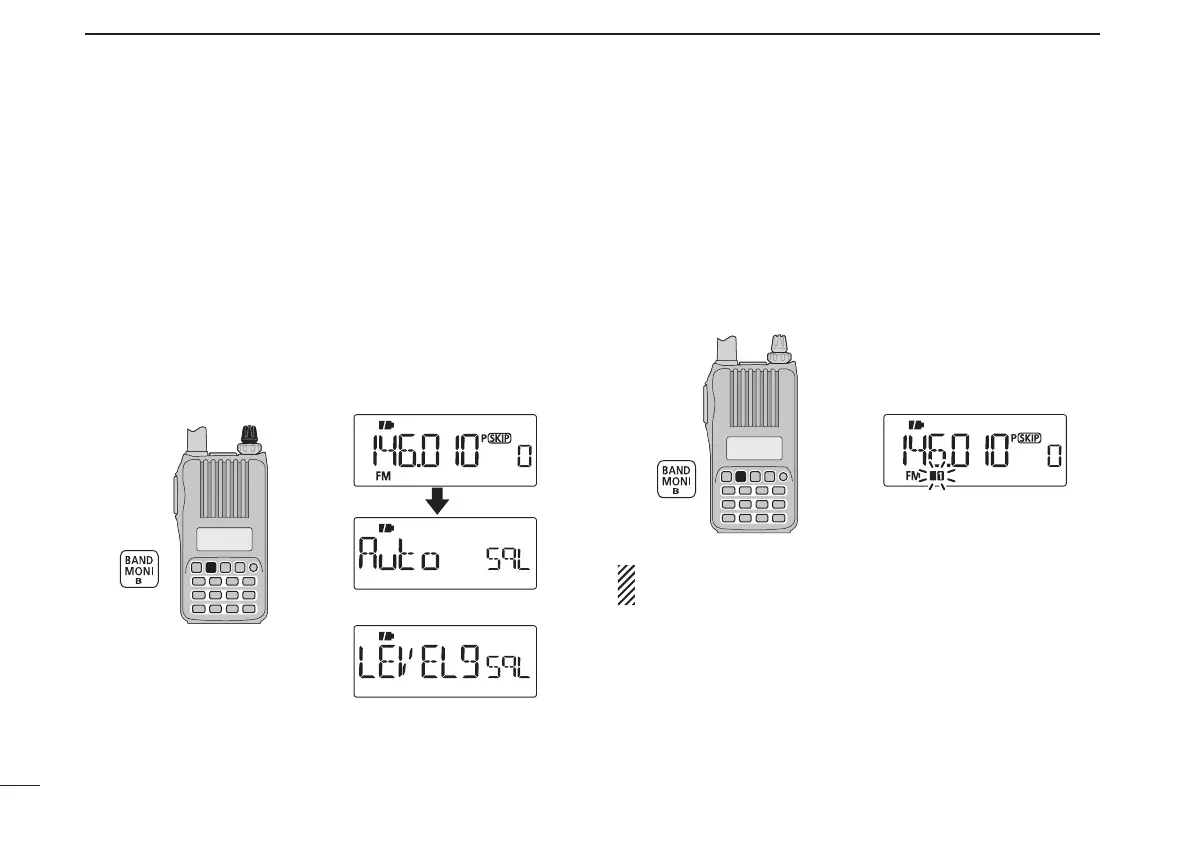
➥ While continuing to push [MONI](BAND), rotate [DIAL] to
select the squelch level.
•“LEVEL1”isloosesquelch(forweaksignals)and“LEVEL9” is
tight squelch (for strong signals).
•“Auto”indicatestheautomaticleveladjustmentbyanoisepulse
counting system.
•“OPEn”indicatesthecontinuouslyopensetting.
[DIAL]
Maximum level
Automatic squelch
■ Monitor function
This function is used to listen to weak signals without disturb-
ing the squelch setting; or to open the squelch manually even
when mute functions such as the tone squelch are in use.
➥ Push and hold [MONI](BAND) to monitor the operating
frequency.
•The1stand2ndsegmentsoftheS-meterblink.
The [MONI] key can be set to a ‘sticky’ operation in the
Initial set mode. See page 63 for details.



 To Next Page