49
8
PRIORITY WATCH
New2001
■ Priority watch operation
D Memory/call channel and memory scan watch
q Select the VFO mode, then set an operating frequency.
w Select the channel(s) to be watched.
For memory channel watch:
Select a desired memory channel.
For call channel watch:
Select a desired call channel.
For memory scan watch:
➥ Select the memory mode, or a desired bank group.
➥ Push and hold [SCAN](H/M/L) for 1 sec. to enter the
scan type selection mode.
➥ Rotate [DIAL] to select a desired scan type, then push
[SCAN](H/M/L) again to start the memory/bank scan.
e Push [SET] to enter the Set mode.
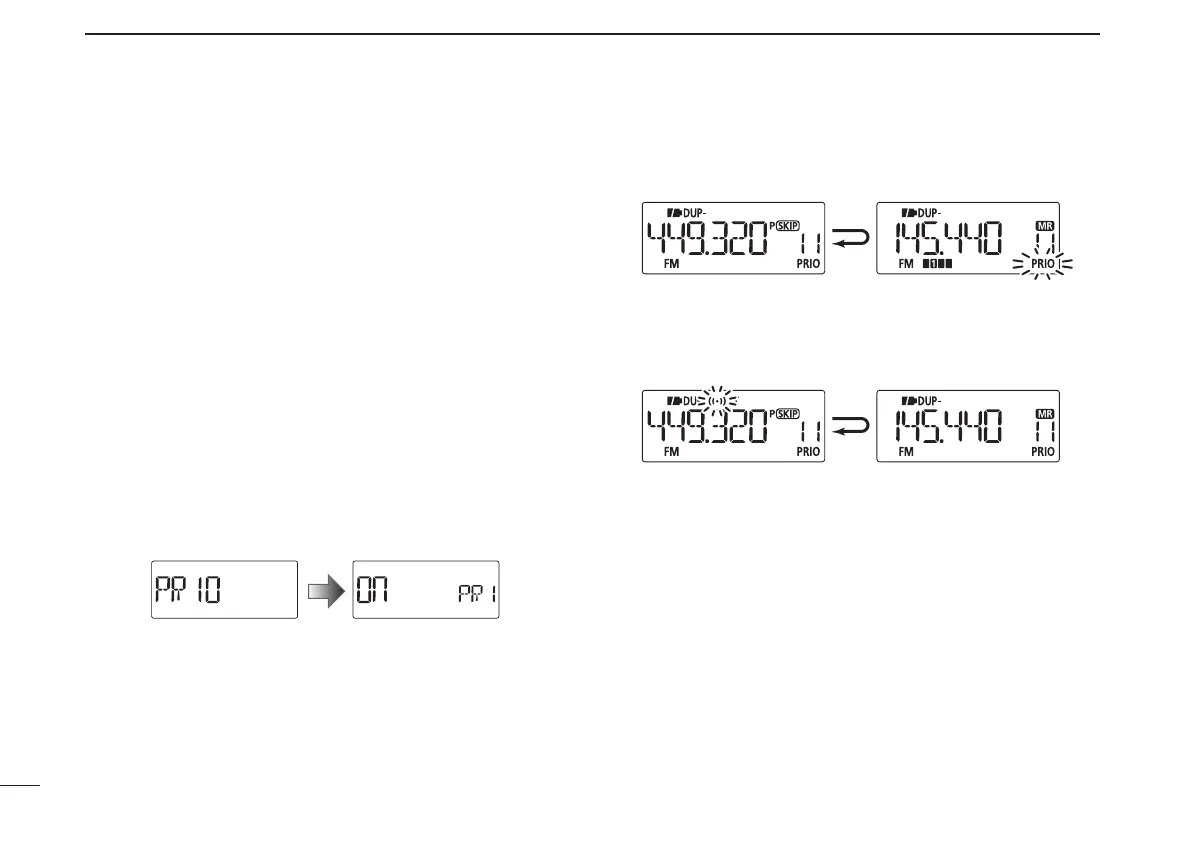
r Rotate [DIAL] to select the priority watch set item, then
rotate [VOL] to select “On.”
•Select“bELL”iftheprioritybeepfunctionisdesired.
t Push [V/M/C] to exit the Set mode and start the watch.
•The“PRIO”iconappears.
•The transceiver checks the memory/bank channel(s) or call
channel every 5 seconds.
•Thewatchresumesaccordingtotheselectedscanresumeset-
ting. (p. 47)
y Push [V/M/C] to cancel the watch.
Monitors VFO frequency
for 5 seconds.
Pauses on a memory
or call channel when
a signal is received.
• During priority watch
A beep tone sounds and “S” icon blinks when a signal is
received on a memory or call channel.
• During priority watch with priority beep
New2001



 To Next Page