19
4
BASIC OPERATION
New2001 New2001
■ Setting the tuning step
The tuning step can be selected for both band. The following
tuning steps are available for the IC-T70A/T70E.
•5.0kHz •10.0kHz •12.5kHz •15.0kHz
•20.0kHz •25.0kHz •30.0kHz •50.0kHz
•100.0kHz •125.0kHz •200.0kHz
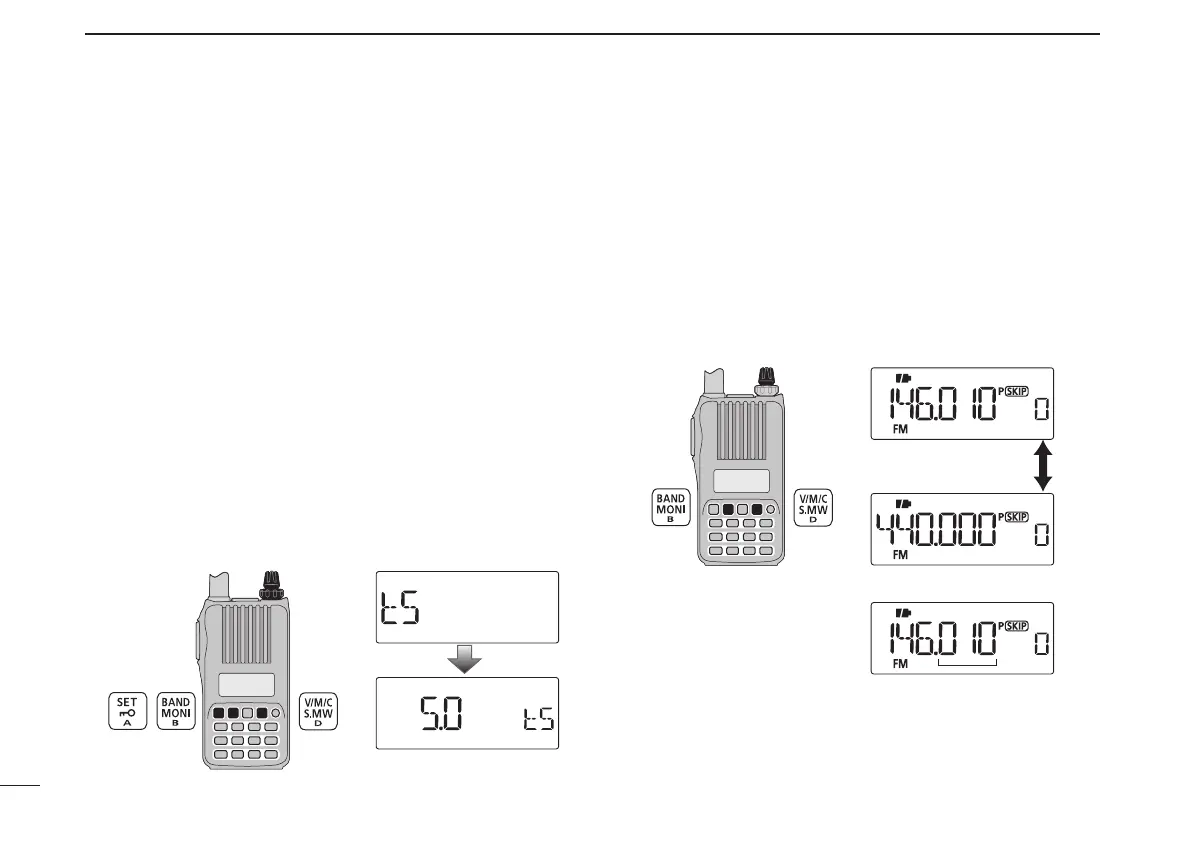
D Tuning step selection
q In the VFO mode, push [BAND] to select the desired fre-
quency band.
•If youare in another mode, such as a memory channel/call
channel mode or the weather channel mode, push [V/M/C] to
select the VFO mode first, then push [BAND] to select the de-
sired band.
w Push [SET] to enter the Set mode.
e Rotate [DIAL] to select the tuning step set item, then ro-
tate [VOL] to select the desired tuning step.
r Push [V/M/C] to return to the VFO mode.
[VOL]
[DIAL]
5 kHz tuning step
■ Setting the frequency
D Using the dial
q Push [V/M/C] to select the VFO mode, if any other mode is
selected.
w Push [BAND] to select the desired frequency band.
e Rotate [DIAL] to select the desired frequency.
•Thefrequencychangesaccordingtothepresettuningsteps.
See the previous topic to set the tuning step.
[DIAL]
[DIAL] changes the frequency
according to the selected
tuning step.
• 144 MHz band
• 440 MHz band
Push [BAND]



 To Next Page