45
7
SCAN OPERATION
New2001 New2001
■ Memory bank scan
IMPORTANT!: To perform a memory bank scan, 2 or more
bank channels MUST be programmed, otherwise the scan
will not start.
q Select the memory bank mode.
➥ Push [V/M/C] to select the memory mode.
➥ Push [BAND] to enter the memory bank selection
mode.
➥ Rotate [DIAL] to set a desired bank (A to Z), then push
[BAND].
w Set the squelch level.
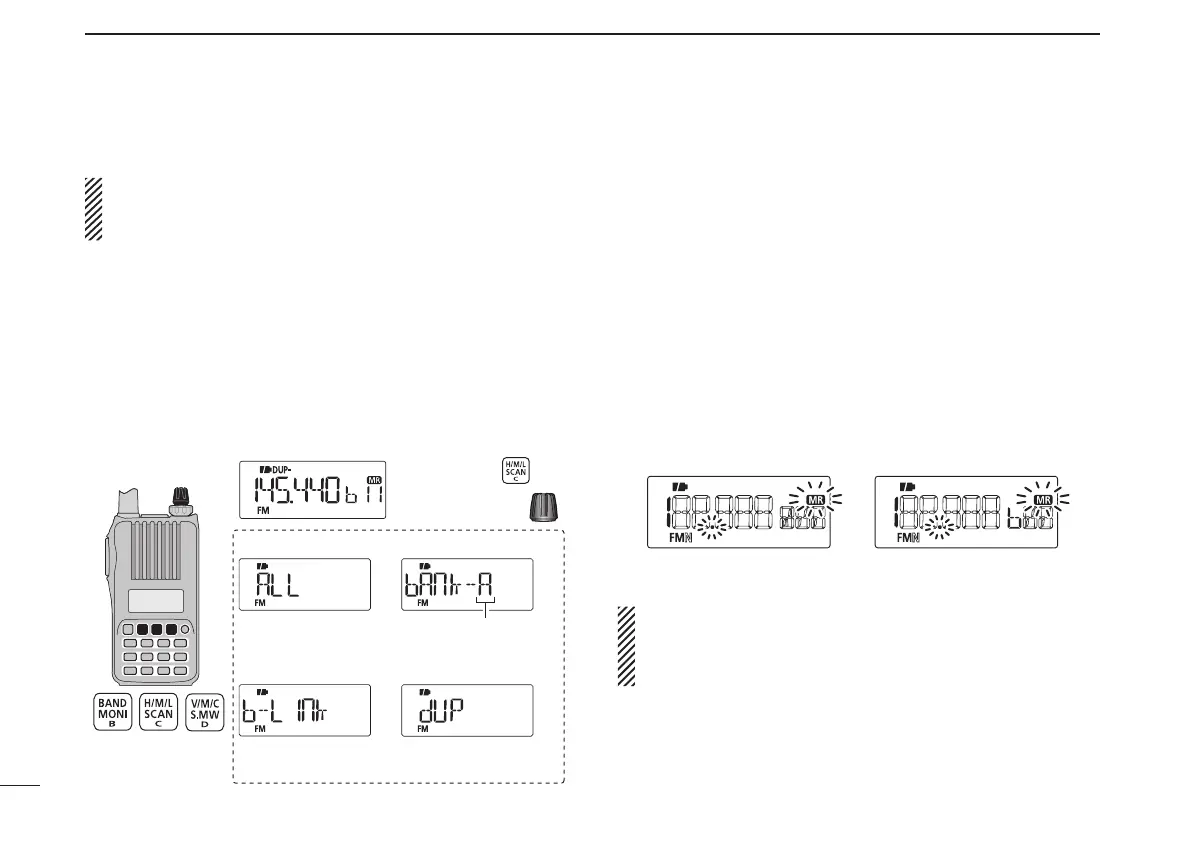
e Push and hold [SCAN](H/M/L) for 1 sec. to enter the scan
type selection mode.
[DIAL]
All bank scan
Bank link scan
Bank scan
Duplex scan
Push and hold
for 1 sec.
Rotate
Selectable from “A” to “Z,”
if programmed. (p. 32)
See page 56 for details of
the bank link programming.
r Rotate [DIAL] to select a desired scanning type.
•Select“ALL”for allbank scan,“b-LInk”for bank link scan or
“bAnk-
x” for bank scan (x= A to Z; only programmed bank
groups are displayed.), “dUP” (appears only when duplex opera-
tion is set) for duplex scan.
t Push [SCAN](H/M/L) to start the scan.
•Thescanpauseswhenasignalisreceived.
•Rotate[DIAL] to change the scanning direction. This also re-
sumes scanning.
•Push[V/M/C] to stop the scan.
•Push[BAND] to change the bank during a bank scan.
•While continuing to push [SCAN](H/M/L) in step e, rotate
[DIAL] to select a desired scanning type, then release the key
also starts the scan.
During all bank/bank link scan During bank scan
Memory bank scan skips any memory channels in the se-
lected bank that are set to “SKIP” or “PSKIP.”
Memory bank scan stops at the first channel when all
channels in a bank are set to “SKIP” or “PSKIP.”



 To Next Page