60
9
SET MODES
New2001
1
2
3
4
5
6
7
8
9
10
11
12
13
14
15
16
17
18
19
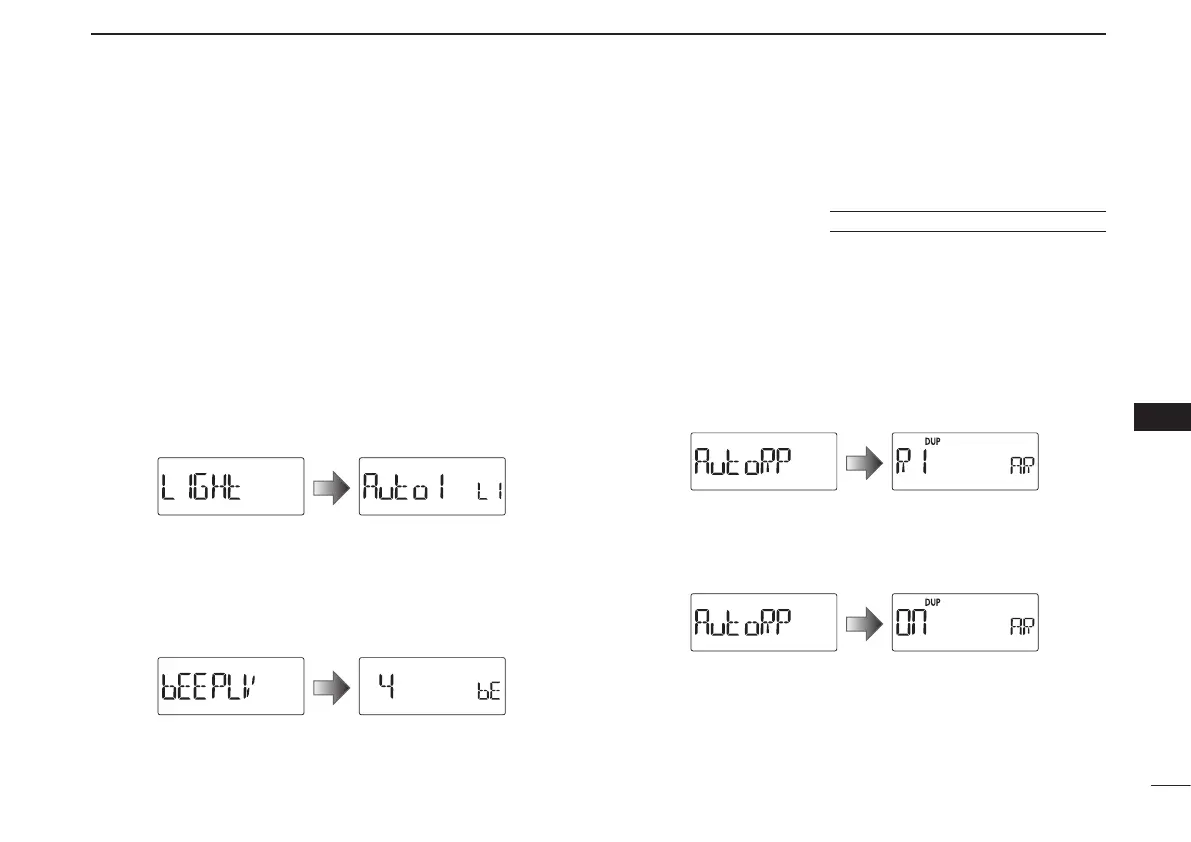
D Display backlighting (LIGHT)
The transceiver has a display backlighting with a 5 second
timer for night time operation. The display backlighting can be
turned ON continuously or turned OFF. (default: Auto1)
•OFF :ThebacklightisturnedOFF.
•On :ThebacklightiscontinuouslyON.
•Auto1 :Lightswhenanoperationisperformed,thengoesout
after 5 seconds.
•Auto2 :Lightswhenanoperationisperformed,thengoesout
after 5 seconds with a battery pack or battery case,
or stays ON when using the external power supply
(more than 10 V DC).
D Beep output level (BEEPLV)
Turns the key-touch beep ON or OFF.
Sets the beep sound level to between 1 and 9.
(default: 4)
D Auto repeater (AUTORP)
U.S.A. and Korean versions only
The auto repeater function automatically turns the duplex op-
eration and tone encoder ON or OFF. The offset and repeater
tone settings are not changed by the auto repeater function.
Reset these frequencies, if necessary.
U.S.A. version:
•OFF :TheautorepeaterfunctionisturnedOFF.
•R1 :Activatesforduplexonly.(default)
•R2 :Activatesforduplexandtone.
Korean version:
•OFF :TheautorepeaterfunctionisturnedOFF.
•On :Activatesforduplexandtone.(default)



 To Next Page