38
6
MEMORY/CALL CHANNELS
New2001
1
2
3
4
5
6
7
8
9
10
11
12
13
14
15
16
17
18
19
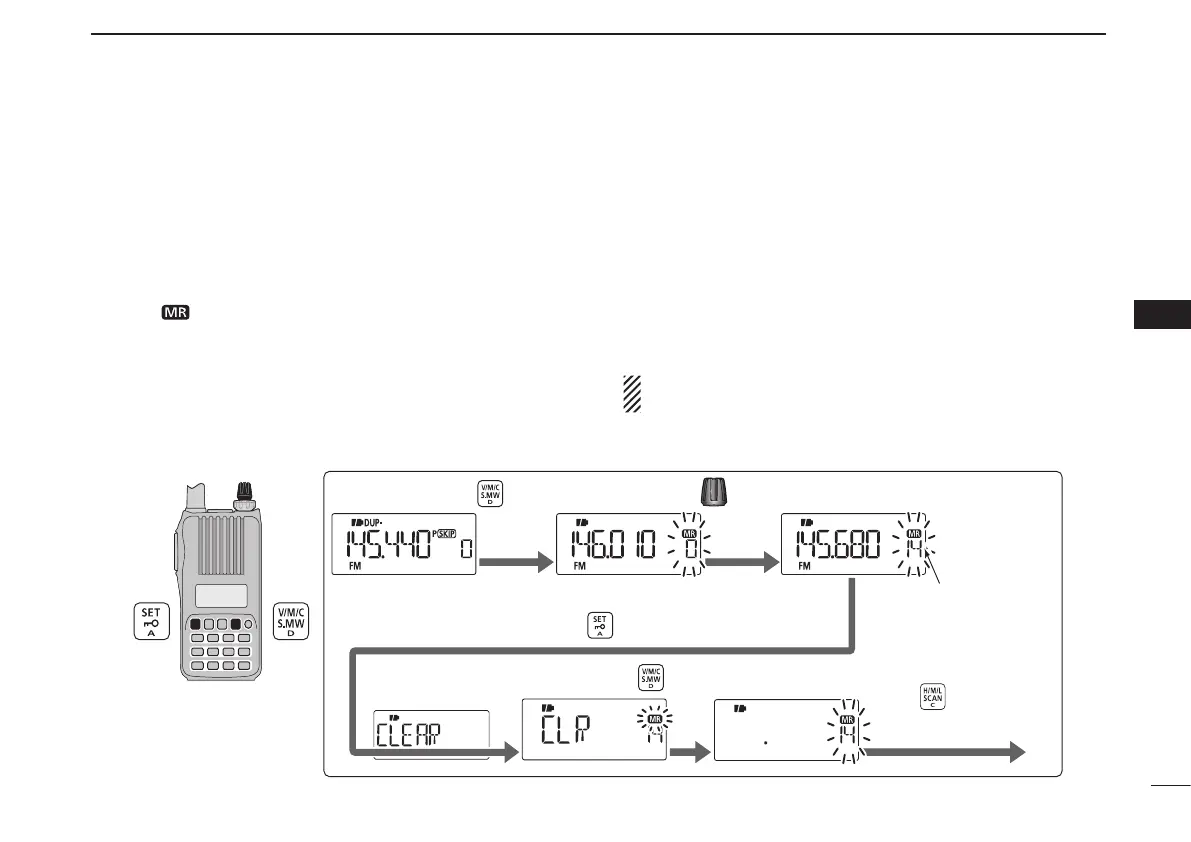
Contents of programmed memories can be cleared (erased),
if desired.
q Push and hold [S.MW](V/M/C) for 1 sec. to enter the select
memory write mode.
•1shortand1longbeepsounds.
•The“
” icon and memory channel number blink.
•Donothold[S.MW](V/M/C) for more than 2 seconds. Otherwise
the memory contents will be copied to the VFO mode.
w Rotate [DIAL] to select a desired memory channel to be
cleared.
e Push [SET] repeatedly to select “CLEAR.”
r Push and hold [S.MW](V/M/C) for 1 sec. to clear the con-
tents.
•3beepssound.
•Theclearedchannelchangesintoablankchannel
•Returntotheselectmemorywritemode.Memory channel num-
ber blinks.
t Push [H/M/L] to exit the select memory write mode.
NOTE: Be careful!— the contents of cleared memories
CANNOT be recalled.
[DIAL]
The VFO mode Enter the select memory write mode.
to select a desired channel.Rotate
Push and hold for 1 sec.
Channel 14
Push repeatedly to select “CLEAR.”
Push and hold
Push to return
to the VFO mode.
for 1 sec to clear.
[EXAMPLE]: Clearing memory channel 14.
■ Memory clearing



 To Next Page