47
6
D-STAR OPERATION
New2001 New2001
While holding down [PTT], q
speak at your normal voice
level.
•TheTX/RXindicatorlightsred.
•The S/RF meter shows the
transmit output power level.
Release[PTT]toreceive. w
Transmitting
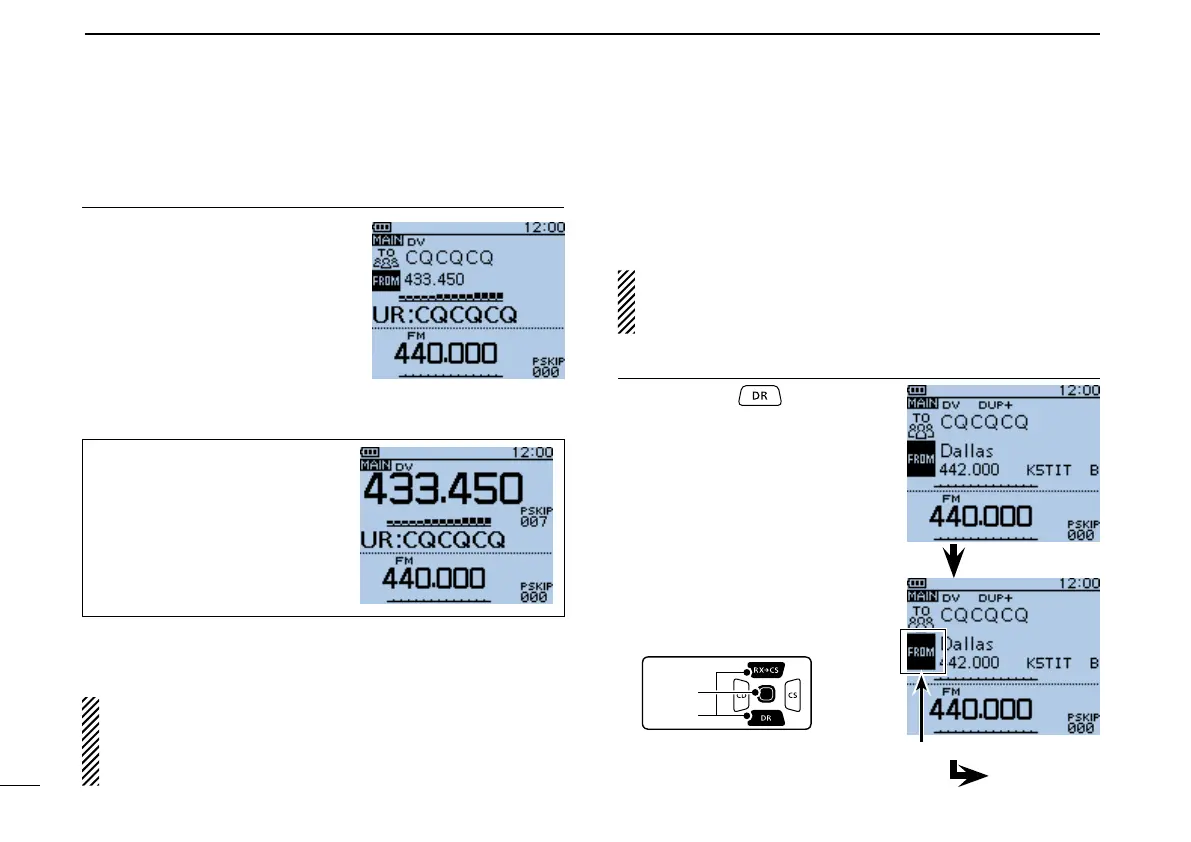
When you make a simplex call in
the VFO mode, the LCD chang-
es, as shown to the right.
NOTE: The simplex frequencies can be changed in the
MENU screen. See the PDF type Advanced Instructions
section 9 for more details.
(MENU > DV memory > RepeaterList)
Holddown[PTT]totransmit2.
■ Accessingrepeaters
This section describes how to check whether or not you can
access your local area repeater (Access repeater), and if your
signal is successfully sent to a destination repeater.
If your call sign (MY) has not been set, or your call sign
and equipment have not been registered at a D-STAR re-
peater, see pages 13 to 16.
SelectyourAccessrepeater(“FROM”)1.
Hold down q
for 1 sec-
ond.
•
The repeater list, described in
this manual, may differ from
your transceiver’s preloaded list.
DR screen
Push D-pad( w ) to select
“FROM” (Access repeater),
and then push D-pad(Ent).
“FROM” is selected.
Go to step e
Making a Simplex call (Continued) ■


 To Next Page
 Loading...













