32
Using the Operator Settings
4.3.5 Connection Test
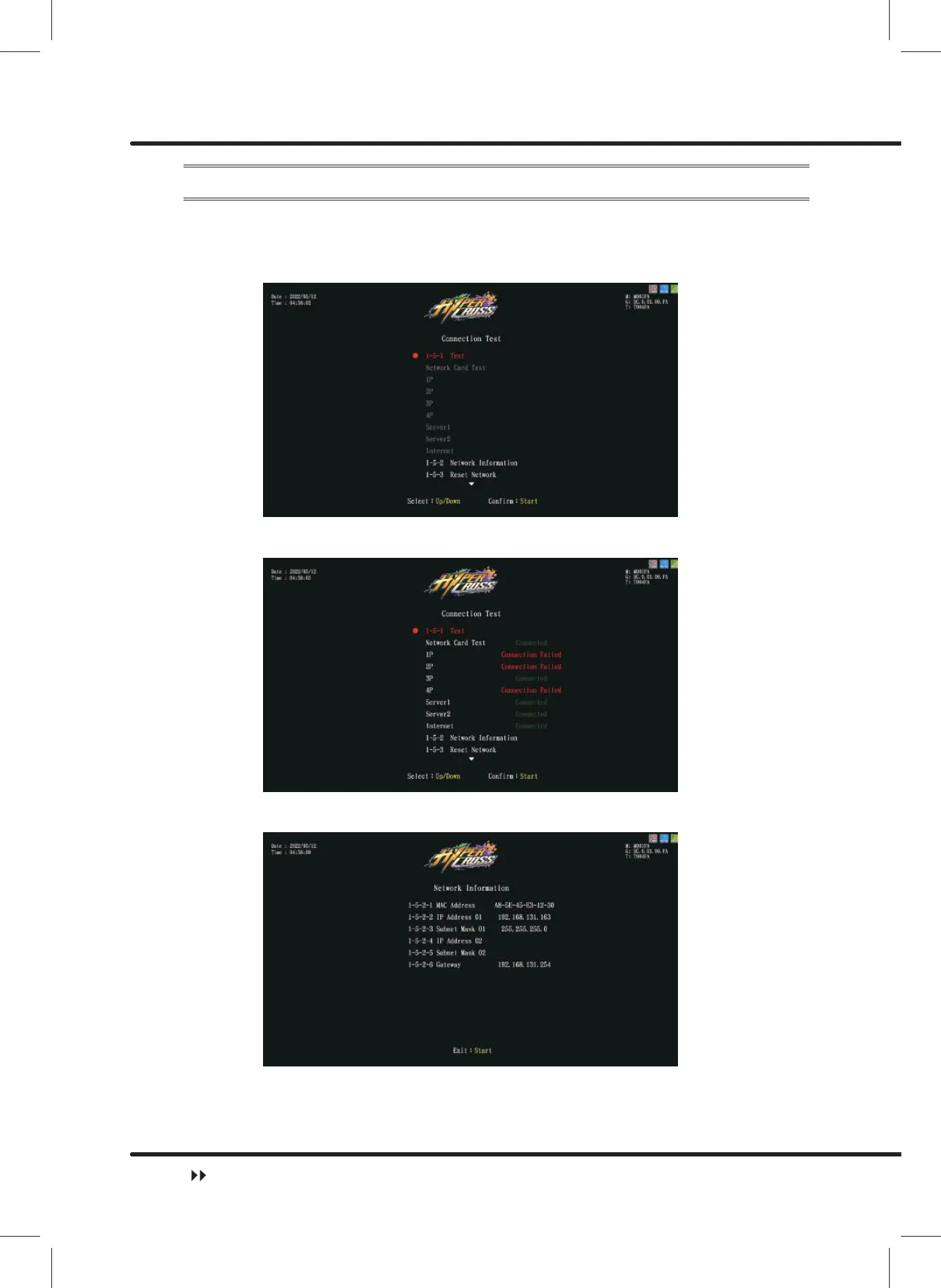
On the page of ȞConnection Testȟ, you can test whether the connection functions
normally.
ɖ Enter ȞMain MenuȟɚȞ1 Hardware TestȟɚȞ&RQQHFWLRQ7HVWȟ, and the screen
will display as below:
ɖ Move the cursor to Ȟ7HVWȟˈand press the ȞStartȟ button to start testing. After
displaying ȞCheckingȟfor few seconds, the results will be shown.
ɖ Move the cursor to Ȟ1HWZRUN,QIRUPDWLRQȟ, and press theȞStartȟ button to
enter the page. The information will display as below:
ɖ Move the cursor to Ȟ5HVHW1HWZRUNȟ, and press theȞStartȟ button to reset
network. After displaying ȞCheckingȟfor few seconds, the results will be shown.
Hardware Test



 To Next Page